Archive
Get ready to Celebrate Star Trek day!
Star Trek Day marks the first airing of Star Trek: The Original Series on NBC on September 8, 1966.
I was in my “Terrible Twos” back then and wasn’t yet memorized by the notion of space travel. Slowly, as other events of the 60’s unfolded, I began to realize that my life would embrace all things science and if I was lucky, I might experience space one day if I worked really hard.
Well, here we are celebrating another Sept 8 (59th anniversary) and I am happy to report that I have worked with computers for over half my life, due in large part to shows like Star Trek.
Join me, as we enter the world of Artificial Intelligence, and welcome the news that Paramount (CBS studios) will be adding several new Star Trek shows and movies centered around this cultural phenomenon.
Take that Star Wars, let’s see Disney try and top that 😁

Trusted Platform Modules
If you are like me and use windows (among other operating systems), you might have wondered why M$ has required you to obtain new hardware just to run Windows 11. Is this just a cash grab by a greedy vendor or is there method to the madness after all?
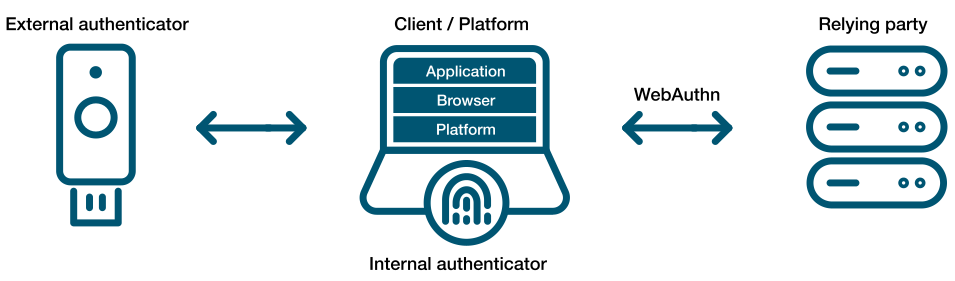
The truth is, the industry has learned the costs of poor security, after decades of breaches and a patch routine that seems to never end. Created to help solve the problems associated with 2 factor authentication and now expanded to replace passwords altogether (using Passkeys), WebAuthN is an API specification designed to use public key cryptography to authenticate Entities (users) to relying parties (Web Servers).
Shown below (from the Yubikey site) demonstrating external authenticators (like Smart cards or hardware) or by utilizing Trusted Platform Modules in our devices, people can authenticate with (or without) the standard username and password we have been using for decades.
The idea of using a password has been like ‘leaving your front door key under the mat’. Anyone observing your behavior or just walking up and checking ‘under the mat’, can use it for themselves. Password abuse has become a leading cause of fraud to so many users that we started to send 6-8 digit codes via mobile telephone, so that users can authenticate using a second factor (2FA). Not everyone carries a mobile phone and we have learned that receiving these codes is not very secure because they are prone to interception.
We have relied on digital communications for e-commerce sites using cryptography (TLS) with such great success. Contributors like Google, Microsoft and many others decided that it was time to apply these principles to authentication and a specification was born.
The WebAuthN API allows servers to register and authenticate users using public key cryptography instead of a password. It allows web servers to integrate with the strong authenticators (using external ones like Smart cards or YubiKeys) and devices with TPMs (like Windows Hello or Apple’s Touch ID) to hold on to private key material and prevent it from being stolen by hackers.
Instead of a password, a private-public keypair (known as a credential) is created for a website. The private key is stored securely on the user’s device; a public key and randomly generated credential ID is sent to the server for storage. The server can then use that public key to prove the user’s identity. The fact that the server no longer receives your secret (like your password) has far-reaching implications for the security of users and organizations. Databases are no longer as attractive to hackers, because the public keys aren’t useful to them.
A virtual TPM is a software-based implementation of the same hardware-based TPM found in devices today. These vTPMs can be configured to simulate hardware-based TPMs for many operating systems. The Trusted Platform Group has created a standard but it is woefully outdated. Happily, many vendors have implemented the ability to use a vTPM in the last few years that allow us to implement external KMS systems to help protect them.
The cloud providers now support virtual TPMs for use with Secure Computing and Hypervisor support using your existing KMS solutions (KMIP). Even VMWare added its own Native Key Provider.

With support for newer operating systems that can take advantage of a TPM to protect private keys (even from its owner), the idea of Public Key Authentication provides users with the ability to eliminate passwords entirely while binding the authenticators to the people who need to use them rather than the hackers who don’t!
Security IN/OF the Solution
Security IN the Solution is about the security of the control plane whereas Security OF the solution is about the data plane.
Lets take a Plaza or Strip Mall as an example. The owner of the property has thick brick walls around the perimeter of the building to provide a strong structure to hold all of the shared services. They tend to divide the property into several smaller units using softer materials like wood and gypsum board so that each tenant has some isolation. They need to provide physical access to each sub-unit that can then be controlled by each tenant and rent the space. The lower the rent, the less isolated each unit is from each other as the costs of providing security for all four walls is reduced.
In this example, you can think of the thick brick exterior as the owners attempt of Security IN the solution. They do not want any part of the sub-units to be breached and they don’t want any of the supporting infrastructure (like water, electrical power or sewage) to be compromized by outsiders so they protect them with a thick perimeter wall. They invest in fire safety and perhaps burglary equipment to protect the investment from the inside and the outside. They invest in features and services that provide security “IN” the building that they own.
Now the Landlord must provide some items for the tenants to feel safe and comfortable or they must allow tenants to modify the units for their own purposes. If you rent a commercial building, you may need to get your own electrical connected (especially if you have custom requirements) or pay for your own water and/or sewage or garbage disposal. All of these features and services are negotiable in the rental agreement and you are encouraged to read the contract carefully because not all rentals come with everything. You may need to provide some/many of the creature comforts you need to run your business. Internet, Cable, perhaps even your own burglar alarm system are all part of Security OF the solution. Your landlord must either provide some of it for you or allow you to purchase and modify the premise so it can be suitable for your use. If not, then you should consider taking your business elsewhere.
After 60 years on this planet and over 30 of them, immersed in the Information Systems industry, I have learned to apply this paradigm to anything from the design of software to the implementation of a solution. I have found that by separating these two objectives, anyone can discuss the roles and responsibilities of any solution and quickly identify ‘How much security you can afford’.
When dealing with third parties who represent warranty for functionality, ask them ‘what do they do to protect themselves?’ For anyone in the IT business, this is referred to as Third party Risk Management. You want to do business with third parties who are reputable and will continue to remain in business. They must be profitable and that means they must have good practices that allow them to operate safely and securely. This helps you choose a service provider that can demonstrate Security IN their Solutions.
Once you have determined who you would like to do business with, you should ask the question, ‘what are they doing to protect you?’ Don’t let their answers fool you, any company that boasts about what they do to protect themselves and then tells you that they use those capabilities to protect you too is mixing the two distinct worlds. What you want them to tell you is what do they do for you and how do they make it safe for you.

Can you see how the two overlap? This might be fine when you develop a relationship with your service provider (like an accountant, a lawyer or your doctor) but if you want to choose a cloud vendor that will house all of your sensitive data, with the purpose of letting them use it to apply Artificial Intelligence on it, you might want to stop and ask yourself, ‘How will they keep my data separate from their staff or any other customers?’ What about rogue employees who might abuse their privileges or what about unauthorized hackers who figure out how to circumvent their controls?
If you are in an industry that is regulated, and there are fines associated with any type of breach of your clients data, you might stand to lose much more than you save by giving your data to a vendor who cannot provide you with the level of data protection you need. This is why you want to consider how a cloud software as a service vendor can provide you with your own level of customization. You want them to show you how they designed their system to provide a distinct separation of all control duties and can provide you with the abilities to trust no one with your data!

When choosing to store data in a cloud service provider or any software as a service vendor, you should consider how they can separate your data away from their shared control plane. If your vendor does not run a Single tenant model (where their control plane is dedicated just for you), and you are forced to choose their multi-tenanted solution, consider how they can keep your data separated.
Many vendors will tell you that they will manage the encryption keys for you and keep them separate from other tenants but would you consider a landlord who required you to give them your sub-unit rentals keys? How do you know that some staff or some robber didn’t open the valet cupboard and just take your keys for a spin? The truth is, if you chose to share sensitive data with this vendor, you don’t!
Now please don’t misunderstand me, SaaS can be a terrific solution for any small or medium sized business that doesn’t have the skills or expertise to manage the complex infrastructure necessary to do something like machine learning. You may not even want the capital expense associated with running your own computer network in order to achieve this but tread lightly and consider the benefits of external key management.
You may not have the ability or the budget to run huge amounts of specialized hardware but you owe it to yourself to manage your own keys. If you don’t rekey your front door, how do you know your inventory will be safe? Remember, the vendor is responsible for Security IN the solution but you are responsible for Security OF the solution you choose.
Before there was a Security Dept.
In response to my wifes’ pleas to ‘clean up my room’, I stumbled upon some memorabilia from the early days of my security career.
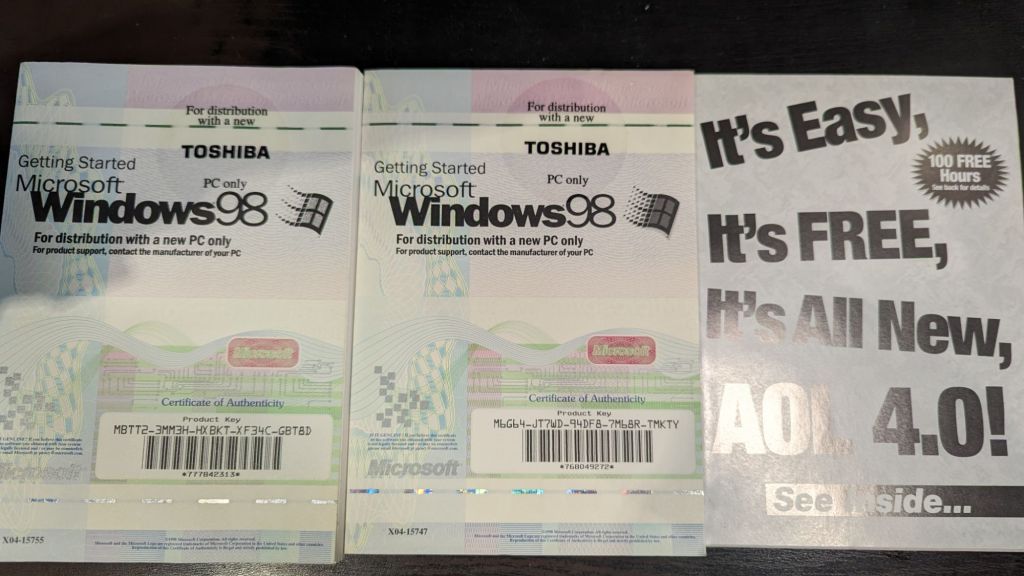
Those ‘dialup days’ made IT Security pretty simple and what were CVEs (common vulnerabilities and exposures).
Anyone want my licenses?
Why your business should never accept a wildcard certificate.
When starting your web service journey, most developers will only see the benefits of using a certificate with *only* the domain name referenced (a.k.a wildcard certificate) and will disregard the risks. On the surface, creating a certificate with an infinite number of first level subdomain (host) records seems like a successful pattern to follow. It is quick and easy to create a single certificate like *.mybank.com and then use it at the load balancer or in your backend to frontend (BFF) right? That certificate is for the benefits of clients, to convince them that the public key contained in the certificate is indeed the public key of the genuine SSL server. With a Wildcard certificate, the left-most label of the domain name is replaced with an asterisk. This is the literal “wildcard” character, and it tells web clients (browsers) that the certificate is valid for every possible name at that label.
What could possibly go wrong… 🙂
Let’s start at the beginning, with a standard: RFC-2818 – HTTP over TLS.
#1 – RFC-2818, Section 3.1 (Server Identity) clearly states that, “If the hostname is available, the client MUST check it against the server’s identity as presented in the server’s Certificate message, in order to prevent man-in-the-middle attacks.
How does a client check *which* server it is connecting to if it does not receive one? Maybe it is one of the authorized endpoints behind your load balancer, but maybe it is not? You would need another method of assurance to validate that connecting and sending your data to this endpoint is safe because connecting over one way TLS, into “any endpoint” claiming to be part of the group of endpoints that *you think* you are connecting to is trivial if your attacker has control of your DNS or any network devices in between you and your connection points.
#2 – The acceleration of Phishing began when wildcard certificates became free.
In 2018, in what was soon to become the world’s largest Certificate Authority (https://www.linuxfoundation.org/resources/case-studies/lets-encrypt), Lets Encrypt began to support wildcard certificates. Hackers would eventually use wildcard certificates to their advantage to hide hostnames and make attacks like ransomware and spear-phishing more versatile.
#3 – Bypasses Certificate Transparency
The entire Web Public Key Infrastructure requires user agents (browsers) and domain owners (servers) to completely trust that Certificate Authorities are tying domains to the right domain owners. Every operating system and every browser must build (or bring) a trusted root store that contains all the public keys for all the “trusted” root certificates and, as is often the case, mistakes can be made (https://www.feistyduck.com/ssl-tls-and-pki-history/#diginotar). By leveraging logs as phishing detection systems, phishers who want to use an SSL certificate to enhance the legitimate appearance of their phishing sites are making it easier to get caught if we don’t use wildcard certs.
#4 – Creates one big broad Trust level across all systems.
Unless all of the systems in your domain have the same trust level, using a wildcard cert to cover all systems under your control is a bad idea. It is a fact that wildcards do not traverse subdomains, so although you can restrict a wildcard cert to a specific namespace (like *.cdn.mybank.com.), if you apply it more granularly, you can limit its trust. If one server or sub-domain is compromised, all sub-domains may be compromised with any number of web-based attacks (SSRF, XSS, CORS, etc.)
#5 – Private Keys must not be shared across multiple hosts.
There are risks associated with using one key for multiple uses. (Imagine if we all had the same front door key?) Some companies *can* manage the private keys for you (https://www.entrust.com/sites/default/files/documentation/solution-briefs/ssl-private-key-duplication-wp.pdf), but without TLS on each individual endpoint, the blast radius increases when they share a private key. A compromise of one using TLS, will be easier to compromise all of them. If cyber criminals gain access to a wildcard certificates’ private key, they may be able to impersonate any domain protected by that wildcard certificate. If cybercriminals trick a CA into issuing a wildcard certificate for a fictitious company, they can then use those wildcard certificates to create subdomains and establish phishing sites.
#6 – Application Layer Protocols Allowing Cross-Protocol Attack (ALPACA)
The NSA says [PDF] that “ALPACA is a complex class of exploitation techniques that can take many forms” “and will confer risk from poorly secured servers to other servers the same certificate’s scope” To exploit this, all that is needed for an attacker, is to redirect a victims’ network traffic, intended for the target web app, to the second service (likely achieved through Domain Name System (DNS) poisoning or a man-in-the-middle compromise). Mitigations for this vulnerability involve Identifying all locations where the wildcard certificates’ private key is stored and ensuring that the security posture for that location is commensurate with the requirements for all applications within the certificates’ scope. Not an easy task given you have unlimited choices!
While the jury is ‘still out’ for the decision on whether Wildcard Certificates are worth the security risks, here are some questions that you should ask yourself before taking this short cut.
– Did you fully document the security risks?
How does the app owner plan to limit the safe and secure use of any use of wildcard certificates, maybe to a specific purpose? What detection (or prevention) controls do you have in place to detect (prevent) wildcard certificates from being used in any case, for your software projects? Consider how limiting your use of wildcard certificates can help you control your security.
– Are you trying to save time or claiming efficiencies?
Does your business find it too difficult to install or too time consuming to get certificates working? Are you planning many sites hosted on a small amount of infrastructure? Are you expecting to save money by issuing less certificates? Consider the tech debt of this decision – Public certificate authorities are competing for your money by offering certificate lifecycle management tools. Cloud Providers have already started providing Private Certificate Authority Services so you can run your own CA!
Reference: https://www.rfc-editor.org/rfc/rfc2818#section-3.1
https://venafi.com/blog/wildcard-certificates-make-encryption-easier-but-less-secure
Where *can* I put my secrets then?
I have spent a large portion of my IT career, hacking others peoples software, so I thought it was time to give back to the community I work in and talk about secrets. Whether they be passwords, key material (like SSH, Asynchronous or Synchronous) or configuration elements, all elements that should be considered ‘sensitive’.
Whether you are an old timer who may still be modifying a monolithic codebase or you have modern cloud enabled shop that builds event driven microservices, the Twelve-Factor App is a great place to start. The link provided is the “12 Factor App” methodology, which outlines best practices for building modern software-as-a-service applications. When choosing to adopt this as your strategy, it can provide the basis for software development that transcends any language or shop-size, and should play a part of any Secure Software Development LifeCycle. In Section III Config, they explain the need to separate config from code but I feel this needs further clarity.
There are two schools of thought for many developers/engineers, when it comes to how to use secrets, you can load them into environment variables (as is outlined in this methodology above) or you can choose to persist them into protected files that may be loaded from any external secret manager and mounted only where they are needed. One thing is clear, you should never persist them alongside your code.
Let’s explore the most common, and arguably the easiest way to treat the risks of someone gaining unauthorized access to your secrets: Environment Variables
- Your build environment may be considered implicitly available to the process of building/deploying your code, it can be difficult, but not impossible, for an attacker to track access and how the contents may be exposed (
ps -eww <PID>). - Some applications or build platforms may grab the whole environment and print it out for debugging or error reporting. This requires will require advanced post processing as your build engine must scrub them from their infrastructure.
- Child processes will inherit any environment variables by default, which may allow for unintended access. This breaks the principle of least privilege when you call another tool/code branch to perform some action and has access to your environment.
- Crash and debug logs can/do store the environment variables in log-files. This means plain-text secrets on disk and will require bespoke post processing to scrub them.
- Putting secrets in ENV variables quickly turns into tribal knowledge. New engineers who are not aware of the sensitive nature of specific environment variables will not handle them appropriately/with care (filtering them to sub-processes, etc).
Ref: https://blog.diogomonica.com//2017/03/27/why-you-shouldnt-use-env-variables-for-secret-data/
Secrets Management done right
Docker decided to to create KeyWhiz as far back as 2016 (seems abandoned now) and many vaulting tools today, make use of injectors that can dynamically populate variables OR create tmpfs mounts with files containing your secrets. When you prefer to read secrets from a temporary file, you can manage the lifecycle more effectively. Your application can call the timestamp functions to learn if/when the contents have changed and signal the running process. This allows database connectors and service connections to gracefully transition whenever key material changes.
Security should never trump convenience but don’t let Perfect be the enemy of ‘Good’. If you have sensitive data like static strings, certificates for protection or Identity or connection strings that could be misused, you need to balance the impact to you or your organization of losing them over your convenience. Learn to setup and use vaulting technology that can provide just enough security to help mitigate any of the risks associated with credential theft. Like hard work and exercise, it might hurt now, but you will thank me later!
Additionally, here are some API key gotchas (which are as dangerous as losing cash) that you should consider whenever you or your teams are building production software.
- Do not embed API keys directly in code or in your repo source tree:
- When API keys are embedded in code they may become exposed to the public, when code is cloned. Consider environment variables or files outside of your application’s source tree.
- Constrain any API keys to any IP addresses, referrer URLs, and mobile apps that need them:
- Limiting who the consumer can be, reduces the impact of a compromised API key.
- Limit specific API keys to be usable only for certain APIs:
- By making more keys, it may seem that you are increasing the impact but if you have multiple APIs enabled in your project and your API key should only be used with some of them, you can easily detect and limit abuse of any one API key.
- Manage the Lifecycle of ALL your API keys:
- To minimize your exposure to attack, delete any API keys that you no longer need.
- Rotate your API keys periodically:
- Rotate your API keys, even when they appear to be used by authorized parties. After the replacement keys are created, your applications should be designed to use the newly-generated keys and discard the old keys.
Ref: https://support.google.com/googleapi/answer/6310037?hl=en
Container Lifecycle Management
I wanted to share a big problem that I see developing for many devs, as they begin to adopt containers. In an effort to familiarize us with some fundamentals, I want to compare the difference between virtual machines and containers.
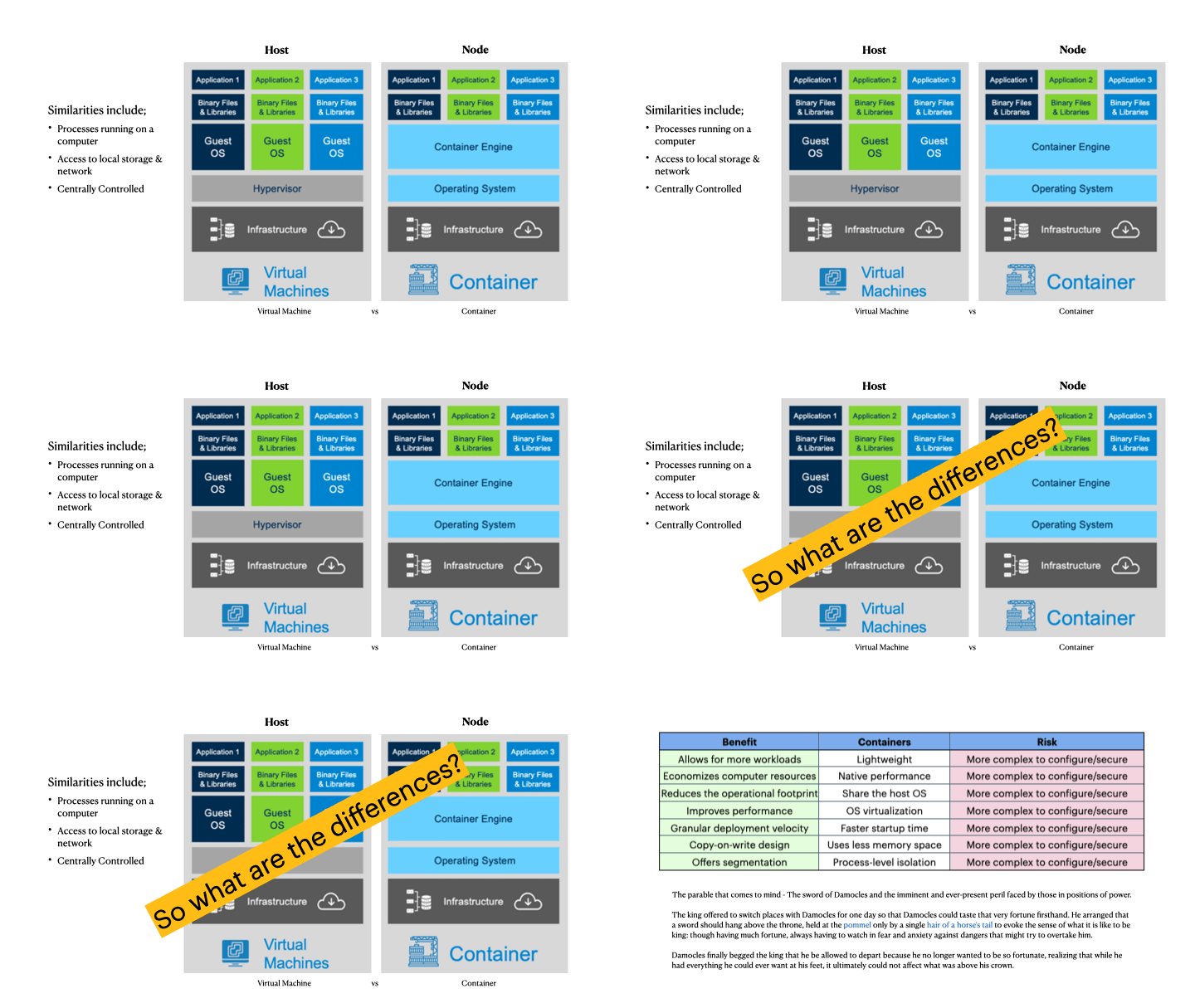
The animation (above) shows a few significant differences that can confuse many developers who are used to virtual machine lifecycles. We can outline the benefits or why you *want* to adopt containers
- On any compute instance, you can run 10x as many applications
- Faster initialization and tear down means better resource management
Now, in the days where you have separate teams, one running infrastructure and another handling application deployment, you learned to rely on one another. The application team would say, ‘works for me’ and cause friction for the infrastructure team. All of that disappears with containers…but…
By adopting containers, teams can overcome those problems by abstracting away the differences of environments, hardware and frameworks. A container that works on a devs laptop, will work anywhere!
What is not made clear to the dev team is, they are now completely responsible for the lifecycle of that container. They must lay down the filesystem and include any libraries needed for their application, that are NOT provided by the host that runs them. This creates several new challenges that they are not familiar with.
The most important part of utilizing containers, that many dev teams fail to understand, is they must update the container image, as often as the base image they choose to use becomes vulnerable. (Containers are made up of layers and the first one is the most important!) Your choice of base image filesystem, will come with some core components that are usually updated, whenever the OS vendor issues patches (which can be daily or even hourly!). When you choose to use a base image, you should consider it like a snapshot, those components develop vulnerabilities that are never fixed in your container image.
One approach that some devs use is live patching the base image (like apt-get or dnf or yum update). Seasoned image developers soon realize that this strategy is just a band-aid when they add another layer (in additional to the first one) and replace some of the components at the cost of increasing the size. Live patching can also add cached components that may/may not fully remove/replace the bad files. Even if you are effective at removing the cached components, you may forget others as you install and compile your application.
The second approach involves layer optimization. Dev teams are failing to reduce the size of the container images which uses more bandwidth, pulling and caching those image layers, which in turn, uses more storage on the nodes that cache them. Memory use is still efficient thanks in part to overlay filesystem optimization but the other resources are clearly wasted.
Dev teams also fail to see the build environment as an opportunity to use more than one. Multipart building strategy involves the use of several sacrificial images to do compilation and transpilation. Choosing to assemble your binaries and copying them to a new clean image helps remove additional vulnerabilities when those intermediate packages are not needed in the final running container image. It also reduces the attack surface and can extend the containers lifecycle.
It takes a very mature team to realize that any application is only as secure as the base image you choose. The really advanced ones ALSO know that keeping your base updated is just as important as keeping ALL your code secure, when dealing with containers.
Run Fedora WSL
Hi fellow WSL folks. I wanted to provide some updates for those of you who still want to run Fedora on your Windows Subsystem install. My aim here is to enable kind/minikube/k3d so you can run kubernetes and to do that, you need to enable systemd.
How do you run your own WSL image you ask? Well if you are a RedHat lover like I am, you can use the current Fedora Cloud image in just a few steps. All you need is the base filesystem to get started. I will demonstrate how I setup my WSL2 image (this presupposes that you have configured your Windows Subsystem already).
First, lets start by downloading your container image. Depending what tools you have, you need to obtain the root filesystem. You may now need to uncompress the files. Either you downloaded a raw fil that was compressed using xz, tar.gz or some other compression tooling. What we want to do is get at the filesystem. Look for the rootfs file. The key is to extract the layer.tar file that consists of the filesystem. I used the Fedora Container Base image from here (https://koji.fedoraproject.org/koji/packageinfo?packageID=26387). Once downloaded, you can extract the tar file and then you can extract the layer (random folder name) to get at the layer.tar file.
Then you can import your Fedora Linux for WSL using this command line example
wsl –import Fedora c:\Tools\WSL\fedora Downloads\layer.tar
wsl.exe (usually in your path)
–import (parameter to import your tarfile)
‘Fedora’ (the name I give it in ‘wsl -l -v’)
‘C:\Tools\WSL’ (the path where I will keep the filesystem)
‘Downloads\…’ (the path where I have my tar file)
If you were successful, you should be able to start your wsl linux using the following command
wsl -d Fedora
(Here I am root and attempt to update the OS using dnf.
dnf update
Fedora 38 – x86_64 2.4 MB/s | 83 MB 00:34
Fedora 38 openh264 (From Cisco) – x86_64 2.7 kB/s | 2.5 kB 00:00
Fedora Modular 38 – x86_64 2.9 MB/s | 2.8 MB 00:00
Fedora 38 – x86_64 – Updates 6.8 MB/s | 24 MB 00:03
Fedora Modular 38 – x86_64 – Updates 1.0 MB/s | 2.1 MB 00:02
Dependencies resolved.
Nothing to do.
Complete!
You must install systemd now to add all of the components
dnf install systemd
The last part included activating systemd in WSL. Add a file called /etc/wsl.conf and add the following
[boot]
systemd=true
That is all of the preparation, now you can restart the OS and you should check to verify if your systemd is working.
systemctl
Zero-Day Exploitation of Atlassian Confluence | Volexity
There is another 0-day for Atlassian, they are having a tough time with RCEs
https://www.volexity.com/blog/2022/06/02/zero-day-exploitation-of-atlassian-confluence/
Bank had no firewall license, intrusion or phishing protection – guess the rest • The Register
Wow, ‘Security is hard’, but keeping licenses updated? It’s not THAT hard folks…
https://www.theregister.com/2022/04/05/mahesh_bank_no_firewall_attack/
 Security Analyst - Jeff Soehner CISSP, GXPN,GPYC,GMOB,GCIH