Archive
Prepare your computers for PQC now!

The quantum computing revolution is rapidly approaching, and with it comes a profound threat to the cryptographic foundations of our digital world. Organizations across the globe are now under pressure to transition to post-quantum cryptography (PQC) to protect sensitive data from future quantum attacks. However, a critical blind spot has emerged in the operational landscape: there is a severe lack of specific guidance for integrating PQC into operating system configurations. This gap leaves countless businesses and governments vulnerable as they attempt to future-proof their digital infrastructure without a clear roadmap. The consequences of this oversight could be catastrophic when quantum computers become a practical threat in the coming decade.
The Post-Quantum Cryptography Challenge: Why Your OS Configuration Matters
Operating systems form the critical bridge between hardware and software applications, making them the primary target for security hardening efforts. Without proper PQC integration, even the most robust cryptographic protocols can be undermined by quantum computing advancements. This challenge is compounded by the fact that operating systems are complex ecosystems where a single misconfiguration can cascade into widespread security failures. For system administrators, the absence of standardized PQC configuration practices creates a significant barrier to adopting new security measures without risking their existing infrastructure. The urgency of this issue cannot be overstated, as quantum computers capable of breaking current encryption standards are expected to become operational within the next decade.
What We Found in the Cybersecurity Landscape (and What We Didn’t)
Our recent analysis of major cybersecurity news sources, government advisories, and incident reports revealed a surprising absence of technical details regarding PQC implementation in operating systems. Instead, the landscape was dominated by general discussions of quantum computing risks, ransomware outbreaks, and AI security concerns. This gap is particularly alarming because organizations need concrete steps to secure their systems before quantum computers become a practical threat. The search results we crawled contained no specific guidelines, configuration templates, or vendor-specific recommendations for integrating PQC into operating system settings. This lack of actionable information leaves many technical teams navigating a complex transition without clear direction or established best practices.
The Critical Gap in Operating System Configuration Management
The lack of standardized, vendor-specific guidance for PQC configuration creates significant hurdles for system administrators and security teams. Without clear protocols, organizations may inadvertently introduce vulnerabilities when migrating from classical to post-quantum cryptographic standards. This gap also hinders the development of automated tools that could streamline the transition process, increasing the time and resources required for implementation. The absence of best practices for OS configuration management means that many organizations are left to rely on their own interpretations of PQC requirements, which can lead to inconsistent and insecure deployments. This situation is especially problematic for organizations with legacy systems that require extensive reconfiguration to support PQC.
Why This Gap is a Problem for Organizations Today
The consequences of this gap are immediate and severe. Companies that fail to address PQC configuration issues could face catastrophic breaches when quantum computers become operational. Moreover, the absence of clear guidelines leads to inconsistent implementations, which increases the risk of security failures across diverse system environments. This inconsistency is particularly dangerous for critical infrastructure sectors like healthcare, finance, and government, where a single breach could have widespread societal impact. The lack of standardized configuration practices also means that organizations must invest additional resources in manual oversight, slowing down the transition to PQC and delaying the protection of sensitive data.

How to takeover a webview in a mobile app
Mobile WebViews: The Silent Gateways to Account Takeover
Mobile webviews have become a critical component in modern applications, yet they present a surprisingly stealthy attack surface that developers often overlook. These components, which render web content within native mobile apps, are vulnerable to a range of security flaws that can lead to severe consequences including account takeovers and data breaches. Understanding these vulnerabilities is essential for building applications that protect user privacy and security in an increasingly connected digital landscape.
The Anatomy of a Classic Exploit: CVE-2018-6495
CVE-2018-6495 represents a cross-origin storage vulnerability in Android’s WebView implementation that allows high-permission applications to leak sensitive cookies to lower-permission content loaded within the same WebView control. This flaw enables attackers to exfiltrate credentials stored by applications with elevated permissions through a mechanism that bypasses typical security boundaries between different app components. The vulnerability exploits how Android WebView handles cross-origin storage by allowing cookies from one app to be accessed by another app with lower privileges, creating a direct path for privilege escalation attacks.
Attackers leverage this weakness to extract sensitive information such as authentication tokens and session cookies from applications that users trust. When malicious content is loaded within the WebView, it can intercept and steal credentials without requiring any user interaction beyond opening the app. This makes CVE-2018-6495 particularly dangerous because it operates through the app’s own WebView infrastructure, meaning users often remain unaware of the breach until their accounts are compromised.
Why iOS WKWebView Isn’t Immune to These Flaws
iOS WKWebView implements additional security measures compared to Android’s WebView, yet it remains vulnerable through misconfiguration and insufficient permission controls. These protections are designed to mitigate cross-origin storage leaks but can be circumvented when developers fail to properly isolate WebView content from other app components. The risk increases significantly when apps store sensitive credentials without adequate security attributes like SameSite cookies or strict CORS policies.
Apple’s security framework includes features to prevent unauthorized data access across origins, but these safeguards are only effective when implemented correctly. Developers often overlook critical configuration steps that could expose their apps to similar vulnerabilities as the Android case. When WebView components are misconfigured, attackers can still exploit same-origin storage leaks to steal session tokens and credentials from legitimate user sessions.
The Account Takeover Attack: When Phishing Meets WebView
Account takeover attacks frequently occur when malicious URL redirections within app-controlled WebView controls redirect users to credential-harvesting phishing pages disguised as legitimate app interfaces. These attacks exploit the trust users have in their own applications by manipulating WebView navigation to present fraudulent login forms that mimic the original app’s design. The attacker then captures credentials through deceptive interfaces that appear to be part of the user’s trusted application environment.
The process typically begins with a user visiting a seemingly safe website within the app’s WebView, followed by a redirection to a malicious endpoint that harvests login credentials. Attackers often use social engineering tactics to trick users into believing they are interacting with their own app, making the phishing attempt appear legitimate. This approach is especially effective because it bypasses traditional browser-based security mechanisms that would otherwise block such redirects.
Protecting Your App: Critical Steps for Secure WebView Implementation
Developers must implement strict permission controls to prevent high-permission apps from leaking cookies to lower-permission content loaded within the same WebView. This includes using secure storage mechanisms and avoiding cross-origin storage without explicit user consent. Additionally, applications should enforce proper CORS configurations to limit how web content can interact with sensitive resources.
Another critical step involves validating all WebView navigation to prevent unauthorized redirects to phishing pages. Implementing SameSite attributes for cookies ensures that session tokens are not sent with requests across different origins, reducing the risk of credential theft. Regular security audits of WebView configurations are essential to identify and fix vulnerabilities before attackers exploit them.
Finally, developers should prioritize user education about app security by clearly communicating when WebView content is being redirected and providing options to block suspicious activity. This proactive approach helps users recognize potential threats before they lead to account compromise. The combination of technical safeguards and user awareness creates a robust defense against WebView-based attacks.
Mobile webviews remain a critical security consideration despite their widespread use. By understanding the underlying vulnerabilities and implementing robust mitigation strategies, developers can significantly reduce the risk of account takeovers and data breaches. The key lies in treating WebView components as a security boundary rather than a passive rendering layer, ensuring that applications maintain the trust users expect from their digital experiences.
Mobile security and Android

Android Security: The Hidden Perils of Unofficial TV Boxes and Beyond
Mobile security for Android devices is a complex and ever-evolving field, especially when dealing with unofficial applications and devices. Many users are unaware that the widespread adoption of cheap, unverified TV boxes running open-source Android versions creates significant vulnerabilities that attackers can exploit. These devices, often purchased from e-commerce sites that promise unlimited streaming app access, become prime targets for malware campaigns that compromise user privacy and security. The consequences of such compromises extend beyond the individual device, potentially affecting entire home networks and local internet connections. Understanding these risks is crucial for anyone using Android-based systems in their daily lives. Additionally, the lack of robust security updates in these unofficial devices compared to certified Google Play editions amplifies the danger, leaving users exposed to a range of threats that could lead to data theft and financial loss.
Botnets and Unofficial Devices: The Popa Threat
Researchers have identified a massive botnet known as Popa that forces millions of unofficial consumer TV boxes to relay internet traffic for advertising fraud and data scraping. This botnet frequently emerges from malware campaigns such as Vo1d, which target devices bought from e-commerce sites that promise unlimited streaming app access. These unverified apps are the common entry point for compromise, leading to devices being hijacked for malicious activities without the user’s knowledge. The Popa botnet operates by turning these TV boxes into residential proxies, allowing attackers to use the home internet connection and local network for malicious purposes. This practice not only facilitates data scraping but also enables large-scale fraud operations that impact millions of users globally.
Hardware and Software Vulnerabilities: Beyond the Surface
Hardware-level exploits present a unique challenge for Android security, as vulnerabilities in the firmware boot chain can lead to arbitrary code execution. While the specific news covered an exploit for Apple A12/A13 chips, similar risks exist in Android devices where securing the low-level system components is critical. Additionally, OAuth breaches, as seen with the Icarus hackers targeting Klue users, can result in sensitive data such as location history or contact lists being exfiltrated if token validation is poorly implemented. These vulnerabilities highlight the importance of robust authentication mechanisms and the need for continuous monitoring of security practices. Furthermore, bugs in plugins handling APIs can lead to unauthenticated access and exposure of secrets, which can have severe implications for user privacy and data integrity.
Emerging Threats: AI, Ransomware, and Human Error
The use of AI by attackers to discover and exploit vulnerabilities in computer code has become an emerging trend, which significantly increases the rate at which zero-days are found against popular frameworks. Ransomware campaigns have shifted from being primarily Windows-centric to targeting mobile platforms, often by encrypting recent files on cloud-connected devices. Furthermore, user behavior remains a primary attack vector, with social engineering tactics such as malicious SMS links and fake app download pages frequently leading to initial compromises. Tools to “stay safe online” emphasize that human error is often the initial step before technical exploits are deployed against an Android device. Addressing these threats requires a combination of technical safeguards and user education to reduce the likelihood of successful attacks.
Data Breaches and Supply Chain Risks: The Critical Landscape
The “Have I Been Pwned” database reveals how frequently user credentials are exposed across thousands of websites, meaning a single compromised service can be leveraged to phish for mobile app tokens or session cookies via SIM swap attacks. Supply chain risks also pose a serious threat, as malicious updates or backdoors in applications distributed through third-party channels can lead to widespread breaches. Government agencies like CISA emphasize the importance of adhering to best practices, particularly for enterprises managing Android devices via Mobile Device Management solutions. These incidents underscore the need for comprehensive security strategies that cover both the technical infrastructure and the human element. Additionally, the risk of unauthorized device enrollment in botnets is a major concern for organizations that rely on mobile devices for critical operations.
In summary, the security landscape for Android devices is increasingly complex and demands a multi-layered approach. From the risks of unofficial TV boxes and residential proxies to the threats of hardware vulnerabilities and AI-assisted attacks, every aspect of the mobile ecosystem requires careful attention. Users and organizations must prioritize vigilance, regular updates, and robust security practices to mitigate the growing number of threats.

Trusted Platform Modules
If you are like me and use windows (among other operating systems), you might have wondered why M$ has required you to obtain new hardware just to run Windows 11. Is this just a cash grab by a greedy vendor or is there method to the madness after all?
The truth is, the industry has learned the costs of poor security, after decades of breaches and a patch routine that seems to never end. Created to help solve the problems associated with 2 factor authentication and now expanded to replace passwords altogether (using Passkeys), WebAuthN is an API specification designed to use public key cryptography to authenticate Entities (users) to relying parties (Web Servers).
Shown below (from the Yubikey site) demonstrating external authenticators (like Smart cards or hardware) or by utilizing Trusted Platform Modules in our devices, people can authenticate with (or without) the standard username and password we have been using for decades.
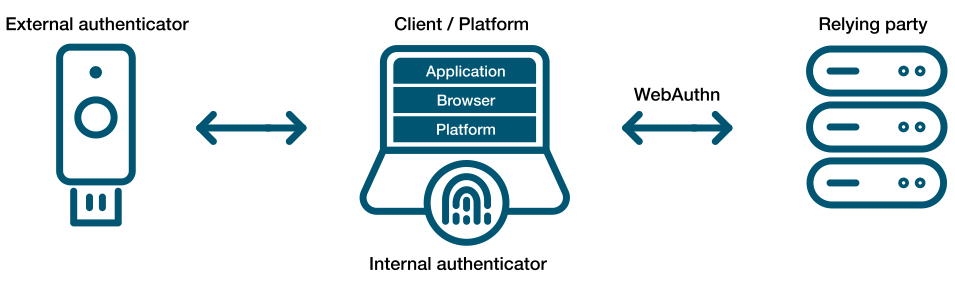
The idea of using a password has been like ‘leaving your front door key under the mat’. Anyone observing your behavior or just walking up and checking ‘under the mat’, can use it for themselves. Password abuse has become a leading cause of fraud to so many users that we started to send 6-8 digit codes via mobile telephone, so that users can authenticate using a second factor (2FA). Not everyone carries a mobile phone and we have learned that receiving these codes is not very secure because they are prone to interception.
We have relied on digital communications for e-commerce sites using cryptography (TLS) with such great success. Contributors like Google, Microsoft and many others decided that it was time to apply these principles to authentication and a specification was born.
The WebAuthN API allows servers to register and authenticate users using public key cryptography instead of a password. It allows web servers to integrate with the strong authenticators (using external ones like Smart cards or YubiKeys) and devices with TPMs (like Windows Hello or Apple’s Touch ID) to hold on to private key material and prevent it from being stolen by hackers.
Instead of a password, a private-public keypair (known as a credential) is created for a website. The private key is stored securely on the user’s device; a public key and randomly generated credential ID is sent to the server for storage. The server can then use that public key to prove the user’s identity. The fact that the server no longer receives your secret (like your password) has far-reaching implications for the security of users and organizations. Databases are no longer as attractive to hackers, because the public keys aren’t useful to them.
A virtual TPM is a software-based implementation of the same hardware-based TPM found in devices today. These vTPMs can be configured to simulate hardware-based TPMs for many operating systems. The Trusted Platform Group has created a standard but it is woefully outdated. Happily, many vendors have implemented the ability to use a vTPM in the last few years that allow us to implement external KMS systems to help protect them.
The cloud providers now support virtual TPMs for use with Secure Computing and Hypervisor support using your existing KMS solutions (KMIP). Even VMWare added its own Native Key Provider.

With support for newer operating systems that can take advantage of a TPM to protect private keys (even from its owner), the idea of Public Key Authentication provides users with the ability to eliminate passwords entirely while binding the authenticators to the people who need to use them rather than the hackers who don’t!

