Archive
Prepare your computers for PQC now!

The quantum computing revolution is rapidly approaching, and with it comes a profound threat to the cryptographic foundations of our digital world. Organizations across the globe are now under pressure to transition to post-quantum cryptography (PQC) to protect sensitive data from future quantum attacks. However, a critical blind spot has emerged in the operational landscape: there is a severe lack of specific guidance for integrating PQC into operating system configurations. This gap leaves countless businesses and governments vulnerable as they attempt to future-proof their digital infrastructure without a clear roadmap. The consequences of this oversight could be catastrophic when quantum computers become a practical threat in the coming decade.
The Post-Quantum Cryptography Challenge: Why Your OS Configuration Matters
Operating systems form the critical bridge between hardware and software applications, making them the primary target for security hardening efforts. Without proper PQC integration, even the most robust cryptographic protocols can be undermined by quantum computing advancements. This challenge is compounded by the fact that operating systems are complex ecosystems where a single misconfiguration can cascade into widespread security failures. For system administrators, the absence of standardized PQC configuration practices creates a significant barrier to adopting new security measures without risking their existing infrastructure. The urgency of this issue cannot be overstated, as quantum computers capable of breaking current encryption standards are expected to become operational within the next decade.
What We Found in the Cybersecurity Landscape (and What We Didn’t)
Our recent analysis of major cybersecurity news sources, government advisories, and incident reports revealed a surprising absence of technical details regarding PQC implementation in operating systems. Instead, the landscape was dominated by general discussions of quantum computing risks, ransomware outbreaks, and AI security concerns. This gap is particularly alarming because organizations need concrete steps to secure their systems before quantum computers become a practical threat. The search results we crawled contained no specific guidelines, configuration templates, or vendor-specific recommendations for integrating PQC into operating system settings. This lack of actionable information leaves many technical teams navigating a complex transition without clear direction or established best practices.
The Critical Gap in Operating System Configuration Management
The lack of standardized, vendor-specific guidance for PQC configuration creates significant hurdles for system administrators and security teams. Without clear protocols, organizations may inadvertently introduce vulnerabilities when migrating from classical to post-quantum cryptographic standards. This gap also hinders the development of automated tools that could streamline the transition process, increasing the time and resources required for implementation. The absence of best practices for OS configuration management means that many organizations are left to rely on their own interpretations of PQC requirements, which can lead to inconsistent and insecure deployments. This situation is especially problematic for organizations with legacy systems that require extensive reconfiguration to support PQC.
Why This Gap is a Problem for Organizations Today
The consequences of this gap are immediate and severe. Companies that fail to address PQC configuration issues could face catastrophic breaches when quantum computers become operational. Moreover, the absence of clear guidelines leads to inconsistent implementations, which increases the risk of security failures across diverse system environments. This inconsistency is particularly dangerous for critical infrastructure sectors like healthcare, finance, and government, where a single breach could have widespread societal impact. The lack of standardized configuration practices also means that organizations must invest additional resources in manual oversight, slowing down the transition to PQC and delaying the protection of sensitive data.

How to takeover a webview in a mobile app
Mobile WebViews: The Silent Gateways to Account Takeover
Mobile webviews have become a critical component in modern applications, yet they present a surprisingly stealthy attack surface that developers often overlook. These components, which render web content within native mobile apps, are vulnerable to a range of security flaws that can lead to severe consequences including account takeovers and data breaches. Understanding these vulnerabilities is essential for building applications that protect user privacy and security in an increasingly connected digital landscape.
The Anatomy of a Classic Exploit: CVE-2018-6495
CVE-2018-6495 represents a cross-origin storage vulnerability in Android’s WebView implementation that allows high-permission applications to leak sensitive cookies to lower-permission content loaded within the same WebView control. This flaw enables attackers to exfiltrate credentials stored by applications with elevated permissions through a mechanism that bypasses typical security boundaries between different app components. The vulnerability exploits how Android WebView handles cross-origin storage by allowing cookies from one app to be accessed by another app with lower privileges, creating a direct path for privilege escalation attacks.
Attackers leverage this weakness to extract sensitive information such as authentication tokens and session cookies from applications that users trust. When malicious content is loaded within the WebView, it can intercept and steal credentials without requiring any user interaction beyond opening the app. This makes CVE-2018-6495 particularly dangerous because it operates through the app’s own WebView infrastructure, meaning users often remain unaware of the breach until their accounts are compromised.
Why iOS WKWebView Isn’t Immune to These Flaws
iOS WKWebView implements additional security measures compared to Android’s WebView, yet it remains vulnerable through misconfiguration and insufficient permission controls. These protections are designed to mitigate cross-origin storage leaks but can be circumvented when developers fail to properly isolate WebView content from other app components. The risk increases significantly when apps store sensitive credentials without adequate security attributes like SameSite cookies or strict CORS policies.
Apple’s security framework includes features to prevent unauthorized data access across origins, but these safeguards are only effective when implemented correctly. Developers often overlook critical configuration steps that could expose their apps to similar vulnerabilities as the Android case. When WebView components are misconfigured, attackers can still exploit same-origin storage leaks to steal session tokens and credentials from legitimate user sessions.
The Account Takeover Attack: When Phishing Meets WebView
Account takeover attacks frequently occur when malicious URL redirections within app-controlled WebView controls redirect users to credential-harvesting phishing pages disguised as legitimate app interfaces. These attacks exploit the trust users have in their own applications by manipulating WebView navigation to present fraudulent login forms that mimic the original app’s design. The attacker then captures credentials through deceptive interfaces that appear to be part of the user’s trusted application environment.
The process typically begins with a user visiting a seemingly safe website within the app’s WebView, followed by a redirection to a malicious endpoint that harvests login credentials. Attackers often use social engineering tactics to trick users into believing they are interacting with their own app, making the phishing attempt appear legitimate. This approach is especially effective because it bypasses traditional browser-based security mechanisms that would otherwise block such redirects.
Protecting Your App: Critical Steps for Secure WebView Implementation
Developers must implement strict permission controls to prevent high-permission apps from leaking cookies to lower-permission content loaded within the same WebView. This includes using secure storage mechanisms and avoiding cross-origin storage without explicit user consent. Additionally, applications should enforce proper CORS configurations to limit how web content can interact with sensitive resources.
Another critical step involves validating all WebView navigation to prevent unauthorized redirects to phishing pages. Implementing SameSite attributes for cookies ensures that session tokens are not sent with requests across different origins, reducing the risk of credential theft. Regular security audits of WebView configurations are essential to identify and fix vulnerabilities before attackers exploit them.
Finally, developers should prioritize user education about app security by clearly communicating when WebView content is being redirected and providing options to block suspicious activity. This proactive approach helps users recognize potential threats before they lead to account compromise. The combination of technical safeguards and user awareness creates a robust defense against WebView-based attacks.
Mobile webviews remain a critical security consideration despite their widespread use. By understanding the underlying vulnerabilities and implementing robust mitigation strategies, developers can significantly reduce the risk of account takeovers and data breaches. The key lies in treating WebView components as a security boundary rather than a passive rendering layer, ensuring that applications maintain the trust users expect from their digital experiences.
Mobile Banking and PQC

The Mobile Banking and Post-Quantum Cryptography Gap: What the Search Results Tell Us
The search results we analyzed only returned a general cryptography Wikipedia page without any specific details about mobile banking or Post-Quantum Cryptography (PQC) implementations. This outcome reveals a significant gap in publicly available information that impacts the ability of financial institutions and developers to plan for quantum threats. The absence of concrete technical specifications or real-world examples makes it difficult for practitioners to understand how mobile banking systems might adopt PQC in the near future, especially as quantum computing advances rapidly.
Post-Quantum Cryptography is an emerging field aimed at creating cryptographic algorithms that remain secure even when quantum computers become powerful enough to break current encryption standards. Despite its growing importance, the integration of PQC into mobile banking applications has not yet reached a stage of widespread deployment due to the complexity of transitioning existing systems. Mobile banking platforms typically prioritize immediate security needs over long-term quantum threats, leading to a delay in adopting PQC that could leave critical infrastructure vulnerable for decades.
The lack of detailed implementation strategies for mobile banking and PQC creates a risk for financial institutions that must protect user data against future quantum attacks. Without clear guidelines, banks may inadvertently use vulnerable cryptographic methods that could be compromised later, potentially leading to massive data breaches. This gap also hinders the development of standardized security practices for mobile banking in the quantum era, forcing organizations to develop custom solutions that may not be optimal or scalable.
The transition to quantum-safe cryptography involves more than just technical adjustments; it requires careful consideration of regulatory requirements, user experience, and system performance. Mobile banking apps must ensure that the shift to PQC does not introduce noticeable delays or reduce the security of transactions, which could cause user frustration and loss of trust. Additionally, the cost of implementing PQC at scale remains a barrier for many organizations, especially smaller banks and fintech startups that lack the resources for extensive overhauls.
In summary, the current state of mobile banking and PQC implementation details highlights a critical need for industry collaboration. Organizations must prioritize practical steps to integrate quantum-resistant cryptography without sacrificing the security and usability that users expect, balancing immediate needs with long-term resilience. The path forward requires a balanced approach that addresses both immediate security concerns and long-term quantum threats through open standards, phased rollouts, and continuous monitoring.

Windows: TLS-1.3 and PQC-Readiness

The quantum computing threat landscape has intensified the urgency for robust cryptographic solutions, especially in modern TLS 1.3 implementations. As of November 2025, Windows client and server operating systems do not natively support post-quantum cryptography algorithms within TLS 1.3 handshakes. Current Windows crypto stacks continue to rely on classical elliptic curve algorithms such as NIST P-curves for key exchange operations. This design choice, while compliant with existing security standards like FIPS 140-2, creates a critical vulnerability as quantum computing capabilities advance.
The Current State of Windows TLS 1.3 and Post-Quantum Cryptography
Windows has not yet integrated native post-quantum cryptography algorithms into its TLS 1.3 stack. Instead, the operating system continues to use classical elliptic curve algorithms such as NIST P-curves for key exchange operations. This approach aligns with current compliance frameworks but leaves systems exposed to future quantum attacks. Hybrid configurations using post-quantum primitives like ML-KEM are available only through application-level libraries and manual configuration.
Microsoft and NIST: Aligning on a Path Forward
CISA recommends transitioning away from pure elliptic curve key exchanges in TLS 1.3 within 5 to 7 years, targeting the mid-2030s for full adoption of hybrid key exchanges. Microsoft has publicly committed to following these timelines for Windows Server updates, though specific rollout dates remain undisclosed beyond general feature update cycles. The alignment between Microsoft and NIST standards provides a clear roadmap for future Windows versions, but current implementations do not enforce PQC algorithms at the system level. This creates a gap between regulatory guidance and immediate operational readiness for enterprise environments.
Regulatory Landscapes and Standardization Efforts
NIST finalized its post-quantum cryptography standards in early 2024, including the FIPS 203-4 suite for algorithm validation. Microsoft Azure services can be configured to use these standards, but Windows core components have not yet adopted them as default settings. The IETF is actively working on a draft standard for hybrid TLS 1.3 key exchanges, with Microsoft aligning its internal testing to ensure future compatibility. However, no public commitment exists for Windows to integrate these standards until the IETF standard is ratified.
Real-World Testing and Validation Challenges
Independent labs such as SANS and NIST have demonstrated that hybrid TLS 1.3 configurations resist known post-quantum attacks. Microsoft has not released independent validation reports for Windows client and server OS PQC capabilities as of November 2025. This absence of internal validation data forces enterprise security teams to adopt a hybrid-first approach for critical workloads. The lack of Microsoft-provided testing reports creates uncertainty for organizations planning their PQC migration strategies.
Strategic Recommendations for Immediate Action
High-security workloads should leverage Azure-managed TLS endpoints that already support hybrid key exchange libraries for immediate compliance. Developers building .NET applications on Windows must manually integrate PQC packages and configure hybrid handshakes in their codebases. Specific Windows version numbers that will receive PQC support remain undocumented, so organizations must rely on CISA guidance and industry-standard libraries. No public beta testing program for Windows OS PQC integration exists beyond Azure infrastructure experiments, making the transition process complex.
In conclusion, Windows currently lacks native post-quantum cryptography support in TLS 1.3, creating a temporary security gap that requires strategic workarounds. Organizations should prioritize Azure-managed solutions and manual PQC integration in applications to mitigate quantum threats. Microsoft’s alignment with NIST standards provides a clear path forward, but the absence of official timelines and validation reports necessitates proactive planning. The transition to quantum-resistant cryptography is an ongoing process, and staying informed about regulatory updates will be critical for long-term security.

Mobile security and Android

Android Security: The Hidden Perils of Unofficial TV Boxes and Beyond
Mobile security for Android devices is a complex and ever-evolving field, especially when dealing with unofficial applications and devices. Many users are unaware that the widespread adoption of cheap, unverified TV boxes running open-source Android versions creates significant vulnerabilities that attackers can exploit. These devices, often purchased from e-commerce sites that promise unlimited streaming app access, become prime targets for malware campaigns that compromise user privacy and security. The consequences of such compromises extend beyond the individual device, potentially affecting entire home networks and local internet connections. Understanding these risks is crucial for anyone using Android-based systems in their daily lives. Additionally, the lack of robust security updates in these unofficial devices compared to certified Google Play editions amplifies the danger, leaving users exposed to a range of threats that could lead to data theft and financial loss.
Botnets and Unofficial Devices: The Popa Threat
Researchers have identified a massive botnet known as Popa that forces millions of unofficial consumer TV boxes to relay internet traffic for advertising fraud and data scraping. This botnet frequently emerges from malware campaigns such as Vo1d, which target devices bought from e-commerce sites that promise unlimited streaming app access. These unverified apps are the common entry point for compromise, leading to devices being hijacked for malicious activities without the user’s knowledge. The Popa botnet operates by turning these TV boxes into residential proxies, allowing attackers to use the home internet connection and local network for malicious purposes. This practice not only facilitates data scraping but also enables large-scale fraud operations that impact millions of users globally.
Hardware and Software Vulnerabilities: Beyond the Surface
Hardware-level exploits present a unique challenge for Android security, as vulnerabilities in the firmware boot chain can lead to arbitrary code execution. While the specific news covered an exploit for Apple A12/A13 chips, similar risks exist in Android devices where securing the low-level system components is critical. Additionally, OAuth breaches, as seen with the Icarus hackers targeting Klue users, can result in sensitive data such as location history or contact lists being exfiltrated if token validation is poorly implemented. These vulnerabilities highlight the importance of robust authentication mechanisms and the need for continuous monitoring of security practices. Furthermore, bugs in plugins handling APIs can lead to unauthenticated access and exposure of secrets, which can have severe implications for user privacy and data integrity.
Emerging Threats: AI, Ransomware, and Human Error
The use of AI by attackers to discover and exploit vulnerabilities in computer code has become an emerging trend, which significantly increases the rate at which zero-days are found against popular frameworks. Ransomware campaigns have shifted from being primarily Windows-centric to targeting mobile platforms, often by encrypting recent files on cloud-connected devices. Furthermore, user behavior remains a primary attack vector, with social engineering tactics such as malicious SMS links and fake app download pages frequently leading to initial compromises. Tools to “stay safe online” emphasize that human error is often the initial step before technical exploits are deployed against an Android device. Addressing these threats requires a combination of technical safeguards and user education to reduce the likelihood of successful attacks.
Data Breaches and Supply Chain Risks: The Critical Landscape
The “Have I Been Pwned” database reveals how frequently user credentials are exposed across thousands of websites, meaning a single compromised service can be leveraged to phish for mobile app tokens or session cookies via SIM swap attacks. Supply chain risks also pose a serious threat, as malicious updates or backdoors in applications distributed through third-party channels can lead to widespread breaches. Government agencies like CISA emphasize the importance of adhering to best practices, particularly for enterprises managing Android devices via Mobile Device Management solutions. These incidents underscore the need for comprehensive security strategies that cover both the technical infrastructure and the human element. Additionally, the risk of unauthorized device enrollment in botnets is a major concern for organizations that rely on mobile devices for critical operations.
In summary, the security landscape for Android devices is increasingly complex and demands a multi-layered approach. From the risks of unofficial TV boxes and residential proxies to the threats of hardware vulnerabilities and AI-assisted attacks, every aspect of the mobile ecosystem requires careful attention. Users and organizations must prioritize vigilance, regular updates, and robust security practices to mitigate the growing number of threats.

AI Code Tech Debt

The Double-Edged Sword of AI in Code Development
In the modern software development landscape, Artificial Intelligence has emerged not just as a tool for automation but as a catalyst that dramatically accelerates code generation. Tools powered by Large Language Models can now produce complex functions in seconds, seemingly solving years of work almost instantaneously. However this rapid surge in productivity brings with it an unexpected and potentially costly companion: Technical Debt specifically engineered to be far more insidious than traditional shortcuts taken by human developers.
The Mechanism Behind AI-Generated Code Debt
To understand this phenomenon, one must look at how these models actually function. Unlike human programmers who can trace their logic back through a mental sandbox or verify every condition manually LLMs are probabilistic engines predicting the next token based on patterns seen in vast datasets of existing code. This means that while AI is incredibly efficient at producing syntactically correct and contextually relevant solutions to new problems essentially writing perfect-looking spaghetti it often lacks true logical depth regarding security best practices or long-term maintainability.
The critical issue lies in the model inability to see outside its training data meaning it cannot inherently understand if a specific piece of generated code violates industry standards for secure coding. Consequently developers are often presented with solutions that work immediately but may introduce hidden vulnerabilities or inefficiencies.
The Critical Summary
AI Code Tech Debt is a critical new frontier for software architects and security professionals. It represents the accumulation of code that appears efficient but relies on patterns found in vast datasets rather than deep logical reasoning introducing latent vulnerabilities and making refactoring exponentially harder over time.
The core takeaway is clear while AI can significantly boost productivity it demands a heightened level of skepticism from developers. Organizations must implement rigorous code review processes that specifically audit for the probabilistic errors introduced by LLMs and prioritize security-by-design principles to prevent this rapidly accumulating debt.
The Path Forward
To mitigate these risks the industry is looking toward better integration of static analysis tools trained specifically on security vulnerabilities within AI workflows. The solution isn’t to reject AI technology but rather to evolve our development practices treating AI suggestions as drafts that require human validation and strict adherence to secure coding standards before deployment.

AI Security

The Double-Edged Sword of Artificial Intelligence
The future landscape of cybersecurity has been dramatically reshaped by the sudden and widespread rise of artificial intelligence, creating an entirely new frontier where our most sophisticated tools could potentially be used for both defense and offense.
AI Security is no longer just a niche sub-field emerging from the shadows; it stands now as a critical necessity that permeates every single layer of modern technology stacks. From the foundational processes we use to train massive models to protect them against adversarial manipulation, the integration has become inevitable across digital infrastructure management workflows.
An Ecosystemic Vulnerability
The core challenge within this evolving landscape lies in understanding that AI Security functions not as a single point failure but rather represents an ecosystemic vulnerability exposed across multiple vectors. Attackers actively exploit the inherent probabilistic nature of machine learning models to:
- Generate harmful outputs or compromise underlying data integrity through adversarial input manipulation.
- Execute model inversion techniques designed to leak sensitive information stored within neural network weights.
- Bypass safety filters through creative prompt engineering and jailbreaking attempts.
This reality forces developers to implement robust guardrails without sacrificing the flexibility that makes Large Language Models so powerful for legitimate enterprise applications in industries ranging from healthcare diagnostics to financial trading algorithms running at millisecond speeds.
Building Resilient Countermeasures
In response, key research initiatives and standardized frameworks have emerged. Security teams are moving toward comprehensive taxonomies like MITRE ATLAS which catalog known attack techniques specifically targeting AI systems. This enables defenders to build countermeasures based on a verified list of threats rather than guessing work in an ever-evolving arms race between automated attackers and protection algorithms augmented by generative adversarial networks capable of detecting previously unseen patterns.
To secure the digital economy moving forward, we must invest specifically in specialized talent proficient both in machine learning theory and traditional cybersecurity principles. Success hinges upon establishing resilient architectures that combine rigorous red teaming exercises designed to probe model robustness against boundary conditions while leveraging federated learning approaches where sensitive data never leaves local devices yet still contributes to global model improvements without compromising privacy rights.

Get ready to Celebrate Star Trek day!
Star Trek Day marks the first airing of Star Trek: The Original Series on NBC on September 8, 1966.
I was in my “Terrible Twos” back then and wasn’t yet memorized by the notion of space travel. Slowly, as other events of the 60’s unfolded, I began to realize that my life would embrace all things science and if I was lucky, I might experience space one day if I worked really hard.
Well, here we are celebrating another Sept 8 (59th anniversary) and I am happy to report that I have worked with computers for over half my life, due in large part to shows like Star Trek.
Join me, as we enter the world of Artificial Intelligence, and welcome the news that Paramount (CBS studios) will be adding several new Star Trek shows and movies centered around this cultural phenomenon.
Take that Star Wars, let’s see Disney try and top that 😁

Trusted Platform Modules
If you are like me and use windows (among other operating systems), you might have wondered why M$ has required you to obtain new hardware just to run Windows 11. Is this just a cash grab by a greedy vendor or is there method to the madness after all?
The truth is, the industry has learned the costs of poor security, after decades of breaches and a patch routine that seems to never end. Created to help solve the problems associated with 2 factor authentication and now expanded to replace passwords altogether (using Passkeys), WebAuthN is an API specification designed to use public key cryptography to authenticate Entities (users) to relying parties (Web Servers).
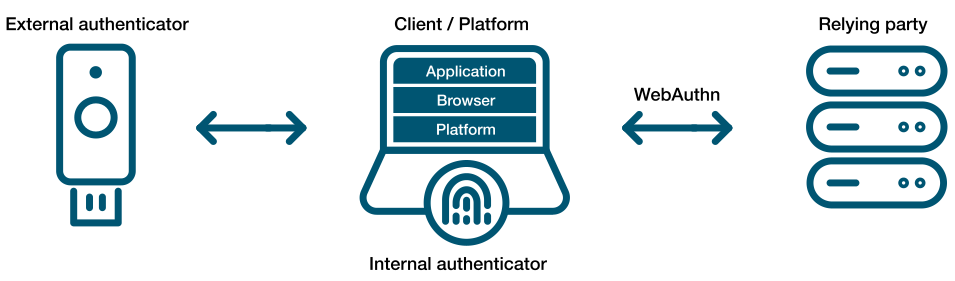
Shown below (from the Yubikey site) demonstrating external authenticators (like Smart cards or hardware) or by utilizing Trusted Platform Modules in our devices, people can authenticate with (or without) the standard username and password we have been using for decades.
The idea of using a password has been like ‘leaving your front door key under the mat’. Anyone observing your behavior or just walking up and checking ‘under the mat’, can use it for themselves. Password abuse has become a leading cause of fraud to so many users that we started to send 6-8 digit codes via mobile telephone, so that users can authenticate using a second factor (2FA). Not everyone carries a mobile phone and we have learned that receiving these codes is not very secure because they are prone to interception.
We have relied on digital communications for e-commerce sites using cryptography (TLS) with such great success. Contributors like Google, Microsoft and many others decided that it was time to apply these principles to authentication and a specification was born.
The WebAuthN API allows servers to register and authenticate users using public key cryptography instead of a password. It allows web servers to integrate with the strong authenticators (using external ones like Smart cards or YubiKeys) and devices with TPMs (like Windows Hello or Apple’s Touch ID) to hold on to private key material and prevent it from being stolen by hackers.
Instead of a password, a private-public keypair (known as a credential) is created for a website. The private key is stored securely on the user’s device; a public key and randomly generated credential ID is sent to the server for storage. The server can then use that public key to prove the user’s identity. The fact that the server no longer receives your secret (like your password) has far-reaching implications for the security of users and organizations. Databases are no longer as attractive to hackers, because the public keys aren’t useful to them.
A virtual TPM is a software-based implementation of the same hardware-based TPM found in devices today. These vTPMs can be configured to simulate hardware-based TPMs for many operating systems. The Trusted Platform Group has created a standard but it is woefully outdated. Happily, many vendors have implemented the ability to use a vTPM in the last few years that allow us to implement external KMS systems to help protect them.
The cloud providers now support virtual TPMs for use with Secure Computing and Hypervisor support using your existing KMS solutions (KMIP). Even VMWare added its own Native Key Provider.

With support for newer operating systems that can take advantage of a TPM to protect private keys (even from its owner), the idea of Public Key Authentication provides users with the ability to eliminate passwords entirely while binding the authenticators to the people who need to use them rather than the hackers who don’t!
Security IN/OF the Solution
Security IN the Solution is about the security of the control plane whereas Security OF the solution is about the data plane.
Lets take a Plaza or Strip Mall as an example. The owner of the property has thick brick walls around the perimeter of the building to provide a strong structure to hold all of the shared services. They tend to divide the property into several smaller units using softer materials like wood and gypsum board so that each tenant has some isolation. They need to provide physical access to each sub-unit that can then be controlled by each tenant and rent the space. The lower the rent, the less isolated each unit is from each other as the costs of providing security for all four walls is reduced.
In this example, you can think of the thick brick exterior as the owners attempt of Security IN the solution. They do not want any part of the sub-units to be breached and they don’t want any of the supporting infrastructure (like water, electrical power or sewage) to be compromized by outsiders so they protect them with a thick perimeter wall. They invest in fire safety and perhaps burglary equipment to protect the investment from the inside and the outside. They invest in features and services that provide security “IN” the building that they own.
Now the Landlord must provide some items for the tenants to feel safe and comfortable or they must allow tenants to modify the units for their own purposes. If you rent a commercial building, you may need to get your own electrical connected (especially if you have custom requirements) or pay for your own water and/or sewage or garbage disposal. All of these features and services are negotiable in the rental agreement and you are encouraged to read the contract carefully because not all rentals come with everything. You may need to provide some/many of the creature comforts you need to run your business. Internet, Cable, perhaps even your own burglar alarm system are all part of Security OF the solution. Your landlord must either provide some of it for you or allow you to purchase and modify the premise so it can be suitable for your use. If not, then you should consider taking your business elsewhere.
After 60 years on this planet and over 30 of them, immersed in the Information Systems industry, I have learned to apply this paradigm to anything from the design of software to the implementation of a solution. I have found that by separating these two objectives, anyone can discuss the roles and responsibilities of any solution and quickly identify ‘How much security you can afford’.
When dealing with third parties who represent warranty for functionality, ask them ‘what do they do to protect themselves?’ For anyone in the IT business, this is referred to as Third party Risk Management. You want to do business with third parties who are reputable and will continue to remain in business. They must be profitable and that means they must have good practices that allow them to operate safely and securely. This helps you choose a service provider that can demonstrate Security IN their Solutions.
Once you have determined who you would like to do business with, you should ask the question, ‘what are they doing to protect you?’ Don’t let their answers fool you, any company that boasts about what they do to protect themselves and then tells you that they use those capabilities to protect you too is mixing the two distinct worlds. What you want them to tell you is what do they do for you and how do they make it safe for you.
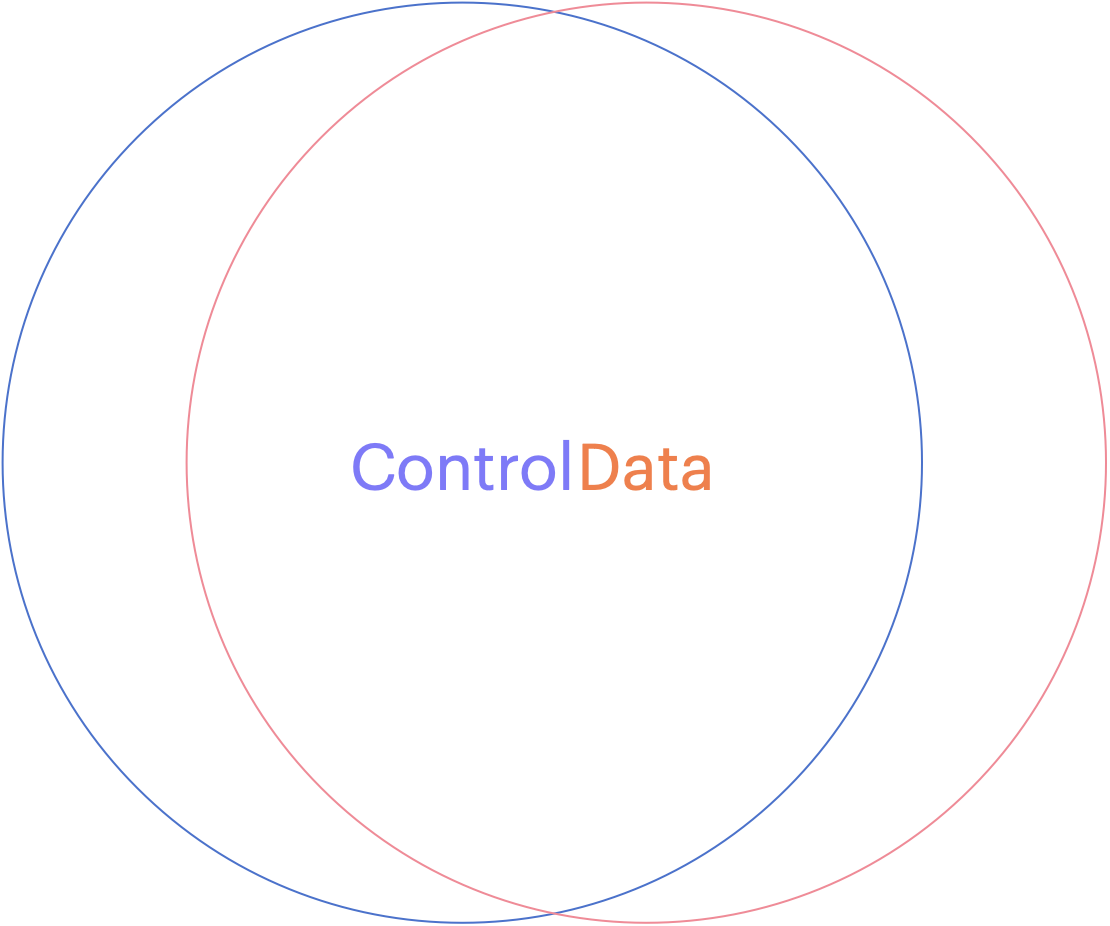
Can you see how the two overlap? This might be fine when you develop a relationship with your service provider (like an accountant, a lawyer or your doctor) but if you want to choose a cloud vendor that will house all of your sensitive data, with the purpose of letting them use it to apply Artificial Intelligence on it, you might want to stop and ask yourself, ‘How will they keep my data separate from their staff or any other customers?’ What about rogue employees who might abuse their privileges or what about unauthorized hackers who figure out how to circumvent their controls?
If you are in an industry that is regulated, and there are fines associated with any type of breach of your clients data, you might stand to lose much more than you save by giving your data to a vendor who cannot provide you with the level of data protection you need. This is why you want to consider how a cloud software as a service vendor can provide you with your own level of customization. You want them to show you how they designed their system to provide a distinct separation of all control duties and can provide you with the abilities to trust no one with your data!

When choosing to store data in a cloud service provider or any software as a service vendor, you should consider how they can separate your data away from their shared control plane. If your vendor does not run a Single tenant model (where their control plane is dedicated just for you), and you are forced to choose their multi-tenanted solution, consider how they can keep your data separated.
Many vendors will tell you that they will manage the encryption keys for you and keep them separate from other tenants but would you consider a landlord who required you to give them your sub-unit rentals keys? How do you know that some staff or some robber didn’t open the valet cupboard and just take your keys for a spin? The truth is, if you chose to share sensitive data with this vendor, you don’t!
Now please don’t misunderstand me, SaaS can be a terrific solution for any small or medium sized business that doesn’t have the skills or expertise to manage the complex infrastructure necessary to do something like machine learning. You may not even want the capital expense associated with running your own computer network in order to achieve this but tread lightly and consider the benefits of external key management.
You may not have the ability or the budget to run huge amounts of specialized hardware but you owe it to yourself to manage your own keys. If you don’t rekey your front door, how do you know your inventory will be safe? Remember, the vendor is responsible for Security IN the solution but you are responsible for Security OF the solution you choose.

