Archive
Security IN/OF the Solution
Security IN the Solution is about the security of the control plane whereas Security OF the solution is about the data plane.
Lets take a Plaza or Strip Mall as an example. The owner of the property has thick brick walls around the perimeter of the building to provide a strong structure to hold all of the shared services. They tend to divide the property into several smaller units using softer materials like wood and gypsum board so that each tenant has some isolation. They need to provide physical access to each sub-unit that can then be controlled by each tenant and rent the space. The lower the rent, the less isolated each unit is from each other as the costs of providing security for all four walls is reduced.
In this example, you can think of the thick brick exterior as the owners attempt of Security IN the solution. They do not want any part of the sub-units to be breached and they don’t want any of the supporting infrastructure (like water, electrical power or sewage) to be compromized by outsiders so they protect them with a thick perimeter wall. They invest in fire safety and perhaps burglary equipment to protect the investment from the inside and the outside. They invest in features and services that provide security “IN” the building that they own.
Now the Landlord must provide some items for the tenants to feel safe and comfortable or they must allow tenants to modify the units for their own purposes. If you rent a commercial building, you may need to get your own electrical connected (especially if you have custom requirements) or pay for your own water and/or sewage or garbage disposal. All of these features and services are negotiable in the rental agreement and you are encouraged to read the contract carefully because not all rentals come with everything. You may need to provide some/many of the creature comforts you need to run your business. Internet, Cable, perhaps even your own burglar alarm system are all part of Security OF the solution. Your landlord must either provide some of it for you or allow you to purchase and modify the premise so it can be suitable for your use. If not, then you should consider taking your business elsewhere.
After 60 years on this planet and over 30 of them, immersed in the Information Systems industry, I have learned to apply this paradigm to anything from the design of software to the implementation of a solution. I have found that by separating these two objectives, anyone can discuss the roles and responsibilities of any solution and quickly identify ‘How much security you can afford’.
When dealing with third parties who represent warranty for functionality, ask them ‘what do they do to protect themselves?’ For anyone in the IT business, this is referred to as Third party Risk Management. You want to do business with third parties who are reputable and will continue to remain in business. They must be profitable and that means they must have good practices that allow them to operate safely and securely. This helps you choose a service provider that can demonstrate Security IN their Solutions.
Once you have determined who you would like to do business with, you should ask the question, ‘what are they doing to protect you?’ Don’t let their answers fool you, any company that boasts about what they do to protect themselves and then tells you that they use those capabilities to protect you too is mixing the two distinct worlds. What you want them to tell you is what do they do for you and how do they make it safe for you.

Can you see how the two overlap? This might be fine when you develop a relationship with your service provider (like an accountant, a lawyer or your doctor) but if you want to choose a cloud vendor that will house all of your sensitive data, with the purpose of letting them use it to apply Artificial Intelligence on it, you might want to stop and ask yourself, ‘How will they keep my data separate from their staff or any other customers?’ What about rogue employees who might abuse their privileges or what about unauthorized hackers who figure out how to circumvent their controls?
If you are in an industry that is regulated, and there are fines associated with any type of breach of your clients data, you might stand to lose much more than you save by giving your data to a vendor who cannot provide you with the level of data protection you need. This is why you want to consider how a cloud software as a service vendor can provide you with your own level of customization. You want them to show you how they designed their system to provide a distinct separation of all control duties and can provide you with the abilities to trust no one with your data!

When choosing to store data in a cloud service provider or any software as a service vendor, you should consider how they can separate your data away from their shared control plane. If your vendor does not run a Single tenant model (where their control plane is dedicated just for you), and you are forced to choose their multi-tenanted solution, consider how they can keep your data separated.
Many vendors will tell you that they will manage the encryption keys for you and keep them separate from other tenants but would you consider a landlord who required you to give them your sub-unit rentals keys? How do you know that some staff or some robber didn’t open the valet cupboard and just take your keys for a spin? The truth is, if you chose to share sensitive data with this vendor, you don’t!
Now please don’t misunderstand me, SaaS can be a terrific solution for any small or medium sized business that doesn’t have the skills or expertise to manage the complex infrastructure necessary to do something like machine learning. You may not even want the capital expense associated with running your own computer network in order to achieve this but tread lightly and consider the benefits of external key management.
You may not have the ability or the budget to run huge amounts of specialized hardware but you owe it to yourself to manage your own keys. If you don’t rekey your front door, how do you know your inventory will be safe? Remember, the vendor is responsible for Security IN the solution but you are responsible for Security OF the solution you choose.
Why your business should never accept a wildcard certificate.
When starting your web service journey, most developers will only see the benefits of using a certificate with *only* the domain name referenced (a.k.a wildcard certificate) and will disregard the risks. On the surface, creating a certificate with an infinite number of first level subdomain (host) records seems like a successful pattern to follow. It is quick and easy to create a single certificate like *.mybank.com and then use it at the load balancer or in your backend to frontend (BFF) right? That certificate is for the benefits of clients, to convince them that the public key contained in the certificate is indeed the public key of the genuine SSL server. With a Wildcard certificate, the left-most label of the domain name is replaced with an asterisk. This is the literal “wildcard” character, and it tells web clients (browsers) that the certificate is valid for every possible name at that label.
What could possibly go wrong… 🙂
Let’s start at the beginning, with a standard: RFC-2818 – HTTP over TLS.
#1 – RFC-2818, Section 3.1 (Server Identity) clearly states that, “If the hostname is available, the client MUST check it against the server’s identity as presented in the server’s Certificate message, in order to prevent man-in-the-middle attacks.
How does a client check *which* server it is connecting to if it does not receive one? Maybe it is one of the authorized endpoints behind your load balancer, but maybe it is not? You would need another method of assurance to validate that connecting and sending your data to this endpoint is safe because connecting over one way TLS, into “any endpoint” claiming to be part of the group of endpoints that *you think* you are connecting to is trivial if your attacker has control of your DNS or any network devices in between you and your connection points.
#2 – The acceleration of Phishing began when wildcard certificates became free.
In 2018, in what was soon to become the world’s largest Certificate Authority (https://www.linuxfoundation.org/resources/case-studies/lets-encrypt), Lets Encrypt began to support wildcard certificates. Hackers would eventually use wildcard certificates to their advantage to hide hostnames and make attacks like ransomware and spear-phishing more versatile.
#3 – Bypasses Certificate Transparency
The entire Web Public Key Infrastructure requires user agents (browsers) and domain owners (servers) to completely trust that Certificate Authorities are tying domains to the right domain owners. Every operating system and every browser must build (or bring) a trusted root store that contains all the public keys for all the “trusted” root certificates and, as is often the case, mistakes can be made (https://www.feistyduck.com/ssl-tls-and-pki-history/#diginotar). By leveraging logs as phishing detection systems, phishers who want to use an SSL certificate to enhance the legitimate appearance of their phishing sites are making it easier to get caught if we don’t use wildcard certs.
#4 – Creates one big broad Trust level across all systems.
Unless all of the systems in your domain have the same trust level, using a wildcard cert to cover all systems under your control is a bad idea. It is a fact that wildcards do not traverse subdomains, so although you can restrict a wildcard cert to a specific namespace (like *.cdn.mybank.com.), if you apply it more granularly, you can limit its trust. If one server or sub-domain is compromised, all sub-domains may be compromised with any number of web-based attacks (SSRF, XSS, CORS, etc.)
#5 – Private Keys must not be shared across multiple hosts.
There are risks associated with using one key for multiple uses. (Imagine if we all had the same front door key?) Some companies *can* manage the private keys for you (https://www.entrust.com/sites/default/files/documentation/solution-briefs/ssl-private-key-duplication-wp.pdf), but without TLS on each individual endpoint, the blast radius increases when they share a private key. A compromise of one using TLS, will be easier to compromise all of them. If cyber criminals gain access to a wildcard certificates’ private key, they may be able to impersonate any domain protected by that wildcard certificate. If cybercriminals trick a CA into issuing a wildcard certificate for a fictitious company, they can then use those wildcard certificates to create subdomains and establish phishing sites.
#6 – Application Layer Protocols Allowing Cross-Protocol Attack (ALPACA)
The NSA says [PDF] that “ALPACA is a complex class of exploitation techniques that can take many forms” “and will confer risk from poorly secured servers to other servers the same certificate’s scope” To exploit this, all that is needed for an attacker, is to redirect a victims’ network traffic, intended for the target web app, to the second service (likely achieved through Domain Name System (DNS) poisoning or a man-in-the-middle compromise). Mitigations for this vulnerability involve Identifying all locations where the wildcard certificates’ private key is stored and ensuring that the security posture for that location is commensurate with the requirements for all applications within the certificates’ scope. Not an easy task given you have unlimited choices!
While the jury is ‘still out’ for the decision on whether Wildcard Certificates are worth the security risks, here are some questions that you should ask yourself before taking this short cut.
– Did you fully document the security risks?
How does the app owner plan to limit the safe and secure use of any use of wildcard certificates, maybe to a specific purpose? What detection (or prevention) controls do you have in place to detect (prevent) wildcard certificates from being used in any case, for your software projects? Consider how limiting your use of wildcard certificates can help you control your security.
– Are you trying to save time or claiming efficiencies?
Does your business find it too difficult to install or too time consuming to get certificates working? Are you planning many sites hosted on a small amount of infrastructure? Are you expecting to save money by issuing less certificates? Consider the tech debt of this decision – Public certificate authorities are competing for your money by offering certificate lifecycle management tools. Cloud Providers have already started providing Private Certificate Authority Services so you can run your own CA!
Reference: https://www.rfc-editor.org/rfc/rfc2818#section-3.1
https://venafi.com/blog/wildcard-certificates-make-encryption-easier-but-less-secure
Forget SPAM, why not backdoor software instead
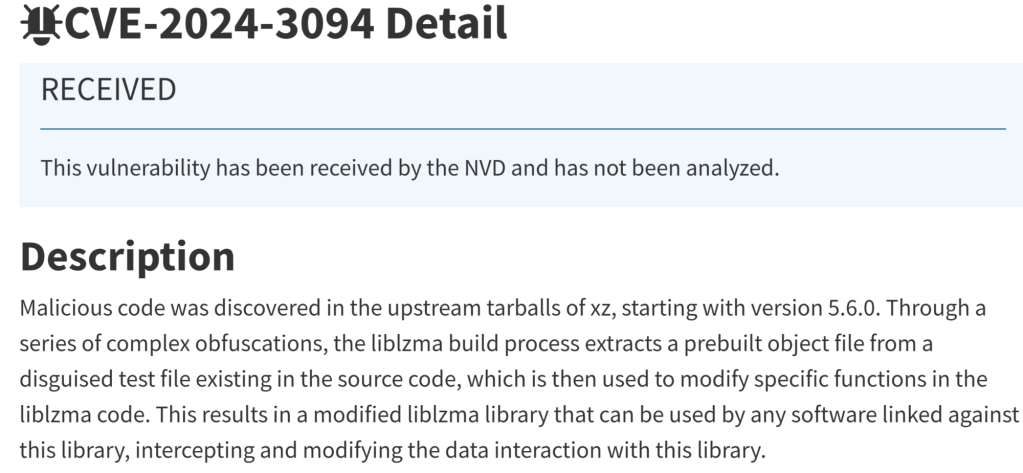
Open Source software is used by so many people, that it has become the target for a more sophisticated attacker. One that is so pernicious, it is known, in the Common Weakness and Exposure chart as CWE-506.
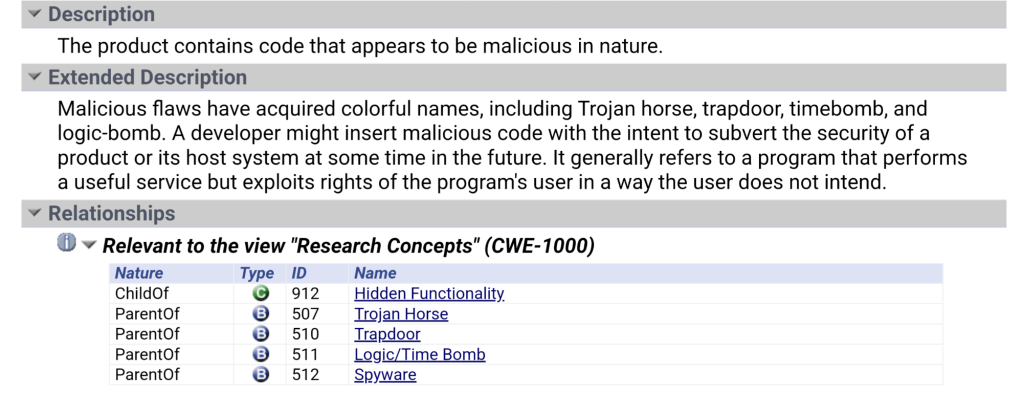
Let’s face it, over the last few decades, as the world was being eaten by software* we became too reliant on other people’s work. We ‘trusted’ what others were doing and relied too much on ‘good people doing great things’ so we could focus more on what we wanted.
The strength of open source (where so many eyes would review the code instead of just a handful of coders in a cave), makes us dependent on those same coders so if they don’t catch the malicious additions, who will?
Luckily, in such a short time, a few posts by a couple of curious sysadmins on Thursday, managed to catch this ‘feature’ being added to the source, which quickly produced this CVE (above) so patch your stuff before you too, become backdoored.
For my readers, I can only say that, if you use software in your business (that should be *all* of you), then you probably use open source so ‘Verify then Trust’ because this happens more often than you realize. Invest in your Security program which should include a threat analysis channel. We are at War with the hacker community and they only need one to win!
Old tech for an old Techy
How many of you remember the days of the Pentium processors? What about the 386 when we used 30 pin SIMMs (1mb shown here) and this 5 pin DIN adapter for the PS2 keyboard?
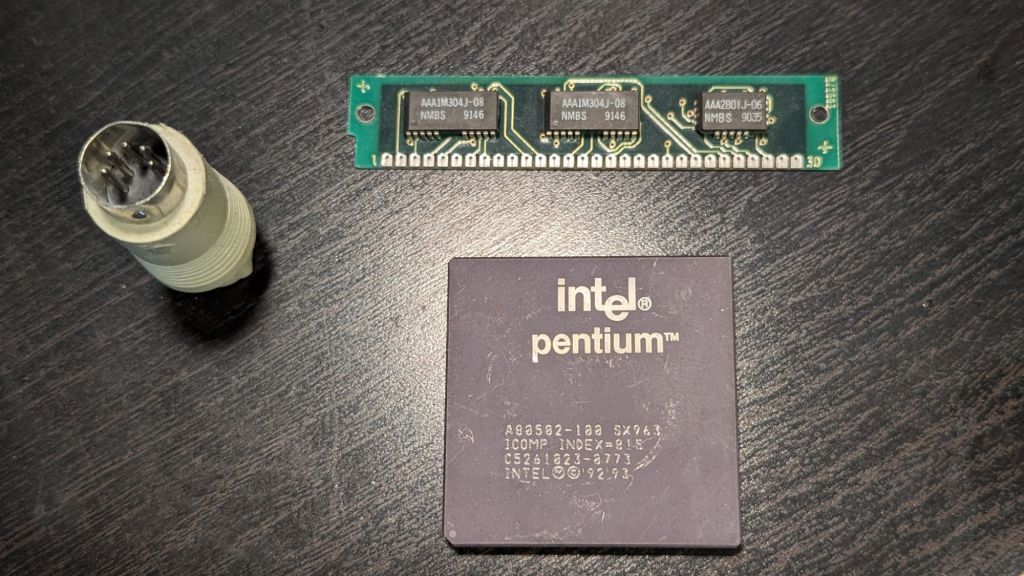
I think that piece of memory actually cost me $25 in 1980s dollars! Computers have come a long way since the early days.
Cloud makes it easier to use but remember, it also makes it easier for the hackers 😜.
SLSA • Supply-chain Levels for Software Artifacts
Oh thank God I am not the only one who sees the next techopolus (O-day apocalypse) as we all adopt kubernetes as the orchestration platform and we forget about *where* those container images come from… http://slsa.dev/
Why exfil your payload via ASCII? A picture is worth…
Malwarebytes has discovered a new type of skimming attack where the booty is sent via an image!
The attackers hides the credit card skimmers in the metadata of icon files and then sends the sensitive info after the attack is successful, to the C2 via an image.
Talk about the need for ‘copy protection’?
As if hiding JavaScript in the copyright tag of the ico file isn’t ingenuous enough, they capture input field data, obfuscate it and place it in a image file to be uploaded so your Siem doesn’t even see it?
They have shared the details in a blog post if you want to learn more.
https://latesthackingnews.com/2020/07/06/attackers-hide-credit-card-skimmers-in-image-files-to-steal-data/
Certificate Expiry – Doh
Don’t you just hate when that happens – you have a nice, professional website that is generating revenue for your company and someone forgets to renew the TLS certificate!
Packt Publishing sure does today when it seems clear that almost all of its visitors will not be able to connect to their website.
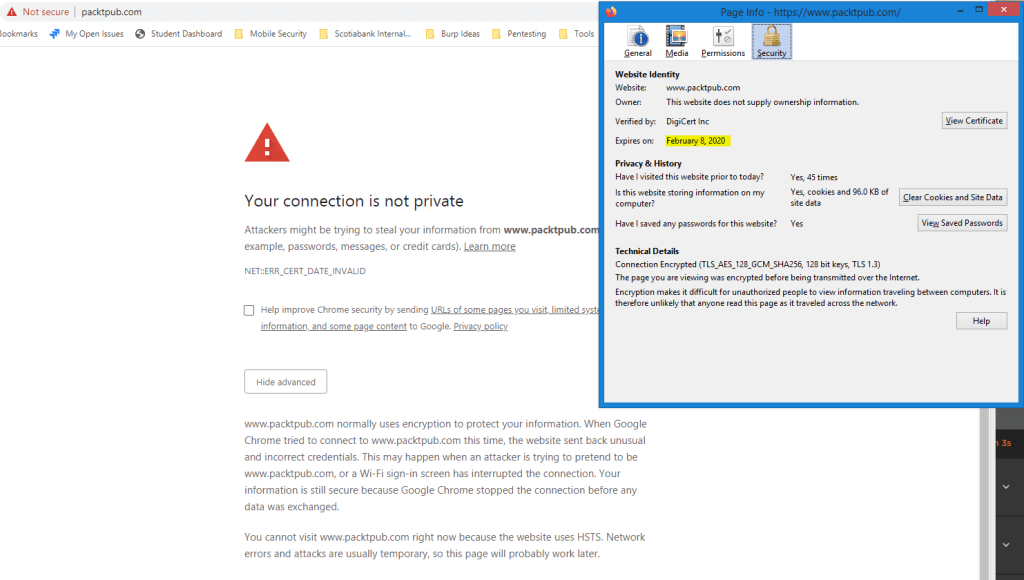
It happens to many of us and it is due to poor certificate management. Microsoft Teams announced that they had surpassed Slack as the number one platform for messaging and collaboration but recently experienced an outage due to an expired certificate. Imagine how that affected their reputation and think of the brand impact that could have resulted in incalculable loss!

Whether you have 1 SSL/TLS Certificate protecting your website or you have setup an extensive server farm both inside and outside your organization, managing certificate renewal can bite you in the A$$.
Think strongly about a certificate management program that can alert you to thinks like certificate expiry for items like websites, Internet of Things and even network devices. With the push to ensure that we adopt https everywhere, you will need to manage certificates for almost every endpoint we use for mail, for file and print services and of course for all of the applications that use web based browsers. Even some of the desktop application are just shells that use a custom shell to deliver http based content so you may also have outage associated with certificates for some of the popular applications like Slack and Teams on your desktop.
Prevent outage by discovering and being aware of all of your certificates before someone else tells you!
Are you a Secure Programmer?
Happy New Year to those of you who read this blog, and to those folks who remember my predictions about going over 20,000 unique CVEs in 2019, I trust you may agree that 2019 was a banner year for vulnerabilities. Lucent/Alcatel are among the vendors who have CVEs that have taken us over 20,000 this year (CVE-2019-20047, 20048).
It’s time to ask yourself, are the hackers getting better at ‘hacking’ or are coders just getting worse? If we are going to examine how the last half of a decade has had more than 10,000 unique vulnerabilities each year and that number keeps increasing, we will all need to come to the conclusion that programmers just don’t know how to create programs that are secure by default!
Here is a chance for some of the best and brightest programmers to change course and learn how to avoid these vulnerabilities once and for all.
A California University (UCDavis) has created an online course that can help teach the Principles of Secure Coding. In a series of four courses, developers can learn about the fundamentals, identify vulnerabilities and walk on the wildside as they learn how to hack just like the a blackhat!
Take one, two or the set of four courses and really understand how pentesters can exploit how code works so you can learn how to avoid many of the common pitfalls. https://www.coursera.org/specializations/secure-coding-practices
RFID hacking for fun (and profit)
I recently received a new proxmark3 easy and began the fun of reader and cloning access badge cards. For those of you unaware of how these little while cards work, allow me to share some fun facts. The Radio Frequency Identification Device (RFID) Card are comprised of a coil of copper wire wrapped in a loop to create an electronic field. They also have an Integrated circuit (IC) embedded in them that is powered when the field is oscillated. Remember how rubbing your hands together creates static electricity?
This oscillating field comes from the reader and is tuned to a specific frequency that can be used to pickup a unique identifier from your card.
Near Field Communication (NFC) uses this mechanism and has a more dense command set which can allow it to utilize encryption.
We use RFID tags on most consumer goods to prevent theft and there was once an idea to embed these into pets and even humans!
 With a little computer know-how and about $100.00 you can create a device that can be used to clone these badges in just seconds.
I setup my device to capture some data from my work facility with relative ease. Once stored (captured) from any card, the buffer of the device can now replay the signal to fool any reader.
I wanted to show you what some of the thinest cards would look like when they are scanned. The version I am using is a 37 bit iClass px D8L and it features the facility code and the card holder number (blanked out for security purposes).

Verifying the data from any card is as simple as issuing the command ‘lf search’. Here we can see the card number (known as the TAG ID) that would be registered into the security system along with the format length.
Now for the fun part – we place our valid card on top of our reader and issue the following command – ‘lf hid fskdemod’. This will tell you the TAG ID and will repeat quite a few times until it has sampled the modulated waveform.
Now we place a T5577 card on our proxmark device and type ‘lf hid clone’ followed by the TAG ID number. With any luck, you now have a cloned copy of your card!
Beware of manned security stations using newer technology, they will often look at the face of anyone who had their picture taken while being issued a card. Unless you look very similar to the person whose card you have cloned, you will surely be caught.
Next step is to setup a malware program on the security computer so that your picture is substituted for the card holder and our physical security challenge is successful. I wonder what their favourite website is to use when there is no one coming in and out of the building….hmmm. Nextime.
Security Controls – Know ’em, Use ’em
I wanted to create a post to share with our readers the SANs top 20 controls. These are a set of ‘good practices’ that are aligned with the National Institute of Standards and Technology (NIST) and should be adopted by any business in order to manage their computers and networks more effectively. I feel they are outlined in order of importance and I would like to begin with the most important (Number 1). A full list of the top 20 controls are available at http://www.sans.org/critical-security-controls/ I will try to detail several of them over the next few blog posts.
- Inventory of Authorized and Unauthorized Devices
The need to have a complete and up to date inventory of what is on your network is crucial to knowing how to stop the bad guys from getting in. You can’t fix it if you don’t know its broken and the same holds true with networking. Just because you cannot see it doesn’t mean it can’t connect to your computers, servers, wireless. Anything that can connect to your wired network must be inventoried and if you use a wireless network you should REALLY inventory any system that is connected to it.
Use an automated asset discovery system to audit all of your devices or do it manually but you must do it. Audit your Dynamic IP configuration tools and consider network level authentication in the case of wireless. You can also consider using Private Key Infrastructure (PKI) to manage the authentication of devices if they support it in order to effectively manage access.
- Inventory of Authorized and Unauthorized Software
Equally as important as knowing about all the devices connected to your network is knowing about all the software running on those devices. Attackers are scanning any device that is connected to your Internet connection starting with your router and any services that you expose to the public facing Internet. Port forwarding remote administration tools, web servers, even ports that you are not aware of so know all of the connection methods that your equipment uses and if you have wireless networks you need to inventory all software. A wireless network that is not separated from your wired (primary) network exposes ALL of your devices and the software running on those devices.
Use software that controls what applications are allowed to run (whitelisting). Use host based firewalls and remove unnecessary software and services that you do not know or need. Only deploy software tools from a known source and verify file integrity using hashes wherever possible.
- Secure Configurations for Hardware and Software on Mobile Devices, Laptops, Workstations, and Servers
In their default configurations, most equipment manufacturers do not focus on safe and secured deployments. Why would they – they want the device to work in ANY situation. They leave the implementation of security to you, the purchaser. If you do not learn to modify configurations for your environment you are exposing yourself to attack not only from outside agents but from within as well (this is especially true with Wireless). Scripts that can be run (intentionally or otherwise) when a user visits a webpage will often include default credentials in order to catch the low hanging fruit. Adding your own configuration parameters can help mitigate those risks.
Utilize a standard build for new computer systems and store them offline if possible. Establish a secure mechanism to deploy any new system over the network and ensure that new configurations adhere to policies that you create and maintain. Implement a file integrity check on all key configuration files and maintain a change management system to log any/all modifications.
- Continuous Vulnerability Assessment and Remediation
As new features, devices are added and software, firmware change the need to monitor and manage vulnerabilities can grow exponentially. Failing to scan for and fix critical vulnerabilities can introduce risk to your organization during the time it takes to find and the patch your software and firmware flaws. Implement or contract for vulnerability assessment on a regular basis to ensure that nothing is missed. All it takes is one avenue for an attacker to penetrate your systems – you have to make sure that all of them are closed. Implement central logging in order to monitor system wide activity and reduce the chance that an attacker can remove his tracks.
Setup a patch testing lab if uptime is important – it will allow you to rate your risk level whenever delay is necessary in deploying patches. Implement an automated patching mechanism and monitor activity to review any errors.
- Malware Defenses
Malware is any software, script or piece of code that is intended to damage, disable or circumvent normal use of a computer. It can be harmful, benign or helpful although the latter is rarely the case. Your need to prevent it from happening is now more important that ever before. The ability for AniVirus/Antimalware software to prevent this from ever happening to you is gone. Attackers can and do use obfuscation techniques to thwart your scanning software so don’t rely on it. On the contrary, make sure that you use one and keep it up to date. It can be useful to catch 50-80% of the infection attempts.
Control/Limit the use of external devices and consider implementing network based Intrusion Detection systems on or in conjunction with your firewall. Log all domain name queries to help identify known command and control contact to malicious domains. Create and implement an incident response process that can be helpful in adding any out of band malware that is not currently being detected by scanning signatures.
These five top 20 controls will have the most effect in preventing breach and helping you mitigate risk on your network. I suggest that my clients subscribe to our management service in order to help monitor and manage their Windows/Apple/Android devices and when we are contracted to manage the entire LAN we will monitor and manage the remaining devices. This allows us to have logs from all of the computer devices and can help us find the primary errors in any organization.
For a more detailed event monitoring approach we suggest that they utilize a device that can be used to hold all event logs from any network system (syslog server). It also allows us to use file integrity monitoring on devices that have a key role in the organization. There are agents for most hardware that can be installed to manage the files, bandwidth, etc.
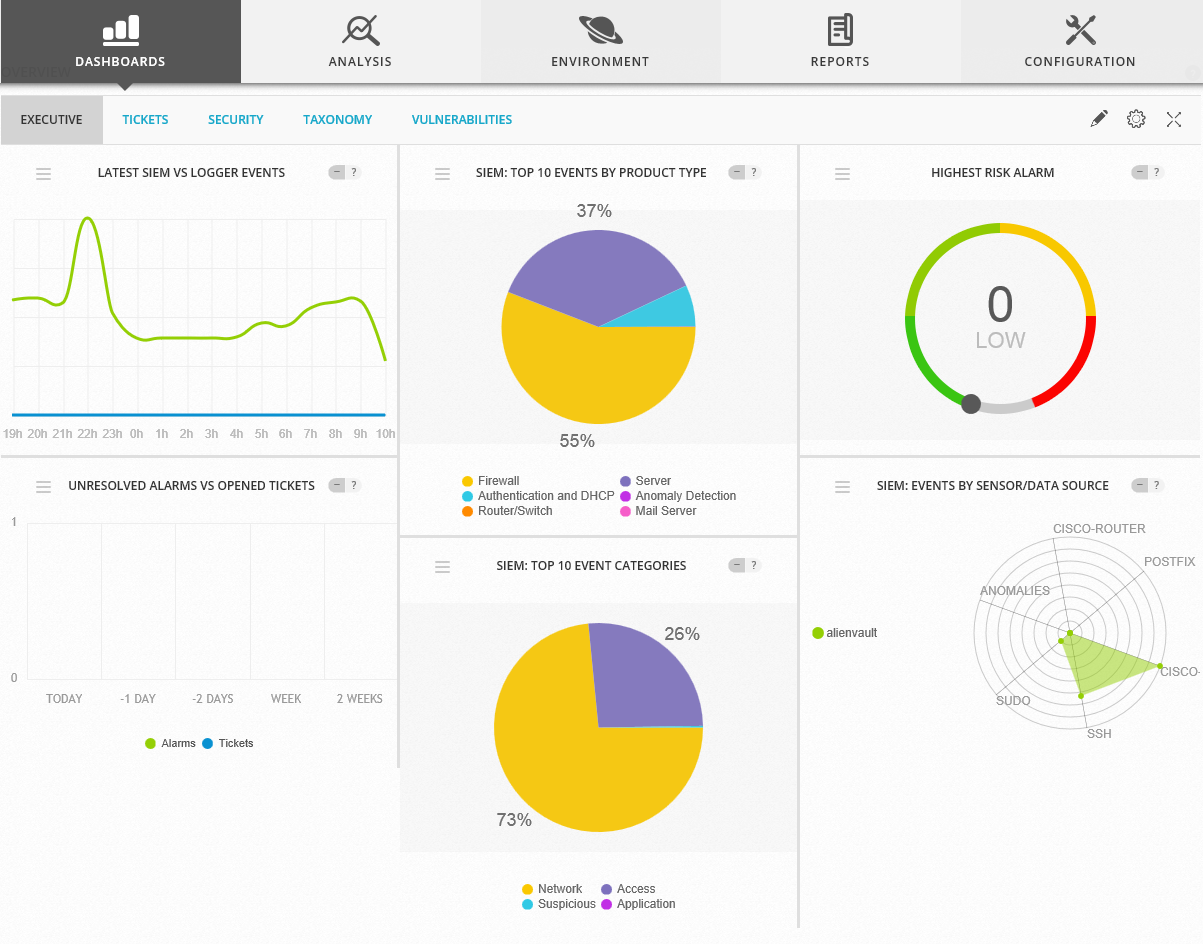
OSSIM Version
It uses a vulnerability scanner to help identify any potential attack vector so we can remedy it. It also has a trouble ticket software built in that can create tickets automatically whenever a set of configured criteria are met which include traffic analysis, breach information, new devices found, etc.
For those of you who have read this far and find yourselves without adequate protection in any/all of these areas I would encourage you to consider looking at the Alienvault line of products.
I feel security is like insurance – it’s better to have and not need than need and not have.
 Security Analyst - Jeff Soehner CISSP, GXPN,GPYC,GMOB,GCIH