For solutions to these and other problems please contact us at The-Techy.com
Certificate Management may be hard, but you don’t have much choice any longer.
March 17, 2024
Leave a comment
Ever since the 1990s when Netscape₁ first introduced “Secure Sockets”, we have turned this thing called “The Internet” into an ecommerce engine worth over 3 trillion USD today. Statistics show that its growth is expected to top 5 trillion USD by 2029₂. Efforts to secure the Internet have been going on for three decades since then so why should be alarmed now? Well, it involves two of the most popular subjects in our modern era, Artificial Intelligence and Quantum Computing.
AI has proven to be highly effective at finding defects in software₃, something that humans continue to create and Quantum Computers will speed up computational power by a factor of 10x. Think of a hacker who never sleeps, has no preconceived notions about ‘if’ something can be accomplished, and just sets itself on a target of guessing your password or even breaking your encryption keys for your secure session with your bank? Is there any doubt that it will succeed…eventually, now that it is 10x faster? Does this sound like a George Orwell book, well it should, that time has arrived!
Traditional certificates relied on factorization of prime numbers. That is just a fancy way of saying 3 times 5 equals 15 (although this is an oversimplification). When you use factors that are thousands of digits long, computers were needed to solve these equations and reversing those equations would take years or even centuries. Now enter the Quantum computer that performs these calculations at dizzying speeds, and you are no longer safe. The only answer to help treat those risks is to replace those equations more often that one or twice every few years.
The scope of the problem becomes apparent when you see how prevalent traditional certificates are in our electronic world. Major use cases are not just limited to SSL/TLS certificates to protect your ecommerce or banking sites. They are used to provide integrity verification used in encryption for proof of ownership or tampering. They are also used for Identity (like secure shell or tokens) and systems that rely on trust. With AI and quantum wildly in use today, these systems are at risk if you do not replace these on a regular basis.
Google wants to shorten the lifecycle of certificates₄, to help manage the risk associated with SSL/TLs certificate usage on the Internet. By replacing the secrets more often, it makes it harder to guess them. Let’s Encrypt has be successful since the last decade, at generating 90-day certificates. There are many client implementations₅ that support the ACME standard that helps accomplish this.
This begs the question, “How do we manage hundreds of thousands of certificates at speeds that would take an army to accomplish?”
Automation is the key! Maybe you can ask your friendly AI prompt to help you accomplish this before someone uses it to crack your password and empty your bank account? 😊
Categories: Quantum, security
cryptography, cybersecurity, quantum-computing, security, technology
WSL Christmas with Fedora
December 24, 2023
Leave a comment
Hey folks – Merry Xmas.
For those of you playing with the windows subsystem for Linux, I wanted to share a great recipe and the steps required for baking your very own Xmas Fedora Docker running on WSL. It makes a great holiday gift to share with your friends and family (because who doesn’t use containers these days!)
- Download your new base image from Koji at https://koji.fedoraproject.org/koji/packageinfo?packageID=26387

2. Carefully open the package and extract the file called layer.tar
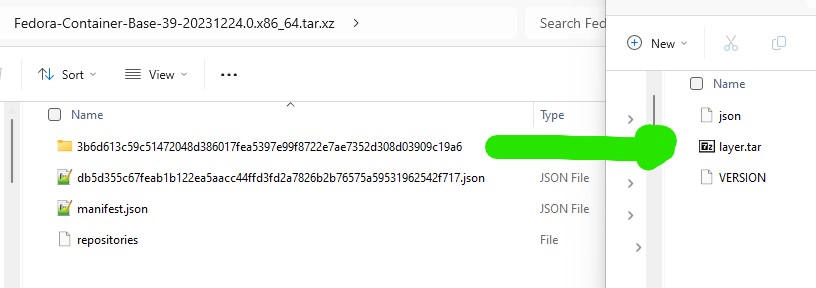
3. Mix well for a few seconds (here we have renamed the layer.tar file and used ‘fedora39’ as the image name but you may adapt this ‘to your own taste’

4. Bake in the oven for a few minutes (here we start the distro, perform an update and then install systemd)
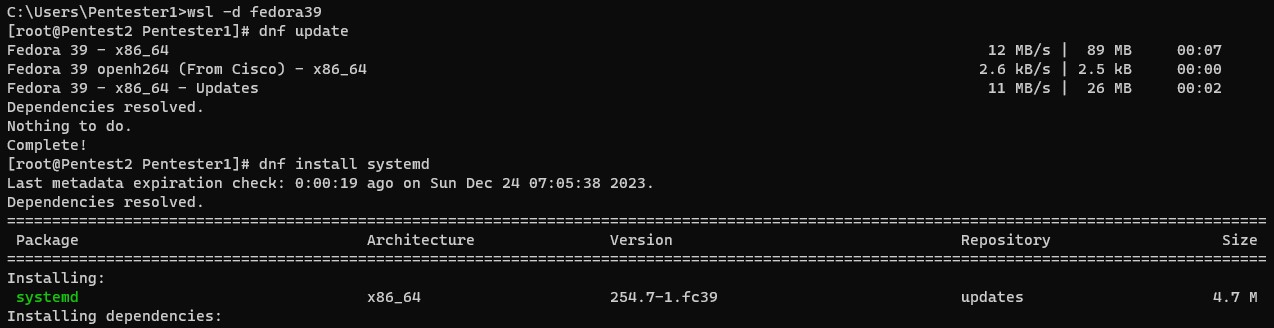
5. Decorate it with a custom file to activate systemd and let it cool down (restart)

6. Package your cake with the following items (dnf-plugins-core)

7. Add the docker community repository for docker binaries and install the following components (docker-ce, docker-ce-cli containerd.io, docker-buildx-plugin and docker-compose-plugin)
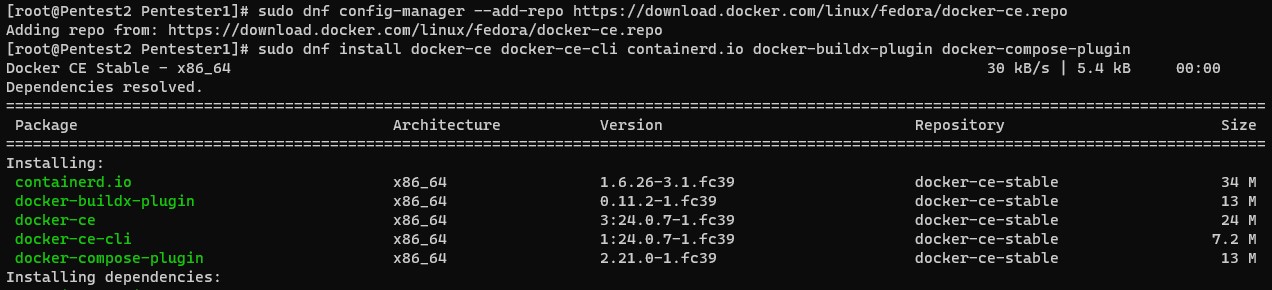
That is it – Serve to friends and family!
Happy Holidays to all my readers and thanks for a great year!
Categories: Work related
security, tools
Where *can* I put my secrets then?
September 9, 2023
Leave a comment
I have spent a large portion of my IT career, hacking others peoples software, so I thought it was time to give back to the community I work in and talk about secrets. Whether they be passwords, key material (like SSH, Asynchronous or Synchronous) or configuration elements, all elements that should be considered ‘sensitive’.
Whether you are an old timer who may still be modifying a monolithic codebase or you have modern cloud enabled shop that builds event driven microservices, the Twelve-Factor App is a great place to start. The link provided is the “12 Factor App” methodology, which outlines best practices for building modern software-as-a-service applications. When choosing to adopt this as your strategy, it can provide the basis for software development that transcends any language or shop-size, and should play a part of any Secure Software Development LifeCycle. In Section III Config, they explain the need to separate config from code but I feel this needs further clarity.
There are two schools of thought for many developers/engineers, when it comes to how to use secrets, you can load them into environment variables (as is outlined in this methodology above) or you can choose to persist them into protected files that may be loaded from any external secret manager and mounted only where they are needed. One thing is clear, you should never persist them alongside your code.
Let’s explore the most common, and arguably the easiest way to treat the risks of someone gaining unauthorized access to your secrets: Environment Variables
- Your build environment may be considered implicitly available to the process of building/deploying your code, it can be difficult, but not impossible, for an attacker to track access and how the contents may be exposed (
ps -eww <PID>). - Some applications or build platforms may grab the whole environment and print it out for debugging or error reporting. This requires will require advanced post processing as your build engine must scrub them from their infrastructure.
- Child processes will inherit any environment variables by default, which may allow for unintended access. This breaks the principle of least privilege when you call another tool/code branch to perform some action and has access to your environment.
- Crash and debug logs can/do store the environment variables in log-files. This means plain-text secrets on disk and will require bespoke post processing to scrub them.
- Putting secrets in ENV variables quickly turns into tribal knowledge. New engineers who are not aware of the sensitive nature of specific environment variables will not handle them appropriately/with care (filtering them to sub-processes, etc).
Ref: https://blog.diogomonica.com//2017/03/27/why-you-shouldnt-use-env-variables-for-secret-data/
Secrets Management done right
Docker decided to to create KeyWhiz as far back as 2016 (seems abandoned now) and many vaulting tools today, make use of injectors that can dynamically populate variables OR create tmpfs mounts with files containing your secrets. When you prefer to read secrets from a temporary file, you can manage the lifecycle more effectively. Your application can call the timestamp functions to learn if/when the contents have changed and signal the running process. This allows database connectors and service connections to gracefully transition whenever key material changes.
Security should never trump convenience but don’t let Perfect be the enemy of ‘Good’. If you have sensitive data like static strings, certificates for protection or Identity or connection strings that could be misused, you need to balance the impact to you or your organization of losing them over your convenience. Learn to setup and use vaulting technology that can provide just enough security to help mitigate any of the risks associated with credential theft. Like hard work and exercise, it might hurt now, but you will thank me later!
Additionally, here are some API key gotchas (which are as dangerous as losing cash) that you should consider whenever you or your teams are building production software.
- Do not embed API keys directly in code or in your repo source tree:
- When API keys are embedded in code they may become exposed to the public, when code is cloned. Consider environment variables or files outside of your application’s source tree.
- Constrain any API keys to any IP addresses, referrer URLs, and mobile apps that need them:
- Limiting who the consumer can be, reduces the impact of a compromised API key.
- Limit specific API keys to be usable only for certain APIs:
- By making more keys, it may seem that you are increasing the impact but if you have multiple APIs enabled in your project and your API key should only be used with some of them, you can easily detect and limit abuse of any one API key.
- Manage the Lifecycle of ALL your API keys:
- To minimize your exposure to attack, delete any API keys that you no longer need.
- Rotate your API keys periodically:
- Rotate your API keys, even when they appear to be used by authorized parties. After the replacement keys are created, your applications should be designed to use the newly-generated keys and discard the old keys.
Ref: https://support.google.com/googleapi/answer/6310037?hl=en
Categories: General
secure coding, security
Container Lifecycle Management
July 16, 2023
Leave a comment
I wanted to share a big problem that I see developing for many devs, as they begin to adopt containers. In an effort to familiarize us with some fundamentals, I want to compare the difference between virtual machines and containers.
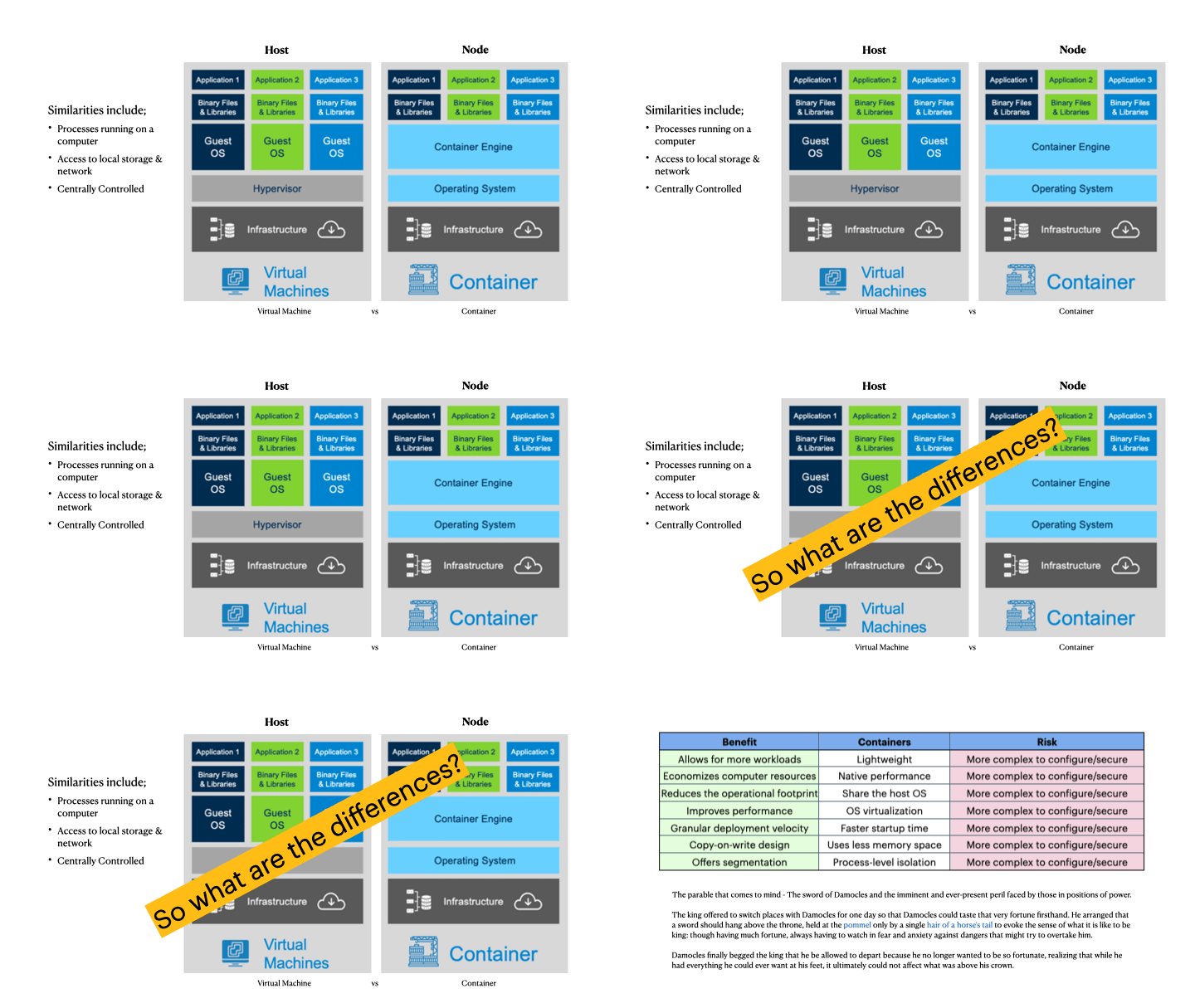
The animation (above) shows a few significant differences that can confuse many developers who are used to virtual machine lifecycles. We can outline the benefits or why you *want* to adopt containers
- On any compute instance, you can run 10x as many applications
- Faster initialization and tear down means better resource management
Now, in the days where you have separate teams, one running infrastructure and another handling application deployment, you learned to rely on one another. The application team would say, ‘works for me’ and cause friction for the infrastructure team. All of that disappears with containers…but…
By adopting containers, teams can overcome those problems by abstracting away the differences of environments, hardware and frameworks. A container that works on a devs laptop, will work anywhere!
What is not made clear to the dev team is, they are now completely responsible for the lifecycle of that container. They must lay down the filesystem and include any libraries needed for their application, that are NOT provided by the host that runs them. This creates several new challenges that they are not familiar with.
The most important part of utilizing containers, that many dev teams fail to understand, is they must update the container image, as often as the base image they choose to use becomes vulnerable. (Containers are made up of layers and the first one is the most important!) Your choice of base image filesystem, will come with some core components that are usually updated, whenever the OS vendor issues patches (which can be daily or even hourly!). When you choose to use a base image, you should consider it like a snapshot, those components develop vulnerabilities that are never fixed in your container image.
One approach that some devs use is live patching the base image (like apt-get or dnf or yum update). Seasoned image developers soon realize that this strategy is just a band-aid when they add another layer (in additional to the first one) and replace some of the components at the cost of increasing the size. Live patching can also add cached components that may/may not fully remove/replace the bad files. Even if you are effective at removing the cached components, you may forget others as you install and compile your application.
The second approach involves layer optimization. Dev teams are failing to reduce the size of the container images which uses more bandwidth, pulling and caching those image layers, which in turn, uses more storage on the nodes that cache them. Memory use is still efficient thanks in part to overlay filesystem optimization but the other resources are clearly wasted.
Dev teams also fail to see the build environment as an opportunity to use more than one. Multipart building strategy involves the use of several sacrificial images to do compilation and transpilation. Choosing to assemble your binaries and copying them to a new clean image helps remove additional vulnerabilities when those intermediate packages are not needed in the final running container image. It also reduces the attack surface and can extend the containers lifecycle.
It takes a very mature team to realize that any application is only as secure as the base image you choose. The really advanced ones ALSO know that keeping your base updated is just as important as keeping ALL your code secure, when dealing with containers.
Categories: General
containers, security
Run Fedora WSL
June 11, 2023
Leave a comment
Hi fellow WSL folks. I wanted to provide some updates for those of you who still want to run Fedora on your Windows Subsystem install. My aim here is to enable kind/minikube/k3d so you can run kubernetes and to do that, you need to enable systemd.
How do you run your own WSL image you ask? Well if you are a RedHat lover like I am, you can use the current Fedora Cloud image in just a few steps. All you need is the base filesystem to get started. I will demonstrate how I setup my WSL2 image (this presupposes that you have configured your Windows Subsystem already).
First, lets start by downloading your container image. Depending what tools you have, you need to obtain the root filesystem. You may now need to uncompress the files. Either you downloaded a raw fil that was compressed using xz, tar.gz or some other compression tooling. What we want to do is get at the filesystem. Look for the rootfs file. The key is to extract the layer.tar file that consists of the filesystem. I used the Fedora Container Base image from here (https://koji.fedoraproject.org/koji/packageinfo?packageID=26387). Once downloaded, you can extract the tar file and then you can extract the layer (random folder name) to get at the layer.tar file.
Then you can import your Fedora Linux for WSL using this command line example
wsl –import Fedora c:\Tools\WSL\fedora Downloads\layer.tar
wsl.exe (usually in your path)
–import (parameter to import your tarfile)
‘Fedora’ (the name I give it in ‘wsl -l -v’)
‘C:\Tools\WSL’ (the path where I will keep the filesystem)
‘Downloads\…’ (the path where I have my tar file)
If you were successful, you should be able to start your wsl linux using the following command
wsl -d Fedora
(Here I am root and attempt to update the OS using dnf.
dnf update
Fedora 38 – x86_64 2.4 MB/s | 83 MB 00:34
Fedora 38 openh264 (From Cisco) – x86_64 2.7 kB/s | 2.5 kB 00:00
Fedora Modular 38 – x86_64 2.9 MB/s | 2.8 MB 00:00
Fedora 38 – x86_64 – Updates 6.8 MB/s | 24 MB 00:03
Fedora Modular 38 – x86_64 – Updates 1.0 MB/s | 2.1 MB 00:02
Dependencies resolved.
Nothing to do.
Complete!
You must install systemd now to add all of the components
dnf install systemd
The last part included activating systemd in WSL. Add a file called /etc/wsl.conf and add the following
[boot]
systemd=true
That is all of the preparation, now you can restart the OS and you should check to verify if your systemd is working.
systemctl
Categories: General
Zero-Day Exploitation of Atlassian Confluence | Volexity
June 3, 2022
Leave a comment
There is another 0-day for Atlassian, they are having a tough time with RCEs
https://www.volexity.com/blog/2022/06/02/zero-day-exploitation-of-atlassian-confluence/
 Security Analyst - Jeff Soehner CISSP, GXPN,GPYC,GMOB,GCIH