Archive
Hack-in-the-Box alpha testing has begun
 Recently we completed construction of the first of our devices that are being designed to help analyse network devices for vulnerabilities. Picture a small computer about the size of a smart phone that will sit quietly on your network and learn about all of the computer devices that are connected.
During its initial phase this device will analyse all of your traffic and identify what some of us don’t even know we have on our wired and wireless networks.
Phase two involves logging into a website to review the devices we have found and identified for you. Once categorized into OS type, function and IP address you can prioritize how to launch any passive scanning. We will monitor activity patterns and check for connections to known malicious sites or dangerous behaviour like scanning, etc.
Phase three involves active scanning which can include vulnerability assessment, break and fix testing and hardware/software analysis. We will assess your security posture as we verify passwords, configuration settings and information leakage. There are also a number of vulnerabilities associated with device firmware on items such as your routers. If you have a very strong control regimen when it comes to all your network devices (this includes routers, printers, wireless devices, smart phones, cameras, IP phones, VOIP providers, etc. then we probably won’t find anything…today. Lets run the test next week, next month when you add the new Cell phone or by the new computer or laptop.
If you are like most of us, keeping up with security is a full time job and most of us already have full time jobs. This is why it is about time that we had a computer that can do it for us.
 Something to keep tabs on all of our ‘Internet of Things’ and keep us safe from the hackers on the Internet or next door to us in the coffee shop or the free Hotel/Restaurant WiFi. It’s about time we can be sure of just who gets to see our information by probing our electronics…are you?
In a flash – you could be vulnerable
0day – this stands for Zero Day in the parlance of the pentester and the blackhat alike. For the rest of us this simply means that someone could break into your computer using a vulnerability that the vendor doesn’t even know about yet.
Well that has changed since yesterday and Adobes Flash player now has a patch against what is now called CVE-2015-3113. It affects all systems Windows, Linux and Mac OS and it even affects those old Windows XP machines if you were smart enough to be running Firefox on too.
Check if you are vulnerable here (https://www.adobe.com/software/flash/about/) and verify that you are running version 18.0.0.194. For Windows 8.1 x64 users like me that means applying KB3074219 from MS if you are running IE (you will need to restart too).
Run don’t walk to your patching system – read more about it here (https://helpx.adobe.com/security/products/flash-player/apsb15-14.html)
Securing the Small Office – Logging and Patch Management on a budget
In this post I wanted to help bring some understanding to many small business owner regarding the need to get control of your Internet connections. With all of the new devices that will surely be enabled in your environment (with and without your knowledge) the need to inventory the usage is now more important than ever.
For those of you who feel that all of this stuff can cost too much money I am happy to show you how you can do it with some free (as in beer) software. When properly setup you can have a great patch management system along with a central logging and reporting server that can help get a handle on usage in your organization.
Logging
Lets start with a Splunk – this is a real-time operational search database capable of handling secured connections from some/all of your devices both wired and wireless. Almost anything that connects to a network and has remote logging capabilities can be configured to send logs to your new splunk server. The server software can be installed on Windows, Linux, Mac OS, AIX, Solaris and FreeBSD. You can reuse any existing computer you currently have along with an existing license or install a free Linux/BSD software to repurpose some existing hardware.
Your splunk server will consist of a few remote connections for your devices to send data to (TCP port 9997 is the default) and a web server that is currently being run in python. The whole system runs with a very small footprint and the free version of Splunk Lite only allows you to index up to 500MB of data per index/ per day so there is no need for a very powerful system. You will be querying this system for reporting and live data feeds so please no 386 computers 🙂
I hope you don’t need to be told about the benefits of error log analysis or the necessity to do so if you want to be compliant but lets just point out that by configuring all your electronics to use some type of syslog facility you can better manage these devices by querying one device on a proactive basis instead of trying to be reactive.
Patch Management
Now we all have some type of windows update program on our machines and trying to connect to each of them to monitor patch success is a nightmare and for most of the sysadmins out there that thought WSUS was the best thing since slice bread until they began to run out of disk space these options just don’t stack up. They can be time and resource intensive and what about third party patches? This is where Desktop Central can come in handy. ManageEngine creates a very nice suite of paid programs and they offer this one for free if you have less that 25 machines to manage. I have a handful of clients that are using this deployment and I can do Windows patch management, all third party patches and I can execute scripts using powershell or windows shell remotely. We run windows disk maintenance like chkdsk and disk cleanup, remove temp files from user and system temp directories. All of this from a single windows server running a postgresql database and some software called Desktop Central.
Now most small business with a few extra hardware resources won’t have to have full-time IT budgets to get enterprise IT management. When coupled with a medium range firewall solution you can mitigate most malware risks and monitor your network all from two web consoles. Knowing is half the battle…
More info about either of these products is available below or feel free to reach out to us here;
http://www.splunk.com/en_us/download.html
https://www.manageengine.com/products/desktop-central/windows-patch-management.html
Why VMware Essentials is ‘essential’ for your business
VMware has been one of the most popular virtualized platforms for enterprise but I wanted to show why most small and medium sized businesses should invest in VMware Essentials.
When VMware removed the Memory cap on ESXi 5.5 they were probably gambling on clients choosing a VMware Essentials license because they included the VMware vCenter license. You get a 6 CPU license which can be used on up to three separate hosts but you can also run a vCenter server (something you don’t get with the free version). This administrative component is really much more valuable to any shop with two or more VM hosts than running the free version as a standalone. When you run a separate vCenter windows server you can run some of the additional features that are available to be installed on the windows version of vCenter.
Patches
With as little as 8G of RAM (although this is less than half of the recommended level) we were able to run the VCenter server core components along with the VMware Update Manager on our test box (a Dell workstation with mirrored hard drives). We setup this server (running a fully patched version of Windows Server 2008 R2) with the bare minimum to see if we could dedicate a system for the task of running it as a vCenter server. If you are interested in keeping your systems patched (and in todays security focused world with vm break outs like venom you should be) then you know its a chore. Running VMwares’ Update Manager helps manage host patches, vmtools and hardware updates automatically so you don’t have to. You can even use it to upgrade major versions when you have older machines.
(Our test box is used expressly as the management interface using VSphere Client. This is necessary in order to configure the VMWare Update Manager although we could use the Web Client – it does appear to be sluggish with the under utilized deployment).
One caveat that upgrading your vmtools introduces is that you will need to use a vCenter management appliance or windows server in order to make changes to your virtual machines. By upgrading your vms to use VMware tools version 10 or higher you can no longer make changes to your existing vms with the vsphere client. You will however need to connect to the vCenter console using the vsphere client in order to use the Update manager plugin. Changes to existing vms must be performed using the new web client once vms are using the newer vmtools.
With the exception of using a standalone server for your Windows VCenter instance or using some resources on an existing VM host you can easily run VCenter as an Linux appliance if you do not want to configure Windows and use a license. Either way the metrics available coupled with a robust management interface makes VMware a clear winner again.
Interesting facts regarding passwords and what you should know about them
I was recently auditing some client systems and decided to try and brute force some passwords on Windows based systems to determine if people are choosing more complex passphrases. I set about using a GPU based system with two graphics cards and used a well known program called Hashcat to try and brute force the hashes.
Now I have mentioned in the past that using a wordlist to ‘guess’ user passwords or WPA passcodes can be done by anyone with enough horse power and a good list of pass phrases. When using GPU based cracking these wordlists go very quickly but unfortunately if you haven’t got the passphrase in your list it will fail.
Another alternative is to use all possible characters to try and brute force them. Although this process is sure to work because any combination of letters (upper and lower case), numbers and all of the special characters can push the permutations so high that it can take days or even weeks and months to brute force.
I decided that a subset of the brute force rule would yield some interesting results. What was the likelihood that people were picking pass phrases with only letters and numbers? I speculated that a cross section of my clients might represent an average sample to test with and the assumption that these results would represent an average of the population – my findings were a little staggering.
I found that with my Dual GPU based system, that I could crack NTLM hashes at a benchmark of approx. 18,000 Mh/s. This represent an extremely quick pattern matching ability which I used to create NTLM hashes that I could use for comparison.
From the Openwall site (current maintainer of the free John the Ripper software based cracking program);
Secure message length
Modern computer perform at 10 millions of NTLM hash/sec aprox. Some calculations:
There are 95 characters printable(this are almost all used in passwords).
With length = 7: 957/107 = 81 days
Lower case letter and numbers are 36.
With length = 8: 368/107 = 3.3 days
Lower case letter are 26.
With length = 9: 269/107 = 6.3 days
This simple calculations means that a NTLM secure password need to be at least 10 character length.
Since my little cracking system operates at almost twice that speed I set out to see if using the NVidia version of hashcat (cudaHashcat) could help determine how many users actually used less than 10 characters for a password (before my 75th birthday) AND if any of them used just numbers and letters (and not any special characters like !@#$%^&*()_-=+'”\|[]{}).
My system was able to find 9 passwords that were 7 characters in length in about 7 seconds. 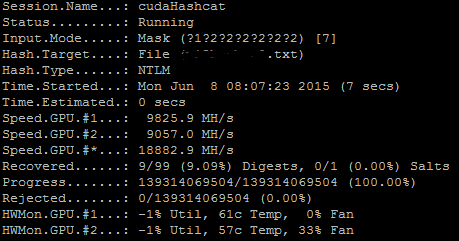
Another 6 were found that were 8 characters in just over 5 minutes. 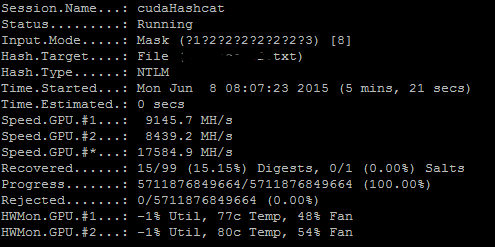
This represented approx. 15% so far and at 1 out of 8 passwords cracked already I was very surprised. We decided to let this experiment continue to 9 characters.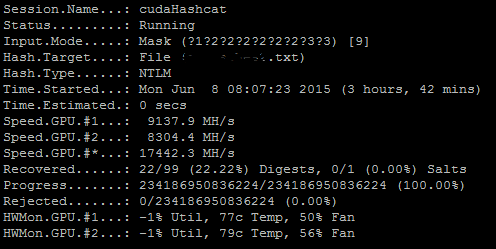 After approx. 3 1/2 hours we had found another 7 user accounts that were using just upper and lower case letters along with numbers as their password. We wanted to see just how many users actually were using the recommended 10 characters as a minimum password length for a Windows pass phrase so our test would require several days. After a couple more hours we have already cracked over 25% of the passwords used by a cross section of users. At our current speed we can have results for any combination of upper/lower case letter and numbers in about 6 days.
The surprising thing to this author is that some users who are not required to use complex password schemes just won’t. If you are wondering why this can represent such an outstanding risk to your organization I invite you to read more about the methods that are used to gain access to your accounts or to your networks in the following articles. They can represent a very real risk that can happen to you once even one account is compromised.
Imagine one of your colleagues sends you a link or an attachment in an email and you recognize them immediately. Maybe they even reply to an existing email with an attachment or some code embedded into the reply email. You don’t even have to open it, by previewing it at the office in your own environment you can become infected very easily.
Bad passwords can affect everyone – please choose wisely. You can check out choices for your new password from this site (https://www.grc.com/haystack.htm)
Security Controls – Know ’em, Use ’em
I wanted to create a post to share with our readers the SANs top 20 controls. These are a set of ‘good practices’ that are aligned with the National Institute of Standards and Technology (NIST) and should be adopted by any business in order to manage their computers and networks more effectively. I feel they are outlined in order of importance and I would like to begin with the most important (Number 1). A full list of the top 20 controls are available at http://www.sans.org/critical-security-controls/ I will try to detail several of them over the next few blog posts.
- Inventory of Authorized and Unauthorized Devices
The need to have a complete and up to date inventory of what is on your network is crucial to knowing how to stop the bad guys from getting in. You can’t fix it if you don’t know its broken and the same holds true with networking. Just because you cannot see it doesn’t mean it can’t connect to your computers, servers, wireless. Anything that can connect to your wired network must be inventoried and if you use a wireless network you should REALLY inventory any system that is connected to it.
Use an automated asset discovery system to audit all of your devices or do it manually but you must do it. Audit your Dynamic IP configuration tools and consider network level authentication in the case of wireless. You can also consider using Private Key Infrastructure (PKI) to manage the authentication of devices if they support it in order to effectively manage access.
- Inventory of Authorized and Unauthorized Software
Equally as important as knowing about all the devices connected to your network is knowing about all the software running on those devices. Attackers are scanning any device that is connected to your Internet connection starting with your router and any services that you expose to the public facing Internet. Port forwarding remote administration tools, web servers, even ports that you are not aware of so know all of the connection methods that your equipment uses and if you have wireless networks you need to inventory all software. A wireless network that is not separated from your wired (primary) network exposes ALL of your devices and the software running on those devices.
Use software that controls what applications are allowed to run (whitelisting). Use host based firewalls and remove unnecessary software and services that you do not know or need. Only deploy software tools from a known source and verify file integrity using hashes wherever possible.
- Secure Configurations for Hardware and Software on Mobile Devices, Laptops, Workstations, and Servers
In their default configurations, most equipment manufacturers do not focus on safe and secured deployments. Why would they – they want the device to work in ANY situation. They leave the implementation of security to you, the purchaser. If you do not learn to modify configurations for your environment you are exposing yourself to attack not only from outside agents but from within as well (this is especially true with Wireless). Scripts that can be run (intentionally or otherwise) when a user visits a webpage will often include default credentials in order to catch the low hanging fruit. Adding your own configuration parameters can help mitigate those risks.
Utilize a standard build for new computer systems and store them offline if possible. Establish a secure mechanism to deploy any new system over the network and ensure that new configurations adhere to policies that you create and maintain. Implement a file integrity check on all key configuration files and maintain a change management system to log any/all modifications.
- Continuous Vulnerability Assessment and Remediation
As new features, devices are added and software, firmware change the need to monitor and manage vulnerabilities can grow exponentially. Failing to scan for and fix critical vulnerabilities can introduce risk to your organization during the time it takes to find and the patch your software and firmware flaws. Implement or contract for vulnerability assessment on a regular basis to ensure that nothing is missed. All it takes is one avenue for an attacker to penetrate your systems – you have to make sure that all of them are closed. Implement central logging in order to monitor system wide activity and reduce the chance that an attacker can remove his tracks.
Setup a patch testing lab if uptime is important – it will allow you to rate your risk level whenever delay is necessary in deploying patches. Implement an automated patching mechanism and monitor activity to review any errors.
- Malware Defenses
Malware is any software, script or piece of code that is intended to damage, disable or circumvent normal use of a computer. It can be harmful, benign or helpful although the latter is rarely the case. Your need to prevent it from happening is now more important that ever before. The ability for AniVirus/Antimalware software to prevent this from ever happening to you is gone. Attackers can and do use obfuscation techniques to thwart your scanning software so don’t rely on it. On the contrary, make sure that you use one and keep it up to date. It can be useful to catch 50-80% of the infection attempts.
Control/Limit the use of external devices and consider implementing network based Intrusion Detection systems on or in conjunction with your firewall. Log all domain name queries to help identify known command and control contact to malicious domains. Create and implement an incident response process that can be helpful in adding any out of band malware that is not currently being detected by scanning signatures.
These five top 20 controls will have the most effect in preventing breach and helping you mitigate risk on your network. I suggest that my clients subscribe to our management service in order to help monitor and manage their Windows/Apple/Android devices and when we are contracted to manage the entire LAN we will monitor and manage the remaining devices. This allows us to have logs from all of the computer devices and can help us find the primary errors in any organization.
For a more detailed event monitoring approach we suggest that they utilize a device that can be used to hold all event logs from any network system (syslog server). It also allows us to use file integrity monitoring on devices that have a key role in the organization. There are agents for most hardware that can be installed to manage the files, bandwidth, etc.
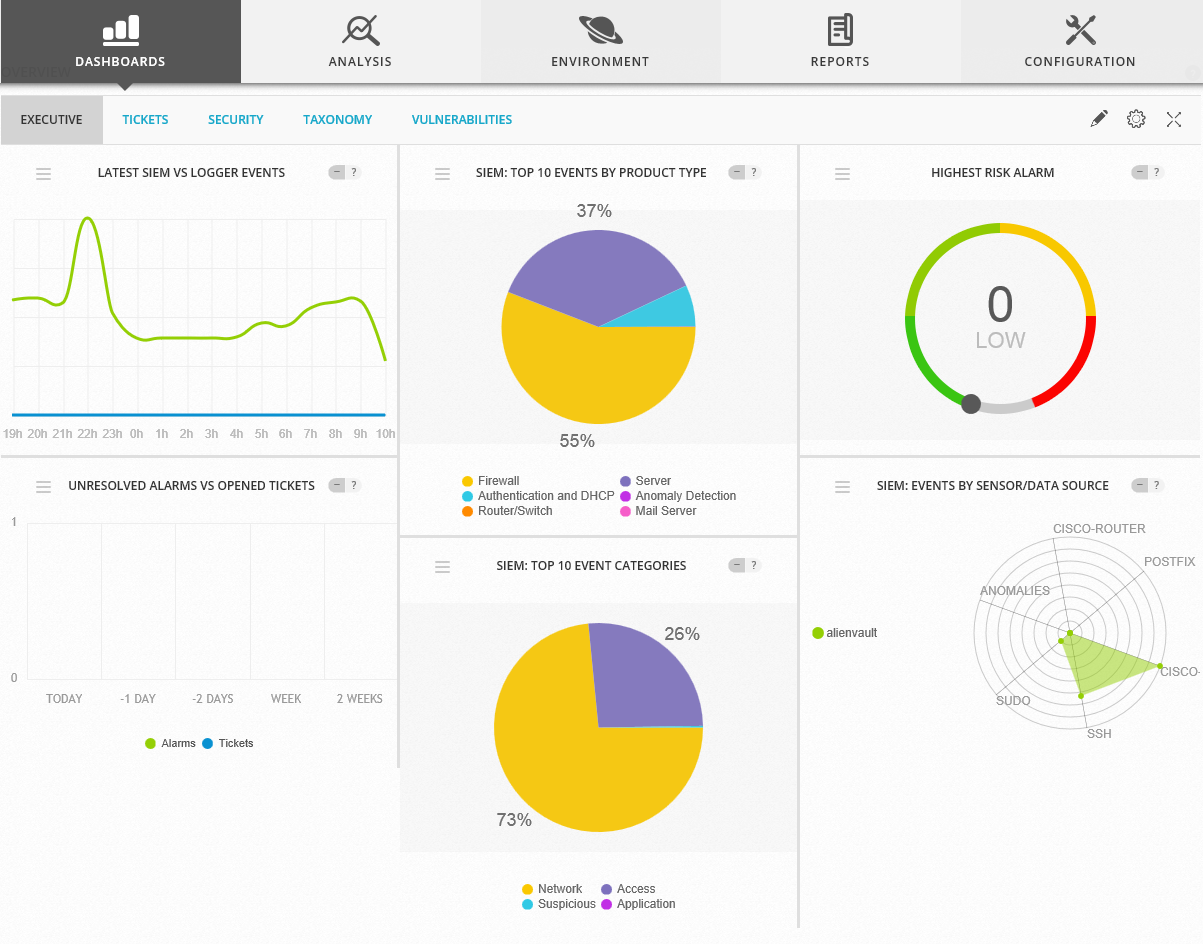
OSSIM Version
It uses a vulnerability scanner to help identify any potential attack vector so we can remedy it. It also has a trouble ticket software built in that can create tickets automatically whenever a set of configured criteria are met which include traffic analysis, breach information, new devices found, etc.
For those of you who have read this far and find yourselves without adequate protection in any/all of these areas I would encourage you to consider looking at the Alienvault line of products.
I feel security is like insurance – it’s better to have and not need than need and not have.
Anatomy of a basic attack…
I was hoping to find a way that the average reader would understand about the process that ensues when a target is identified and eventually pwned. ‘Pwned’ is a term whose etymology is attributed to a typo because the keys ‘o’ and ‘p’ are so close to each other on a qwerty style keyboard. Its history dating back to the early 21rst century when first person shooters were popular video games. It is meant to indicate the ability to conquer and gain ownership.
Today ownership isn’t just in the video game area – it is being waged in the computer world to control information, bandwidth and overall control of a computer and it’s network. If you loose control of your electronic devices you may or may not ever know it. Individuals, competitors or even nation states have been doing this for many years and everyone is a potential victim.
If you buy electronics and want to be hooked up to the internet you may want to read about the methods that can be used to gain access to your computers. Whether it is for fun, to prove a point or as a launching point to another site anyone can suffer from an orchestrated attack.
I recently reviewed a website who managed to sum up the essence of an attack. You can read more about the process from his link (here) but please pay heed – this could happen to you if you don’t take steps to prevent it from happening. Contact us for a consultation and to learn more.
Do you know your rights when it comes to your security?
We recently began a debate here in Canada over our rights when a fellow countryman returned back over the border and found that he was arrested as a result of denying a request to give up his mobile passphrase.
We hear a lot of grumblings from our neighbours to the south and most of us assume that we have similar rights while this is not the case. The Electronic Frontier Foundation is basically a collection of lawyers in the US who have fought tirelessly to maintain certain rights and freedoms and their work is needed now more than ever before.
Recently the US law makers came under pressure to renew portions of the Patriot Act after the Supreme court overturned the Nation Security Agency’s ability to unilaterally tap every call in and out of the country. Under the guise that if it doesn’t get renewed this could result in ‘failing to keep the American people safe and secure’. I mean we are talking about stopping the government from keeping a complete record of every call in and out of the country – is that really such a bad thing? The phone companies have had this for years – just get a court order and ask them.
Back in Canada we have the Canadian Security Intelligence Service (CSIS) along with the Canadian Border Service Agency (CBSA) and the Supreme court of Canada all rewriting section 8 of our Charter of Rights and Freedoms. In what is clearly a divided decision by everyone, the court has ruled in favour of law enforcement ability to obtain access to your electronic devices without a warrant.
For more information regarding your Canadian rights or any other portion of this story see our links below.
http://www.huffingtonpost.ca/2014/12/11/cellphone-searches-canada-police_n_6308208.html
mSpy debacle keeps on giving…
In keeping with the NSA theme this year, Brian Krebs broke a story about a company that sells tracking software but, get this, they were hacked and now all of your tracking info is available for anyone to see! The software was designed to capture and upload key data points from home computers and mobile devices and the data is now available for some creative people to pilfer.
I think the worst part is that now the company has being outed, they started to claim that there was no breach and now they try to minimize the scale of the event. This event and others like it, should serve as a reminder to any individuals or businesses that ‘O, what a tangled web we weave when first we practise to deceive’.
SQLi – still number 2 on the hackers list…
I came across reference to a cartoon that I thought was some of the funniest I have seen regarding technology these days and I thought I would share it for everyone here in case you haven’t seen it. Has hacking become so mainstream these days that we are making jokes about it – seems so…enjoy!
 Security Analyst - Jeff Soehner CISSP, GXPN,GPYC,GMOB,GCIH