Archive
Security IN/OF the Solution
Security IN the Solution is about the security of the control plane whereas Security OF the solution is about the data plane.
Lets take a Plaza or Strip Mall as an example. The owner of the property has thick brick walls around the perimeter of the building to provide a strong structure to hold all of the shared services. They tend to divide the property into several smaller units using softer materials like wood and gypsum board so that each tenant has some isolation. They need to provide physical access to each sub-unit that can then be controlled by each tenant and rent the space. The lower the rent, the less isolated each unit is from each other as the costs of providing security for all four walls is reduced.
In this example, you can think of the thick brick exterior as the owners attempt of Security IN the solution. They do not want any part of the sub-units to be breached and they don’t want any of the supporting infrastructure (like water, electrical power or sewage) to be compromized by outsiders so they protect them with a thick perimeter wall. They invest in fire safety and perhaps burglary equipment to protect the investment from the inside and the outside. They invest in features and services that provide security “IN” the building that they own.
Now the Landlord must provide some items for the tenants to feel safe and comfortable or they must allow tenants to modify the units for their own purposes. If you rent a commercial building, you may need to get your own electrical connected (especially if you have custom requirements) or pay for your own water and/or sewage or garbage disposal. All of these features and services are negotiable in the rental agreement and you are encouraged to read the contract carefully because not all rentals come with everything. You may need to provide some/many of the creature comforts you need to run your business. Internet, Cable, perhaps even your own burglar alarm system are all part of Security OF the solution. Your landlord must either provide some of it for you or allow you to purchase and modify the premise so it can be suitable for your use. If not, then you should consider taking your business elsewhere.
After 60 years on this planet and over 30 of them, immersed in the Information Systems industry, I have learned to apply this paradigm to anything from the design of software to the implementation of a solution. I have found that by separating these two objectives, anyone can discuss the roles and responsibilities of any solution and quickly identify ‘How much security you can afford’.
When dealing with third parties who represent warranty for functionality, ask them ‘what do they do to protect themselves?’ For anyone in the IT business, this is referred to as Third party Risk Management. You want to do business with third parties who are reputable and will continue to remain in business. They must be profitable and that means they must have good practices that allow them to operate safely and securely. This helps you choose a service provider that can demonstrate Security IN their Solutions.
Once you have determined who you would like to do business with, you should ask the question, ‘what are they doing to protect you?’ Don’t let their answers fool you, any company that boasts about what they do to protect themselves and then tells you that they use those capabilities to protect you too is mixing the two distinct worlds. What you want them to tell you is what do they do for you and how do they make it safe for you.
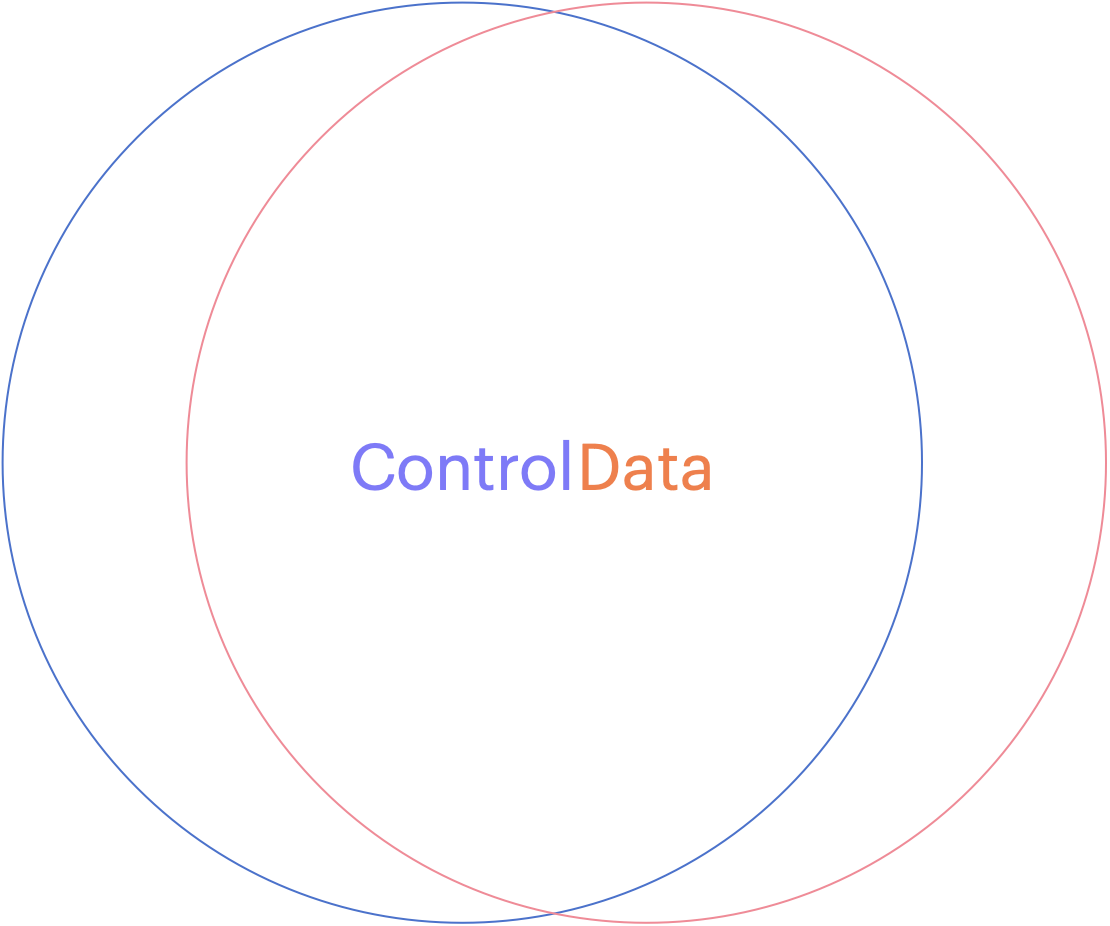
Can you see how the two overlap? This might be fine when you develop a relationship with your service provider (like an accountant, a lawyer or your doctor) but if you want to choose a cloud vendor that will house all of your sensitive data, with the purpose of letting them use it to apply Artificial Intelligence on it, you might want to stop and ask yourself, ‘How will they keep my data separate from their staff or any other customers?’ What about rogue employees who might abuse their privileges or what about unauthorized hackers who figure out how to circumvent their controls?
If you are in an industry that is regulated, and there are fines associated with any type of breach of your clients data, you might stand to lose much more than you save by giving your data to a vendor who cannot provide you with the level of data protection you need. This is why you want to consider how a cloud software as a service vendor can provide you with your own level of customization. You want them to show you how they designed their system to provide a distinct separation of all control duties and can provide you with the abilities to trust no one with your data!
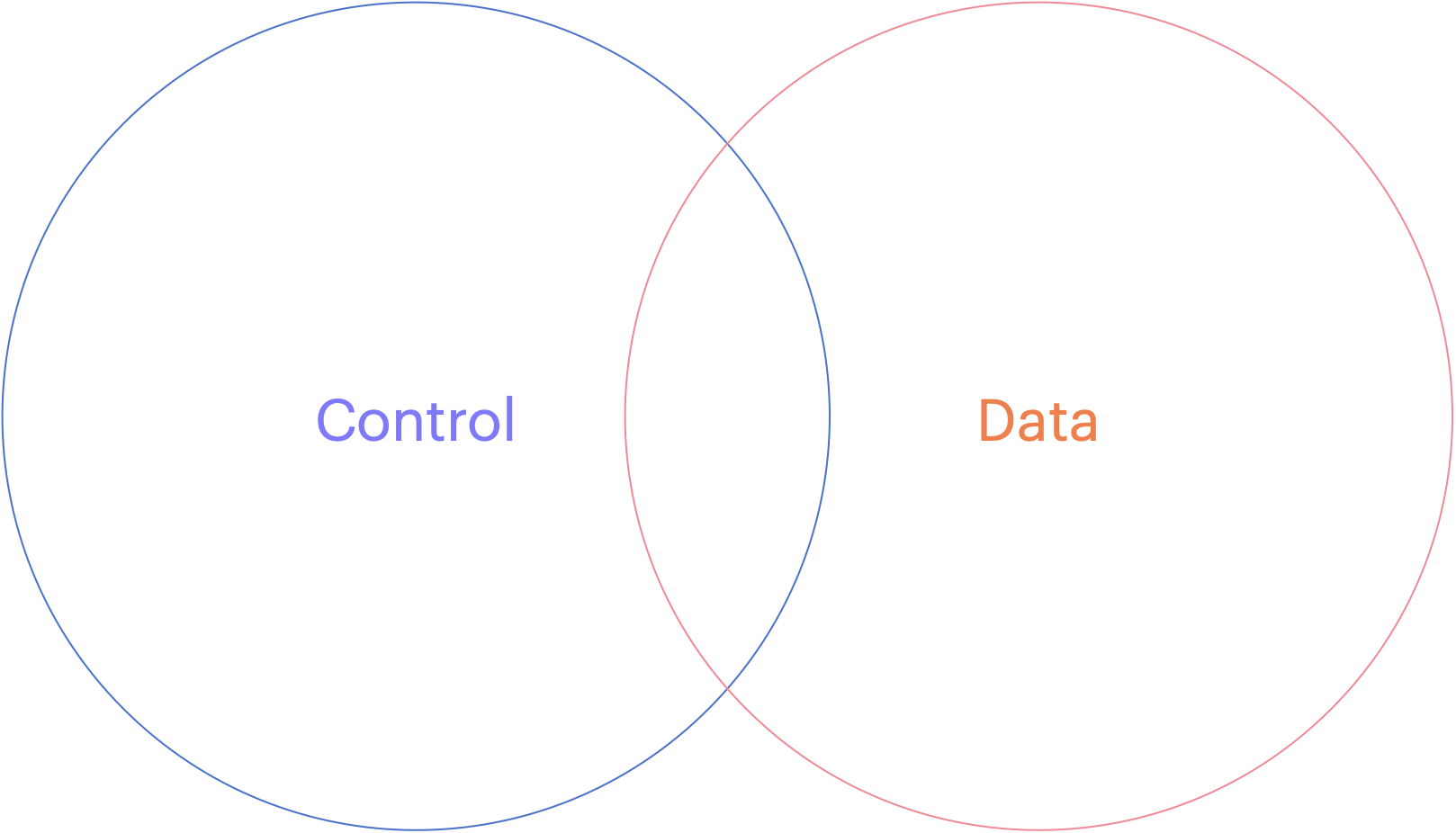
When choosing to store data in a cloud service provider or any software as a service vendor, you should consider how they can separate your data away from their shared control plane. If your vendor does not run a Single tenant model (where their control plane is dedicated just for you), and you are forced to choose their multi-tenanted solution, consider how they can keep your data separated.
Many vendors will tell you that they will manage the encryption keys for you and keep them separate from other tenants but would you consider a landlord who required you to give them your sub-unit rentals keys? How do you know that some staff or some robber didn’t open the valet cupboard and just take your keys for a spin? The truth is, if you chose to share sensitive data with this vendor, you don’t!
Now please don’t misunderstand me, SaaS can be a terrific solution for any small or medium sized business that doesn’t have the skills or expertise to manage the complex infrastructure necessary to do something like machine learning. You may not even want the capital expense associated with running your own computer network in order to achieve this but tread lightly and consider the benefits of external key management.
You may not have the ability or the budget to run huge amounts of specialized hardware but you owe it to yourself to manage your own keys. If you don’t rekey your front door, how do you know your inventory will be safe? Remember, the vendor is responsible for Security IN the solution but you are responsible for Security OF the solution you choose.
Crowdstrike then Azure and now DigiCert, oh my!
In what is becoming a series of ‘big fails for big tech’, now DigiCert has rushed to fix a problem that can only be described as a failure of their quality controls.
“The company’s modernization efforts inadvertently removed a crucial step in its validation process, which went undetected due to limitations in its regression testing.”
https://cybersecuritynews.com/digicert-to-revoke-thousands-of-certificates/
Death of a TLS salesman
While the world still sleeps quietly behind their firewalls, a technology giant (Chrome), responsible for over 70% (combined) market share, has dropped the hammer on Entrust, a major player in the Certificate Authority business. If you use these TLS certificates to protect any of your public facing websites, you better start looking for a new CA.
Google has been aggressively trying to improve the security for Internet browsing, first by moving away from OS trust stores (something that Mozilla has always done) in favor of its own. This gave them the ability to distrust root certificates from Certificate Authorities who flagrantly break the rules of operation.
Recently, they added a feature where distrust could selectively be done after a certificate timestamp (SCT) and that change has emboldened them to distrust a lot more CAs without significant impact to the consumers who trusted them in the first place.
Bravo Google, for making the Internet a better place!
https://security.googleblog.com/2024/06/sustaining-digital-certificate-security.html?m=1
Before there was a Security Dept.
In response to my wifes’ pleas to ‘clean up my room’, I stumbled upon some memorabilia from the early days of my security career.
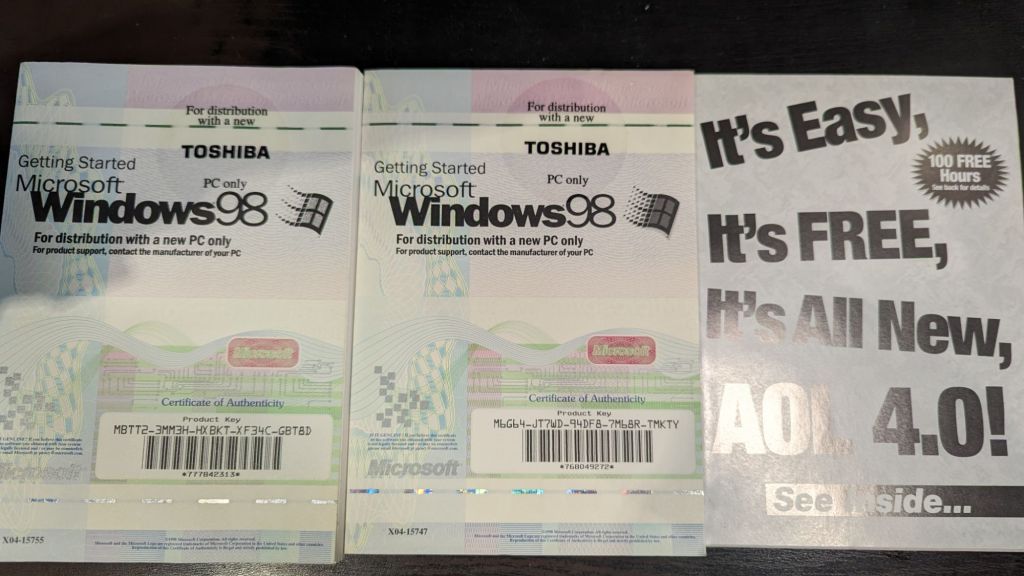
Those ‘dialup days’ made IT Security pretty simple and what were CVEs (common vulnerabilities and exposures).
Anyone want my licenses?
Why your business should never accept a wildcard certificate.
When starting your web service journey, most developers will only see the benefits of using a certificate with *only* the domain name referenced (a.k.a wildcard certificate) and will disregard the risks. On the surface, creating a certificate with an infinite number of first level subdomain (host) records seems like a successful pattern to follow. It is quick and easy to create a single certificate like *.mybank.com and then use it at the load balancer or in your backend to frontend (BFF) right? That certificate is for the benefits of clients, to convince them that the public key contained in the certificate is indeed the public key of the genuine SSL server. With a Wildcard certificate, the left-most label of the domain name is replaced with an asterisk. This is the literal “wildcard” character, and it tells web clients (browsers) that the certificate is valid for every possible name at that label.
What could possibly go wrong… 🙂
Let’s start at the beginning, with a standard: RFC-2818 – HTTP over TLS.
#1 – RFC-2818, Section 3.1 (Server Identity) clearly states that, “If the hostname is available, the client MUST check it against the server’s identity as presented in the server’s Certificate message, in order to prevent man-in-the-middle attacks.
How does a client check *which* server it is connecting to if it does not receive one? Maybe it is one of the authorized endpoints behind your load balancer, but maybe it is not? You would need another method of assurance to validate that connecting and sending your data to this endpoint is safe because connecting over one way TLS, into “any endpoint” claiming to be part of the group of endpoints that *you think* you are connecting to is trivial if your attacker has control of your DNS or any network devices in between you and your connection points.
#2 – The acceleration of Phishing began when wildcard certificates became free.
In 2018, in what was soon to become the world’s largest Certificate Authority (https://www.linuxfoundation.org/resources/case-studies/lets-encrypt), Lets Encrypt began to support wildcard certificates. Hackers would eventually use wildcard certificates to their advantage to hide hostnames and make attacks like ransomware and spear-phishing more versatile.
#3 – Bypasses Certificate Transparency
The entire Web Public Key Infrastructure requires user agents (browsers) and domain owners (servers) to completely trust that Certificate Authorities are tying domains to the right domain owners. Every operating system and every browser must build (or bring) a trusted root store that contains all the public keys for all the “trusted” root certificates and, as is often the case, mistakes can be made (https://www.feistyduck.com/ssl-tls-and-pki-history/#diginotar). By leveraging logs as phishing detection systems, phishers who want to use an SSL certificate to enhance the legitimate appearance of their phishing sites are making it easier to get caught if we don’t use wildcard certs.
#4 – Creates one big broad Trust level across all systems.
Unless all of the systems in your domain have the same trust level, using a wildcard cert to cover all systems under your control is a bad idea. It is a fact that wildcards do not traverse subdomains, so although you can restrict a wildcard cert to a specific namespace (like *.cdn.mybank.com.), if you apply it more granularly, you can limit its trust. If one server or sub-domain is compromised, all sub-domains may be compromised with any number of web-based attacks (SSRF, XSS, CORS, etc.)
#5 – Private Keys must not be shared across multiple hosts.
There are risks associated with using one key for multiple uses. (Imagine if we all had the same front door key?) Some companies *can* manage the private keys for you (https://www.entrust.com/sites/default/files/documentation/solution-briefs/ssl-private-key-duplication-wp.pdf), but without TLS on each individual endpoint, the blast radius increases when they share a private key. A compromise of one using TLS, will be easier to compromise all of them. If cyber criminals gain access to a wildcard certificates’ private key, they may be able to impersonate any domain protected by that wildcard certificate. If cybercriminals trick a CA into issuing a wildcard certificate for a fictitious company, they can then use those wildcard certificates to create subdomains and establish phishing sites.
#6 – Application Layer Protocols Allowing Cross-Protocol Attack (ALPACA)
The NSA says [PDF] that “ALPACA is a complex class of exploitation techniques that can take many forms” “and will confer risk from poorly secured servers to other servers the same certificate’s scope” To exploit this, all that is needed for an attacker, is to redirect a victims’ network traffic, intended for the target web app, to the second service (likely achieved through Domain Name System (DNS) poisoning or a man-in-the-middle compromise). Mitigations for this vulnerability involve Identifying all locations where the wildcard certificates’ private key is stored and ensuring that the security posture for that location is commensurate with the requirements for all applications within the certificates’ scope. Not an easy task given you have unlimited choices!
While the jury is ‘still out’ for the decision on whether Wildcard Certificates are worth the security risks, here are some questions that you should ask yourself before taking this short cut.
– Did you fully document the security risks?
How does the app owner plan to limit the safe and secure use of any use of wildcard certificates, maybe to a specific purpose? What detection (or prevention) controls do you have in place to detect (prevent) wildcard certificates from being used in any case, for your software projects? Consider how limiting your use of wildcard certificates can help you control your security.
– Are you trying to save time or claiming efficiencies?
Does your business find it too difficult to install or too time consuming to get certificates working? Are you planning many sites hosted on a small amount of infrastructure? Are you expecting to save money by issuing less certificates? Consider the tech debt of this decision – Public certificate authorities are competing for your money by offering certificate lifecycle management tools. Cloud Providers have already started providing Private Certificate Authority Services so you can run your own CA!
Reference: https://www.rfc-editor.org/rfc/rfc2818#section-3.1
https://venafi.com/blog/wildcard-certificates-make-encryption-easier-but-less-secure
Forget SPAM, why not backdoor software instead
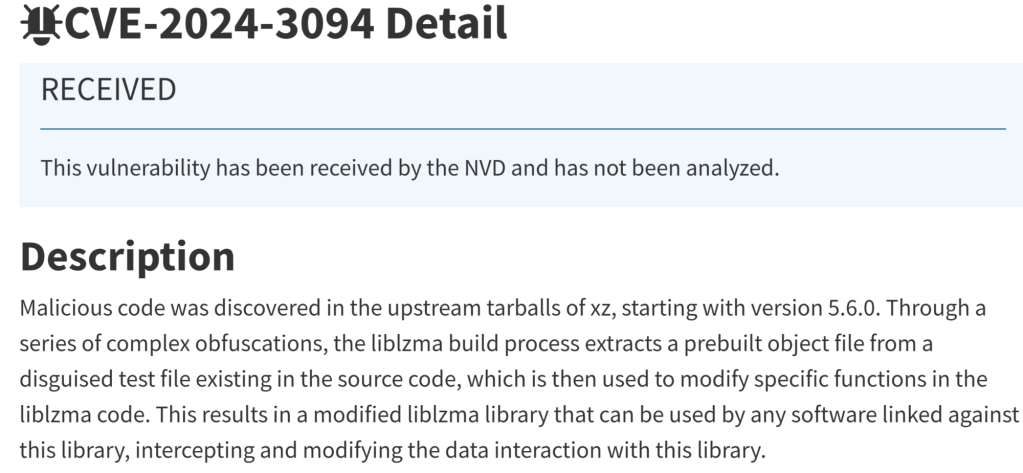
Open Source software is used by so many people, that it has become the target for a more sophisticated attacker. One that is so pernicious, it is known, in the Common Weakness and Exposure chart as CWE-506.
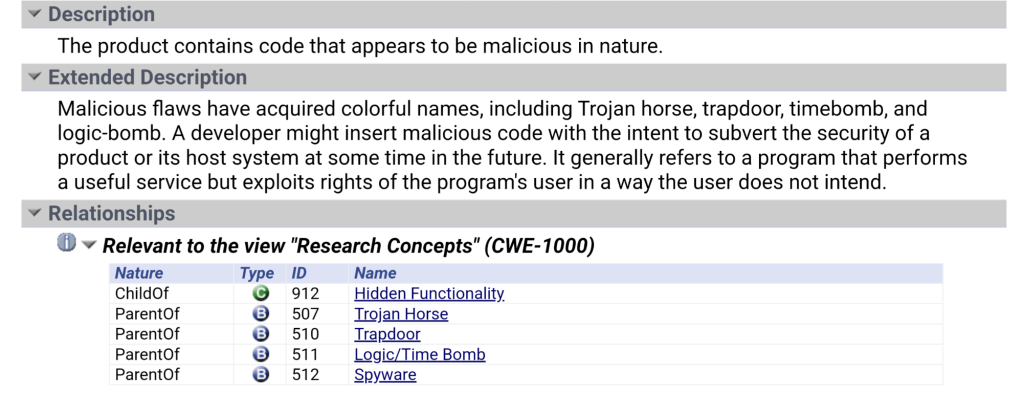
Let’s face it, over the last few decades, as the world was being eaten by software* we became too reliant on other people’s work. We ‘trusted’ what others were doing and relied too much on ‘good people doing great things’ so we could focus more on what we wanted.
The strength of open source (where so many eyes would review the code instead of just a handful of coders in a cave), makes us dependent on those same coders so if they don’t catch the malicious additions, who will?
Luckily, in such a short time, a few posts by a couple of curious sysadmins on Thursday, managed to catch this ‘feature’ being added to the source, which quickly produced this CVE (above) so patch your stuff before you too, become backdoored.
For my readers, I can only say that, if you use software in your business (that should be *all* of you), then you probably use open source so ‘Verify then Trust’ because this happens more often than you realize. Invest in your Security program which should include a threat analysis channel. We are at War with the hacker community and they only need one to win!
Old tech for an old Techy
How many of you remember the days of the Pentium processors? What about the 386 when we used 30 pin SIMMs (1mb shown here) and this 5 pin DIN adapter for the PS2 keyboard?
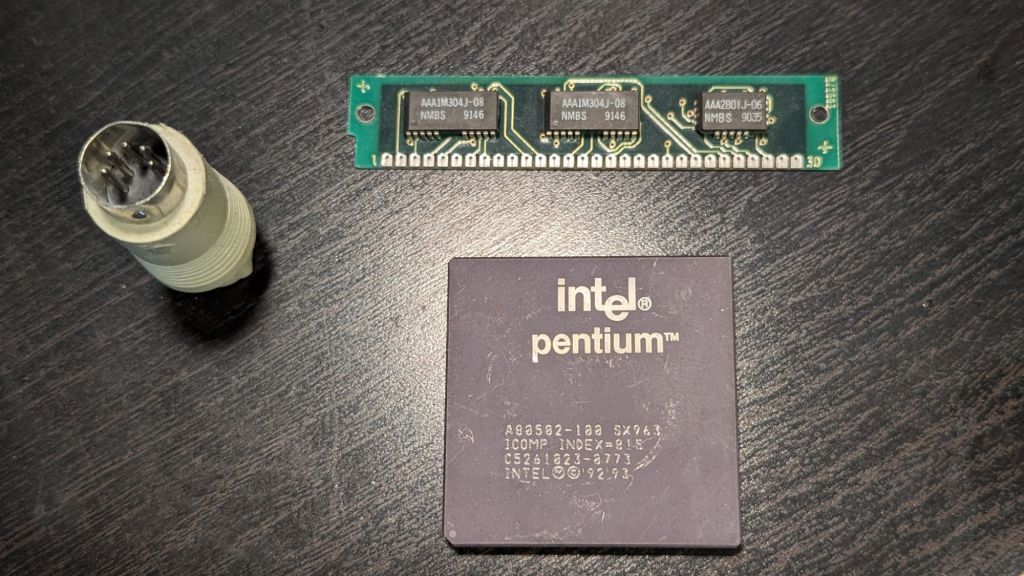
I think that piece of memory actually cost me $25 in 1980s dollars! Computers have come a long way since the early days.
Cloud makes it easier to use but remember, it also makes it easier for the hackers 😜.
Kubernetes and Certificates
Kubernetes has become the defacto way to run software these days and many people are simply not aware of just how much it relies on cryptography. All the nodes use certificates for almost all the connections, the commands between them, Identity of services, and encryption at rest and in transit, and well… every part of the operating model. Functioning as its own Public Key Infrastructure, the security of the cluster is directly related to the safe and secure methods associated with all this key management.
I wanted to raise the awareness for most of my readers, of many organizations use of Kubernetes and introduce the practices of Certificate Lifecycle Management as they apply to Kubernetes.
If you have used KinD (Kubernetes in Docker) before, you may notice that when you use the latest version of the kind-control-plane (from this image)
kindest/node v1.29.2 09c50567d34e 4 weeks ago 956MB
You should notice that the Certificate Authority certificate is *still* being created to last 10 years.
docker exec -t kind-control-plane openssl x509 -startdate -enddate -noout -in /etc/kubernetes/pki/ca.crt
notBefore=Mar 12 17:27:26 2024 GMT
notAfter=Mar 10 17:32:26 2034 GMT
This helps to demonstrate that the primary Certificate authority that is used to stand up your kind cluster, has a lifecycle of 10 years. This seems overly permissive but for any root CA, it is still well under the acceptable limit. Why don’t we try to determine what our production GKE clusters are using by executing this command…
gcloud container clusters describe --zone <zone> <clustername> --project <projectname> --format="value(masterAuth.clusterCaCertificate)" | base64 --decode | openssl x509 -startdate -enddate -noout
When you execute this command on your tenant, what do you think we should see as the output? Would we see that you used your own root-CA to create an Intermediary CA for Google to use in your clusters?
Ideally, a mature organization could be using a private CA (either external or now, with help as a Google service offering) to secure all certificates being created and verified inside each GKE cluster or nodes? (This might be a little too much to ask – we must walk before we learn to run)
What about letting Google, who is probably creating the cluster for you, create the Kubernetes Root CA and perhaps they would be following the best practice for root certificates by limiting it to 15 years? (Note: Google is *also* proposing a maximum term limit of 7 years for any publicly accessible root CA certificate – https://www.chromium.org/Home/chromium-security/root-ca-policy/moving-forward-together/).
Well, sadly, they continue to create the default term for their GKE Kubernetes clusters of…
notBefore=Mar 17 15:43:17 2022 GMT
notAfter=Mar 9 16:43:17 2052 GMT
30 years!
So now that we know that all certificates, for *any* purpose, within your GKE clusters, (at least this one) will be using a default lifetime of 30 years, you may be asking, is there anything we can do about that? I mean, what if the key becomes compromised, we should trust ANY activity, no service mesh, no identity, not even any nodes trying to communicate with the etcd (Kubernetes database) …. well surprisingly…. YES you can – you can rotate them yourself.
In this reference from the GKE help pages, we learn that we can perform a credential rotation as a way to mitigate the loss or compromise of your root CA keys! Great, but how hard is it?
gcloud container clusters update CLUSTER_NAME --region REGION_NAME --start-credential-rotation
gcloud container clusters upgrade CLUSTER_NAME --location=LOCATION --cluster-version=VERSION
You can use the same version of each cluster to force each node to request and use the newly created certificates that will be signed by the new Kubernetes root CA certificate. Once you are sure that all your nodes have been rotated and are using new credentials, you can complete the synchronization.
gcloud container clusters update CLUSTER_NAME --region REGION_NAME --complete-credential-rotation
So why don’t more organizations do this if the process is so easy to recover? Well, if you are deploying your clusters using defaults, you probably aren’t aware of this little fact. Security people have learned that it is better to be safe than to be sorry. Mature organizations become aware of these gotchas early on in their usage of Kubernetes (over 10 years now) and first learn how to correct bad outcomes. Later, they learn how to avoid these bad outcomes by managing all parts of the Kubernetes platform to help assure it.
Kubernetes *may* be the greatest invention since Virtualization, but with great power comes great responsibility. Don’t let an old hacker (like me) get the better of your organization!
Certificate Management may be hard, but you don’t have much choice any longer.
Ever since the 1990s when Netscape₁ first introduced “Secure Sockets”, we have turned this thing called “The Internet” into an ecommerce engine worth over 3 trillion USD today. Statistics show that its growth is expected to top 5 trillion USD by 2029₂. Efforts to secure the Internet have been going on for three decades since then so why should be alarmed now? Well, it involves two of the most popular subjects in our modern era, Artificial Intelligence and Quantum Computing.
AI has proven to be highly effective at finding defects in software₃, something that humans continue to create and Quantum Computers will speed up computational power by a factor of 10x. Think of a hacker who never sleeps, has no preconceived notions about ‘if’ something can be accomplished, and just sets itself on a target of guessing your password or even breaking your encryption keys for your secure session with your bank? Is there any doubt that it will succeed…eventually, now that it is 10x faster? Does this sound like a George Orwell book, well it should, that time has arrived!
Traditional certificates relied on factorization of prime numbers. That is just a fancy way of saying 3 times 5 equals 15 (although this is an oversimplification). When you use factors that are thousands of digits long, computers were needed to solve these equations and reversing those equations would take years or even centuries. Now enter the Quantum computer that performs these calculations at dizzying speeds, and you are no longer safe. The only answer to help treat those risks is to replace those equations more often that one or twice every few years.
The scope of the problem becomes apparent when you see how prevalent traditional certificates are in our electronic world. Major use cases are not just limited to SSL/TLS certificates to protect your ecommerce or banking sites. They are used to provide integrity verification used in encryption for proof of ownership or tampering. They are also used for Identity (like secure shell or tokens) and systems that rely on trust. With AI and quantum wildly in use today, these systems are at risk if you do not replace these on a regular basis.
Google wants to shorten the lifecycle of certificates₄, to help manage the risk associated with SSL/TLs certificate usage on the Internet. By replacing the secrets more often, it makes it harder to guess them. Let’s Encrypt has be successful since the last decade, at generating 90-day certificates. There are many client implementations₅ that support the ACME standard that helps accomplish this.
This begs the question, “How do we manage hundreds of thousands of certificates at speeds that would take an army to accomplish?”
Automation is the key! Maybe you can ask your friendly AI prompt to help you accomplish this before someone uses it to crack your password and empty your bank account? 😊
WSL Christmas with Fedora
Hey folks – Merry Xmas.
For those of you playing with the windows subsystem for Linux, I wanted to share a great recipe and the steps required for baking your very own Xmas Fedora Docker running on WSL. It makes a great holiday gift to share with your friends and family (because who doesn’t use containers these days!)
- Download your new base image from Koji at https://koji.fedoraproject.org/koji/packageinfo?packageID=26387

2. Carefully open the package and extract the file called layer.tar
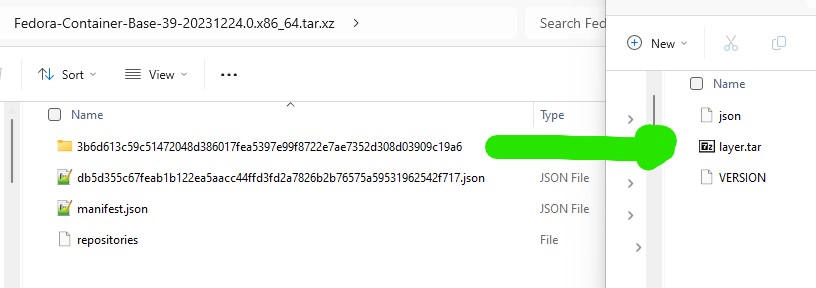
3. Mix well for a few seconds (here we have renamed the layer.tar file and used ‘fedora39’ as the image name but you may adapt this ‘to your own taste’

4. Bake in the oven for a few minutes (here we start the distro, perform an update and then install systemd)
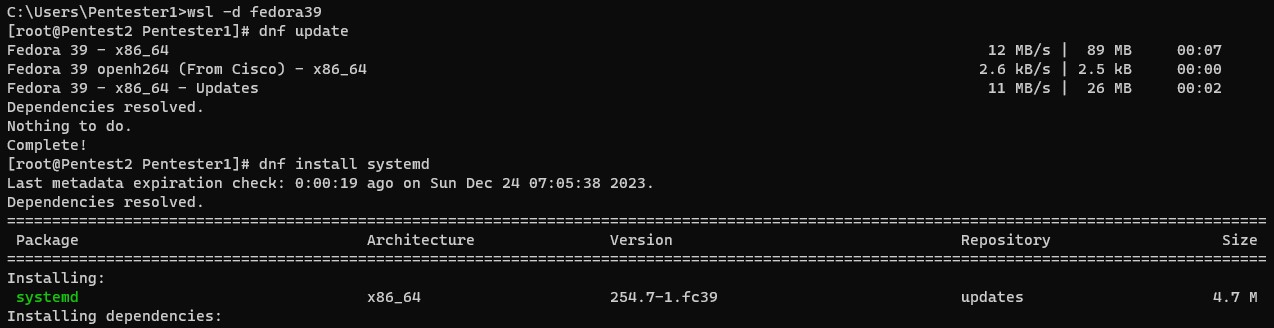
5. Decorate it with a custom file to activate systemd and let it cool down (restart)

6. Package your cake with the following items (dnf-plugins-core)

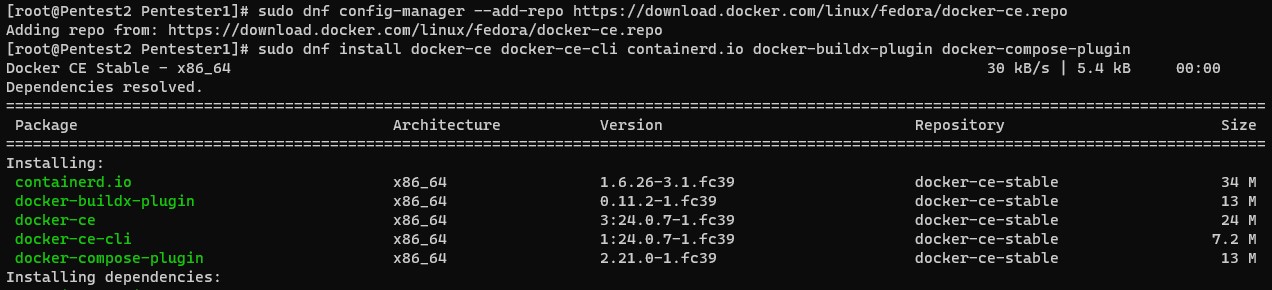
7. Add the docker community repository for docker binaries and install the following components (docker-ce, docker-ce-cli containerd.io, docker-buildx-plugin and docker-compose-plugin)
That is it – Serve to friends and family!
Happy Holidays to all my readers and thanks for a great year!

