Archive
Computer Breach and what you can do about it

Security Breach can happen to you
Experts agree that 2015 will be a tipping point for most small to medium sized businesses when it comes to computer security. The average organization cost of data breach is now over 6 million dollars. For most of my clients their loss won’t be anywhere near those numbers but to understand the cost to you or your organization that is over $200 per record. Maybe it’s a list of your clients or your employee wages or perhaps it’s usernames and passwords for your organization. Do the math – these can add up to large scale loss for everyone.
Among the top 5 threats for computer networks today are;
- IoT – The Internet of things brings along convenience but those IP enabled devices are not without risk. As you purchase Wi-Fi enabled security systems, TVs, media devices, Network Area Storage, etc. we are seeing an increase in vulnerabilities that expose your network and help to increase your attack surface. They need to be monitored and maintained because they are not as secure as a computer or a server.
- DDoS – The abilty to overwhelm your network with traffic is quite common and can easily be done by most consumers with a home network connection. If you require the Internet to do business you should evaluate whether you can operate without it. If not then you should consider protecting yourself against the real possibility that it could happen to you.
- Social Media Attacks – If your business uses any cloud based or social media application you should review your authentication and user management policies to avoid a potential breach of your accounts. Hackers are now targeting online applications in order to infect your users and gain access to your networks through the use of Cross Site scripting vulnerabilities. All it takes to be infected is for an email to be clicked on and you can no longer rely that your AntiVirus will prevent any Trojans from getting through.
- Mobile Malware – The volume of mobile devices beginning to enter your workplace and the ability to use your internet connection add a very large possibility that malware on a mobile device can get access to your corporate network. If you already allow users to have access to your network with any computerized devices you are probably at risk. You should consider controlling the access or monitor all of the devices by using a Mobile Device Management platform or you risk a possible breach to continue without your knowledge.
- Third party Attacks – Many companies allow third party applications to connect with their own network assets but how safe are they? Large scale breaches have been shown to be caused by third party vulnerabilities and these occupy a ‘grey area’ when it comes to management (who is responsible to keep all applications up to date on those systems?). Many user agreements do not cover damages that can be caused by a lack of security practices and once the vulnerabilities have been exploited, hackers use those systems to pivot onto your networks and wreak havoc on your networks.
There are several methods you can implement that can help mitigate the risks.
- Implement Monitoring – It is no longer safe practice to just implement a firewall you need to monitor all traffic coming into and out of your network. Hundreds of breaches in any network design have been traced to a failure to see IOC (Indicators of compromise). Not only do you need to record reams of data but you need to review them in order to determine what is normal behavior and what indicates a potential breach. There are devices available that can help you do that and although they can be complicated to implement, once properly deployed they can help you become aware of details that help you find attacks before they become too big.
- End User security awareness – If you don’t already have a program in place you should consider a large scale awareness campaign surrounding security at your organization. It can be as simple as a regular talk over lunch or it can involve testing to be sure that your employees have taken the necessary steps and understand your policies. You need to train your users about the do’s and don’ts of all aspects of your security. Physical security, passwords, email questions, sharing account credentials, staffing questions, etc. You need to protect all aspects of information leakage whereas hackers only need one of them.
- Inventory all equipment – If you do not have an active list of your equipment, anything that is or was connected to your network, then take the time to make one and keep it up to date. Many organizations are leaking information that can be critical to your operations. Network devices that no longer are connected should be properly disposed of and /or their configurations need to be wiped. Improperly configured devices and anything with wireless access remain the largest risk to any organization – all of these devices need to be audited on an regular basis to manage the risk.
- Review your Protection – Make sure that you update ALL software (this includes Operating systems and any third party applications) that are actively used on all networked computers. Update any firmware on devices that connect to your networks. Implement and maintain Antivirus software on any computer that is actively used to open emails or browse the Internet.
There are many different ways you can help protect yourself from attack but I wanted to point out the clear methods to avoid them. If you are aware of all of the different methods that can be used to gain access to your company or it’s information then you can help manage them. A failure to see them coming is a sure fire way to enable the attack over an over again.
Still using short passwords in your organization…
With email turning 40 years old recently we though it was a good time to visit ‘password length’ and how choosing one factor above all can make the difference in your online security for you and your organization.
There are very few applications left that require short eight character passwords (known as legacy apps) so you should be thinking of different ways to create and recall your passwords. There are several methods I have heard over the years and whichever method or combinations you choose to employ, security experts all agree, length is the most important one of all (at least that what the ladies are saying :-))
I wanted to show how anyone who plays games on a computer can use that graphics card to guess your password. Typically it is the main Central Processing Unit (CPU) that is responsible for the ‘heavy lifting’ in your computer but for our purposes we need a Graphics Processing Unit (GPU) to do the tedious task of computing.
Now typically password guessing has involved a wordlist, a list of common passwords that is used to compare against what your password *might* be. This was necessary because of the permutations of each place holder. If we wanted to check every combination of upper case, lower case, number or special character in each of the 6 positions it would take an enormous amount of time. You could thwart the risk of someone guessing your password with a good password rotation policy but as processor power increased this is quickly becoming a concern.
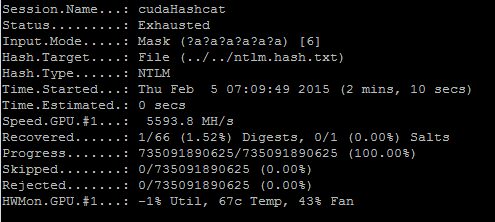 Here we show how fast we can brute force any password to a length of 6 characters. This is the default password length of a windows password. In as little as 2 minutes someone with about a $1000.00 computer can crack your password files on your computer or in your organization.
Here we see how easy it is for that same person to try every possible combination of characters if you change the minimum length to 7.
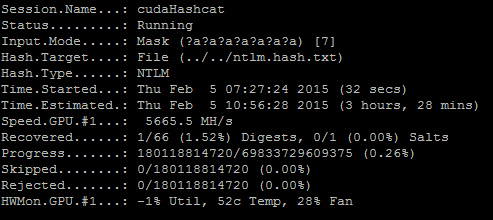 In as little as 3 1/2 hours we can use the power of a single video card to examine every combination of characters you can possible use to create a password of 7 characters or less.
How about 8 characters? This same user would take approx. 2 days to try all possible passwords and compare them with the password file that stores your hashes. All anyone needs to do is run a tool on your computer or on your domain controller to exfiltrate your password hashes and they can use the power of the GPU to guess your passwords. How about 9 characters? Well the amount of time it takes for a single medium priced GPU to tackle 9 characters is quite high (almost 4 years). So why not just make the minimum length of passwords to be 9 characters? Well these results were derived using a single $400.00 video card. We can buy a more expensive card and increase our processing power another 20%. We could even buy a more expensive computer that is capable of running 4 or even 8 video cards in the same system! A machine like this would probably reduce the amount of time it takes to brute force 10 character passwords to a few hours (this is an estimate – YMMV).
The days of simple dictionary passwords may not be here anymore and you might feel that it is impossible to remember all of these long passwords so I wanted to point out a few methods you should adopt that can help you. I hope I have shown you how trivial it is to guess your password and failure to adopt a longer password could result in compromise of your accounts. All it would take for a hacker to get access to your information is to use a ‘free’ wifi hotspot and your computer could be owned.
1. Use a longer password – add dots, dashes, your phone number, anything that will take your password length beyond 12 character Security professionals have forecasted that 12 characters is the minimum length we should be using with todays technology.
2. Use an online password manager – these systems can generate random passwords of various lengths and you only need to remember one password (the password to log you in).
If you are interested in finding out just how easy it could be to guess your current password you can visit https://www.grc.com/haystack.htm
Hey dude – pass the hash…
I wanted to share my experience with a client recently and mention a great tool that helped us resolve an issue that many IT admins probably face on a regular basis. It is my hope that it can help someone as it has helped me and my client.
We recently took on a client who has a Windows 2003 SBS server and did not have the current password for the Administrator user. We used several methods to try and crack the existing password and they were all failing. I even used a method to remove the SAM and system registry to begin to crack it offline (a process that took almost 8 hours to setup). After an hour or two of running a tool to try and brute force the password I thought I would try to ‘pass the hash’ (a method that windows uses when a password is used to access resources across the network on remote shares).
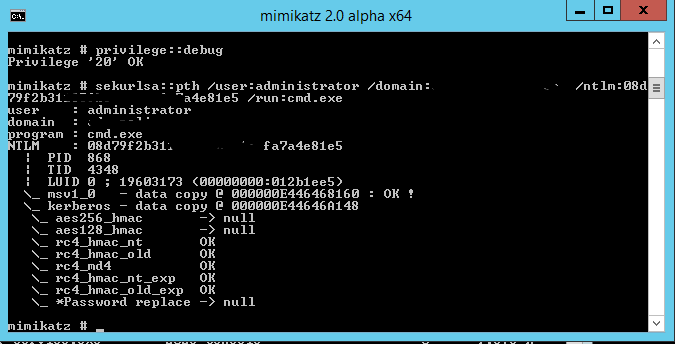
Mimikatz in action
Mimikatz is a tool written by Benjamin DELPY who also goes by Gentle Kiwi (https://github.com/gentilkiwi/mimikatz) and this tool can setup and impersonate a session that can be used to authenticate to your system. All you need is the ntlm hash, the domain (which is found on the login screen) and the username (also found in the hash – usually ‘Administrator’). When used correctly it can setup a session that will impersonate the user and the password without knowing what the password is!
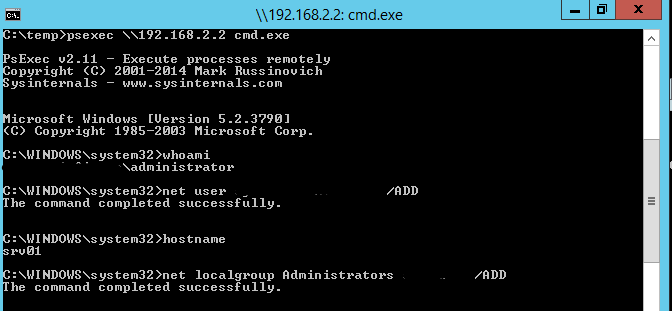
PsExec in action
Once you open a new command prompt you can use another fantastic tool from Mark Russinovich called PsExec (http://msdn.microsoft.com/en-us/library/bb897553.aspx) to connect using the authenticated command window to your target machine as if you have a local login with those credentials and run a remote command window on your target – viola.
Now we have a remote shell on the target we can add a new user and make them administrator.
We have installed our remote software and all completed before the second hour of cracking the password has begun.
 Security Analyst - Jeff Soehner CISSP, GXPN,GPYC,GMOB,GCIH