Archive
Key services for encryption?
In an effort to ensure that hackers do not load vulnerable versions of firmware, Apple uses a key service to enable testing versions of their newest firmware. This affords users the ability to try out the new firmware while they collect statistics, crash logs and other metrics. After a period of time when they are certain all of the platforms have stabilized, they remove the signing key for the older version to prevent users from upgrading/downgrading to that version.
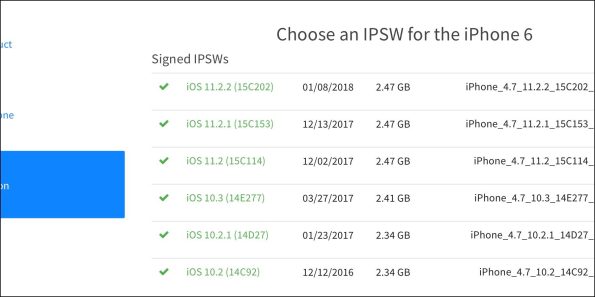
Earlier this year, a mistake was made that allowed several older versions to be ‘available’ so that users who wanted to downgrade to older vulnerable versions could do it for a short period of time. The mistake was reversed pretty easily by removing those signatures from the public facing server.
Imagine if you could use this type of service for encryption? Encrypt your entire hard drive with a key from a remote system so that each time you need to boot it, you fetch the key and if available, you continue to boot. If it is not available, perhaps because the image was stolen and you choose to remove the signing key, anyone who came across this image would not be able to decrypt it? Imaging using this in a highly volatile infrastructure like the cloud?
Well, the fine folks from RedHat have now done this with the Linux Unified Key Setup (LUKS) system. With RHEL 7.5 there is a new service called Network Bound Disk Encryption (NBDE) that will auto magically mount your LUKS enabled root partitions using a third party key service. Loose your disk image and you don’t have to worry about someone else booting it up and/or mounting and decrypting the data on it.
Now that is smart! – https://rhelblog.redhat.com/tag/nbde/
Burp Certificate Magic
Setting up a custom Burp CA certificate for Android
With certificate store improvements to Android, creating a man in the middle scenario for testing has become very hard. When we add to this, the problem of using self-signed certificates from burp, I am not too excited spending time to add certificates over and over again when I have many devices and many testing environments that I use on a daily basis. I wanted to mint my own certificate that I can use to load on a device, a burp instance and a browser once and for all to eliminate the need to repeat it.
This document will serve to show how you can create your own self-signed certificate with a custom Organizational name to install on your Android N device (or higher). This will allow you to identify which CA certificate is installed quickly and easily. This will help you to avoid removing it when you have several ‘Portswigger’ or ‘mitmproxy’ certificates. Use one certificate for all of your devices or for your entire group so you can exchange workstations or devices. We will then show you how to import the certificate to your running burp installation and to an Android instance running Nougat.
Step 1 – Creating your own CA
You will need to create a new certificate with custom attributes. The Organization is used as a name to identify the Certificate on mobile devices under the Trusted Certificate Store. Customizing the org name helps you identify the correct certificate. In our example below – we used “My-Burp-Cert”.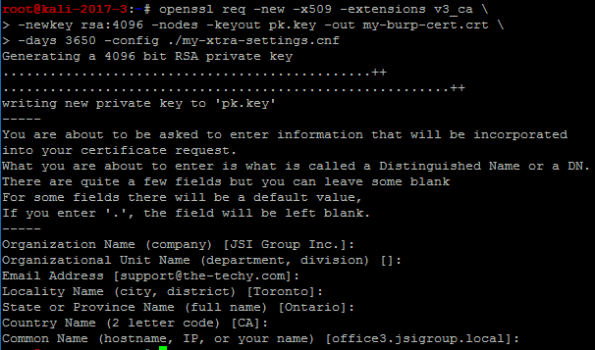
We used the following (below) to make our custom ‘my-xtra-settings.cnf file. You can setup your own files to make it easier to create your certificate but you must add the ‘v3_ca’ section at a minimum. Once you have run the command above, this will produce two files – “my-burp.cert.crt” and “pk.key” – You will need these for the next command.
[ req ]
distinguished_name = req_distinguished_name
[ req_distinguished_name ]
# Variable name Prompt string
#———————- ———————————-
0.organizationName = Organization Name (company)
organizationalUnitName = Organizational Unit Name (department, division)
emailAddress = Email Address
emailAddress_max = 40
localityName = Locality Name (city, district)
stateOrProvinceName = State or Province Name (full name)
countryName = Country Name (2 letter code)
countryName_min = 2
countryName_max = 2
commonName = Common Name (hostname, IP, or your name)
commonName_max = 64
# Default values for the above, for consistency and less typing.
# Variable name Value
#—————————— ——————————
0.organizationName_default = JSI Group Inc.
localityName_default = Toronto
stateOrProvinceName_default = Ontario
countryName_default = CA
commonName_default = office3.jsigroup.local
emailAddress_default = support@the-techy.com
[ v3_ca ]
basicConstraints = critical,CA:TRUE
subjectKeyIdentifier = hash
keyUsage=digitalSignature,nonRepudiation,keyCertSign,cRLSign
extendedKeyUsage=serverAuth,clientAuth
Step 2 – Exporting a PKCS12 file for use with Burp
Export the certificate (with a password) as a p12 file to install into your version of Burp. (You must import a CA file into Burp with a password)
You will import this file (my-burp-cert.p12) into Burp for use as your own Certificate Authority for all versions of Burp that you use. This will help avoid reinstalling Burp certificates in devices and browsers where you perform MitM testing. (you can specify your own CA bundle with mitmproxy by using the ‘–upstream-trusted-ca my_burp-cert.pem’ parameter when you start mitmproxy)
Start Burp and go to the Proxy tab. Click on Options and you can choose to import the certificate and private key using the file ending in ‘p12’ you created in Step 2.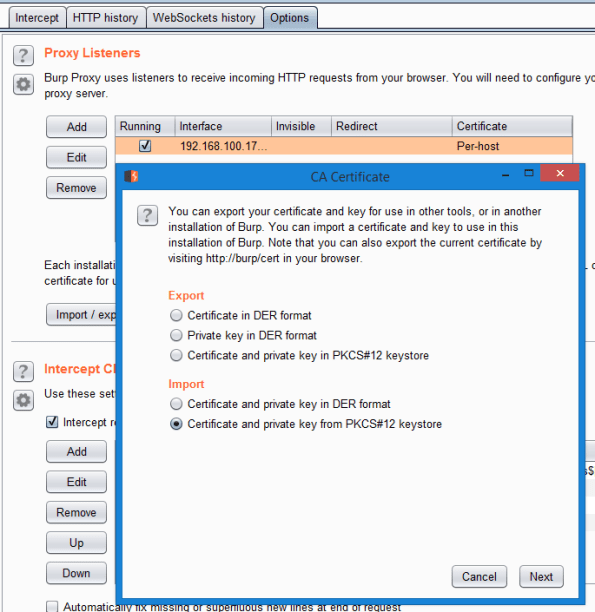
You must navigate to the directory where you stored this file. Remember that you will also need to enter the password you used to export it in Step 2 (by default we executed a command to export using a hard coded password of “12345678”. Don’t forget to change yours to be a strong password).
Step 3 – Installing the CA into your rooted Android Nougat (or higher) device
Convert the certificate.p12 into a pem file. This is necessary to use the certificate on a client like Android. (Remember to use a strong password)
Obtain the Subject hash using the following command
Create the CA file for Android using multiple steps
This will leave you with a file that has all of the properties to be loaded on an Android phone and be treated as a system CA certificate.
Step 4 – Install Certificate into Android device
We are now ready to move this file to your Android device and place it in the system storage area of the new Android N (Nougat) O (Oreo) or P (Pineapple) operating systems. We will be using adb to upload the new certificate file.
Open ADB and cd into your directory where you have the burp certificate files prepared in the previous steps.
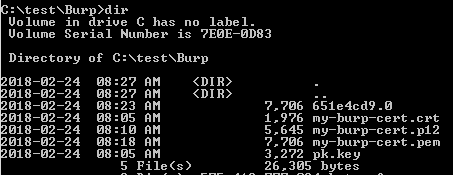
Copy the certificate to the Android device
Connect to the Android device (Nougat or higher). We are going to use adb to open a shell, elevate to root, remount the system partition using busybox as read/write and then move our root CA file into the system ca store area. Finally we will change the permissions to 644. Last step is to reboot the device.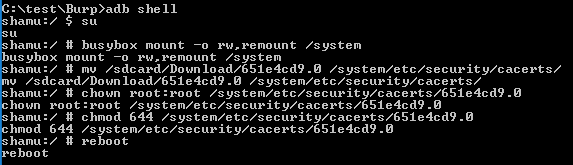
Now you will need to verify that you have it installed.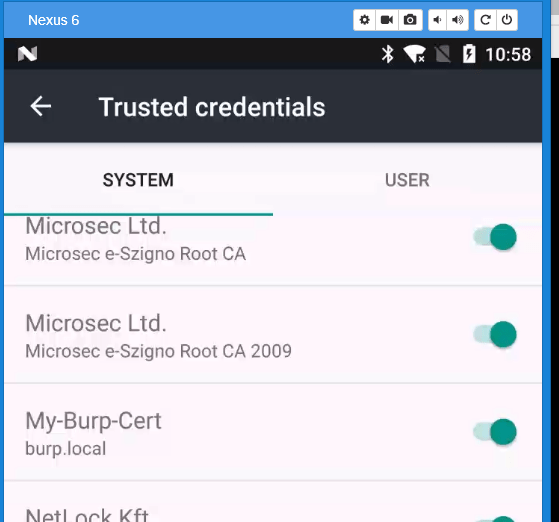
Step 5 – Install Burp cert (.crt) file into Firefox desktop
Now that you have installed the Certificate into a smart phone, you will want to add the same certificate to your list of Trusted CA certificates on your desktop. Firefox uses its own trust store and can be done easily. If you wish to add it so that Chrome or Internet Explorer/Edge will work, please follow the instructions on how to update the Certificate Authorities using MMC.
Open your Firefox and Navigate to about:preferences#privacy. Scroll down to the bottom and click on View Certificates.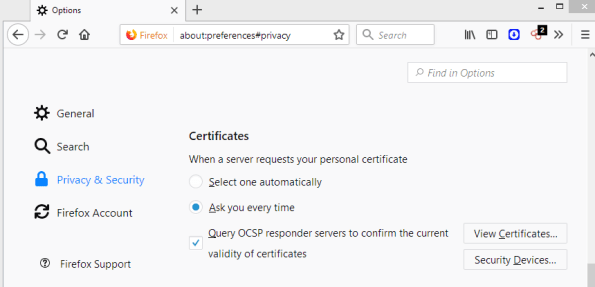
You will need to click on Import and look for your certificate file that ends with ‘crt’. Select it and choose Okay. Be sure to select the ‘This certificate can identify websites’ check box and then click Okay again.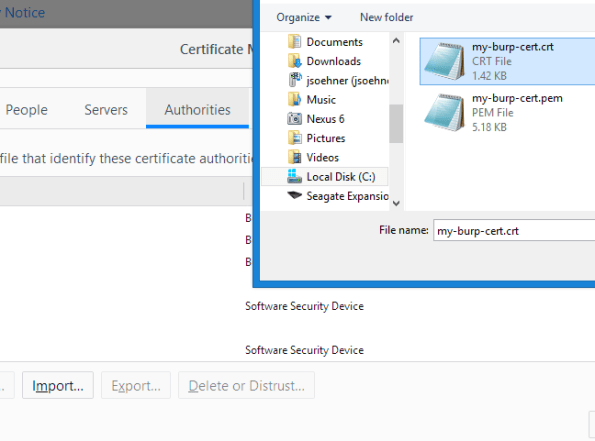
If everything went well you should now see your certificate installed.
Now you can point your browser to use your burp instance asa proxy and you should be able to intercept SSL traffic.
The folks at Google have made it very difficult for testers to configure a testing environment so I hope this means that we will be a little safer. If you have read this far and you are like me, you are probably a crusty old hacker who won’t take no for an answer.
I hope this has helped some of you, I have documented it here for my own edification but feel free to comment if you have a better solution.
Happy Hacking!
Bruteforce your identity from a single CC number?
In this article and the accompanying white paper, the details that hackers use to take a skimmed or stolen credit card number and work backwards are revealed. They start to figure out your expiry first and then your postal code, CV code and finally your billing address to make purchases as you.
Mastercard holders are winners here because the verification system they use is not vulnerable but visa card holders beware.
Fortunately for card holders, they are indemnified against fraudulent purchases but if you only have one card you may be stuck waiting for a replacement.
https://www.schneier.com/blog/archives/2016/12/guessing_credit.html
Malvertizing just got a whole lot smarter.
With a stroke of genius, a new approach allows hackers to determine if you are running IE without up to date antivirus and then using several flash vulnerabilities, attack your pc using steganography.
It’s like a ninja sneaking up on you, deadly, virtually undetectable and very smart.
Thinking of using your debit card at the pump, think again
Visa Delays Chip Deadline for Pumps To 2020 https://krebsonsecurity.com/2016/12/visa-delays-chip-deadline-for-pumps-to-2020/
Caving to the Convenience store lobby, Visa has delayed making the move to chip and pin which can make your debit cards huge win in a skimmer. If you are at a pump that does not use a chip reader, DO NOT USE YOUR DEBIT CARD!
Newly discovered router flaw being hammered by in-the-wild attacks | Ars Technica
It seems painfully clear to most security researchers now that the Mirai botnet is not finished and may never be unless providers take security seriously.
In an article from Arstechnica,
They explain that the loophole being exploited now deals with remote management ports for devices that our cable and DSL providers use. With most of the home users struggling to setup these devices when they get them home, they seldom change the default passwords and that allows hackers to exploit them. Vendors are also leaving application ports open to the Internet without proper source filtering which allows them to be enumerated by tools like Shodan and Censys.
We simply need to get better at taking ownership of our security posture, both consumers and vendors alike. Let’s all step up out game…
SafetyNet: Google’s tamper detection for Android · John Kozyrakis ~ blog
Interesting article about Google’s idea to test for rooted phones for developers who want to make sure that your phone is ‘safe’ to run their applications.
Stay tuned for more hacking…
I was reading this article about the sentencing of a 17 year old in the UK for a Web attack that happened in 2015. He says he won’t do it again but do we really want that?
http://www.infosecurity-magazine.com/news/talktalk-breach-17yearold-confesses/
It tells us that several websites were vulnerable to a SQL injection attack which leaked personally identifiable info (Pii).
Aren’t we punishing the wrong people here? I mean his motives were to show off his abilities and not to obtain and exploit the data. It also appears that the site already knew about the attack and was not able to do anything to mitigate?
I know that we would all like to live in a world where lost wallets are always returned to us with all the money inside but isn’t the company primarily responsible for continuing to neglect the security of the data?
Until we start legislative accountability for companies that hold service availability over security, we will continue to have breaches. To penalize individuals who help to find these flaws instead of congratulating them is like forgiving the dog and scolding the bone for just being there.
Cirque du Soleil – Ole
Had a great night out in Mexico watching the new Cirque du Soleil production called ‘Joya’. I saw golfer Greg Norman at the event and the only thing I could think of saying to him was ‘Happy 20Th Anniversary’ 😦
Bruce Schneier on the most recent attack vector, USB sticks
Think of it, you walk into a building, see a computer that (hopefully) is locked and you plug in a USB device and walk away. Just like James Bond, you look at your watch and a few minutes pass by. You unplug your device and head back to the Astin Martin…
Well okay this part is fictitious but the rest isn’t. Read more about the the technique in this article.
https://www.schneier.com/blog/archives/2016/11/hacking_passwor.html
 Security Analyst - Jeff Soehner CISSP, GXPN,GPYC,GMOB,GCIH