Archive
Oracles VM Server – a look inside Part 2
One thing is sure – this is not a simple Virtual server setup – this software is complicated and best of all it’s free! You can have several machines running clustered storage and VMs that can all be controlled by a web driven interface.
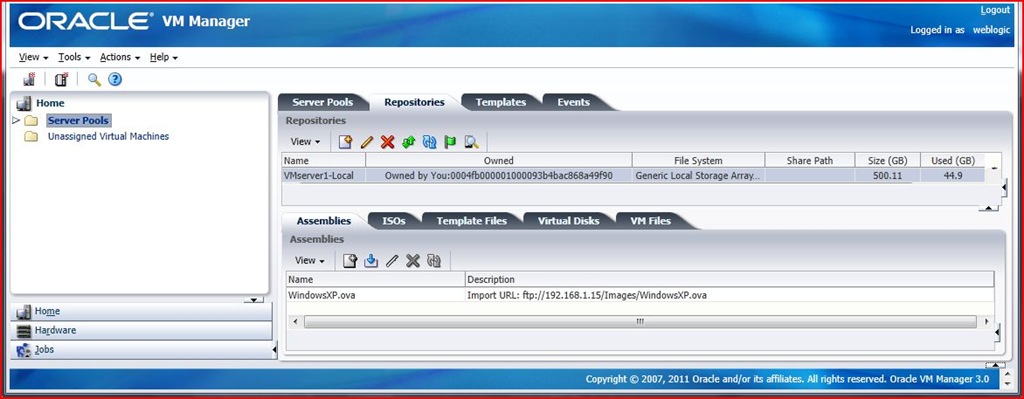
We begin by diving into the VM manager interface using Internet Explorer as our web browser. (Some of the demos show Firefox but one thing is sure – you need java installed to use the VNC console for these VMs).
I have seen several of the older VM 2.x install and config documented so I won’t go into detail here but while I was testing this platform I did noticed a few pros and cons that I have noted below.
When configuring the VNC connection to your VMs the session does not stay open. You have to ‘Launch Console’ again and again when setting up your VM after it reboots.
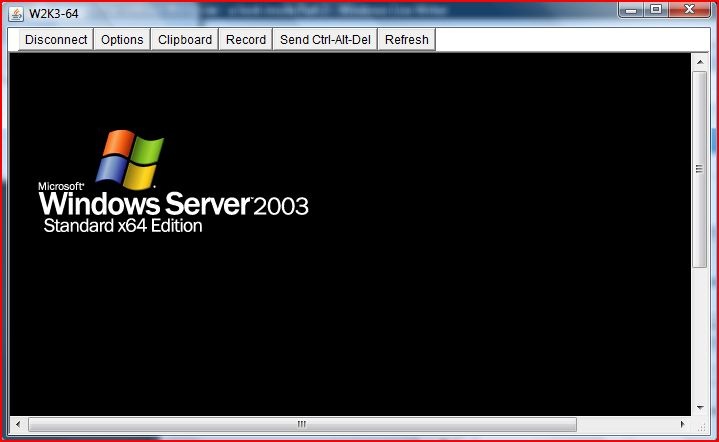
Import/Export is not supported as well as the other platforms. I suspect that there are problems with ‘Stop 07B’ errors when using SATA imaging and then importing them to the VM server.
I think the clear bonus is the free cluster features when using more than one VM server. You can use several network cards to create private networking for management and for clustered storage and fail-over migration to reduce latency.
One caveat is that the machines must share a repository (you can’t use local storage on each of the VM servers and they must be the same versions – 2 AMD or 2 Intels is not enough). I tried to migrate a running vm between two lab machines – HP DX5750 and a Dell Optiplex 740 and received the following ‘reasons’ for the failure from the Oracle VM Manager web interface.
1.VM: WinXPSP3, has its config file is in repository: VMserver1-Local, which is not presented on server: VMserver2
2.VM: WinXPSP3, has vDisk or ISO: WinXPSP3, whose repository: VMserver1-Local, is not presented on server: VMserver2
3.VM: WinXPSP3, has vDisk or ISO: WXP-SP3.iso, whose repository: VMserver1-Local, is not presented on server: VMserver2
4.Server: VMserver2, and server: VMserver1, have CPUs in different compatibility groups: Default_AMD_Family:15_Model:67, Default_AMD_Family:15_Model:75
Oracles VM Server – a look inside Part 1
I wanted to setup a production environment in my lab to test out Oracles VM Server framework so I set aside a few hours to take ‘a look inside’. After downloading the small ISO to setup a server (it only runs on 64-bit hardware) I set out to download and setup the manager component. Unfortunately it wasn’t as easy as running a windows client like the Citrix and VMware product but I was intrigued and decided to persevere.
After downloading the Oracle Linux image (wow it’s almost a full DVD) I installed it on a system. It looks a lot like a RedHat system with anaconda being customized for their installer. I then found that I needed to tweak one of the installed files to increase the files that could be opened in order to run the installer. (Add the following lines to /etc/security/limits.conf file: * soft nproc 4096 * hard nproc 16384 * soft nofile 16384 * hard nofile 65536)
After rebooting and creating a new user (oracle) with a group (dba) I mounted the install CD and ran the runInstaller.sh script. 
After entering three passwords for the database, weblogic and VM manager applications the install ran for about 20 minutes (your time may vary). We are then presented with a line that tells us to wait while ‘ WebLogic configures the applications…”
After about 5 more minutes we were done. You get a brief summary of the installation once you are done.
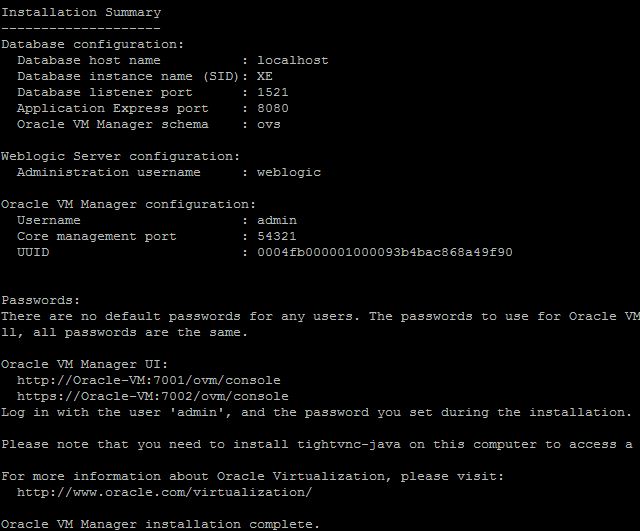
(You can get an RPM for tightvnc-java from here – http://oss.oracle.com/oraclevm/manager/RPMS/)
I rebooted the workstation and waited several minutes for all the services to start…
and then we were ready to begin the configuration…
2012 is the year of the virtual server
As some of you may already know several companies have virtual server software and have released free editions for small business to use. Windows released it’s free Hyper-V platform with windows 2008 and while Citrix has ‘Xenserver’ and give you a yearly free license, Oracle has VM Server and is free. Finally VMware releases a free license for as many servers that you wish to use. If you have a Desktop PC and want to run another OS there are quite a few free versions that can run a wide variety of systems for both PC and MAC.
Since almost everyone today has at least one server/workstation dedicated to running some type of app (directory services as in a Domain controller or just some type of collaboration service like email or calendaring) we suggest that you consider running it on a virtual server this year. There are several paid and free tools you can also use tools to migrate existing hardware based windows and RedHat/SuSE Linux servers to your new virtual servers making it easy to start saving about 70% on your hardware costs (power, air conditioning, disaster recovery, etc.)
You can learn more about the platforms from the following links or just give us a call and we will be happy to discuss the differences.
http://www.citrix.com/English/ps2/products/product.asp?contentID=683148&ntref=prod_top
http://www.oracle.com/us/technologies/virtualization/oraclevm/index.html
http://www.vmware.com/products/vsphere/esxi-and-esx/why-esxi.html
Platespin now fully supports free ESXi 5
Wow – Novells Platespin 9 now allows you to connect to the new ESXi 5 with a free license and run a complete migration without the need of booting the target manually. In the past we needed to boot an ISO image in order to register a target for migration. The VM API was not available on the free version and the platespin controller wouldn’t create virtual machines unless you had a VMware license but I am happy to report that this has now been changed. We just finished a 64 bit windows 2003 migration onto a patched version of ESXi 5 (474610).
ESXi 5 will only run with VT processors
With all of the advancements to VMWare we continue to have more and more things to do. ESXi 3.5 can still be run on older SMP machines and ESXi 4.1 runs very well with the 64bit machines. Both systems can be run to support virtualized windows and linux machines. Recently ESXi 5 came out and will only support multi core processors. I tried to update an older DL380 G4 with the new version but it throws a purple screen of death.
I guess we will all have to get use to running and updating three different versions of vmware until the hardware all gets replaced!
ESXi 5.0 is out and it has some nice improvements
Five reasons I will be upgrading my clients to the new 5.0;
VMTools 4.1 ESXi 5.0 upgrade your machine in place and the tools still work. VMClient supports old ESXi versions too
Native MacOSX support – easier to deploy
They have improved the screen size – no more tiny screens
Added easy system logs under the customizing screen
Ability to join datastores together with the new vmfs5
and the number one reason to upgrade my clients to use the new 5.0…Wow is it fast and uses very little memory!
Now VMWare is even better – ask me how we can help your business reduce it’s footprint.
Migrate SLES 11 in about half an hour
Wow you can move your SuSE Enterprise Linux server from hardware (or even another virtual box) using the software PlateSpin Migrate. We were able to migrate a 10G hd from a older version of VMware to the newest version of ESXi 5 in under 30 minutes.
With new features like the ability to use thin provisioning you can save space and improve efficiency.
Check out more about these two products from this blog
Posted with WordPress for BlackBerry.
Great migration software for your windows servers
Have you ever dreaded recreating a server with all of the little gotchas that you have learnt over the years only to realize that it wasn’t as easy as you thought. Is seems that whenever you plan for a few hours it ends up taking more than that?
A company called Platespin (was bought by Novell a few years back) has created a great scripting engine that you can install on a windows system as a server that will manage the hardware upgrades for you WHILE THE MACHINE IS STILL ONLINE! It allows either a block based or file based migration and can inject drivers for you.
We recently used it to migrate a domain server to new hardware for a client that was retiring an old server but you can also use it to virtualize the server farm. http://www.novell.com/products/migrate/
More virtualization updates
Hey folks;
Have you ever thought of just how long it takes to setup a new XPSP3 system with MS office updates, IE8 and all the patching? Now don’t forget that M$ will be removing support on XPSP3 in less than 3 years so you will also need to think about updating hardware to use the new Windows 7 or 8! (Have I got your attention – read on)
Well I don’t want you to worry because Virtualization has made its way to the desktop too! VDI is a way to boot a static image in order to connect to a terminal session on a virtual machine (wow talk about everything old becomes new again eh?). We have been busy setting up VDI in a box (from Kaviza) and using X2 (Virtual Desktop Server) to deliver and control a PXE image to boot old computers without the need for a hard drive. Kaviza has a VM that runs on the free version of VMware or Xenserver and X2 is free for a few clients.
We will post some statistics when we have more information but we have it working in the lab on some test systems. More info is available from www.x2.com and http://www.kaviza.com.
Virtualize your network servers and save
We recently took a client ‘into the cloud’ and helped save them big money by reducing their carbon footprint in the server room. For the cost of replacing an aging server on old hardware we used a free version of Vmware ESXi to leverage their new hardware and put 8 servers on it!
We were able to replace about 4 physical machines with one piece of iron and are now running 8 virtual servers on it without any need for external storage. Best of all their staff and clients are reporting that the new virtual servers are responding as fast or even faster then the old hardware based ones! They can also count on a reduced heat contribution that is helping with the cooling costs and their overall electricity demand is down almost 65 percent. This is all due to the rich environment that virtual computing can bring to your infrastructure.
Contact me at sales@the-techy.com to learn more about ways that I can help your business reduce it’s computing footprint and help increase performance.
Want more info?
Pages
Archives
- September 2025
- July 2025
- November 2024
- July 2024
- June 2024
- April 2024
- March 2024
- December 2023
- September 2023
- July 2023
- June 2023
- August 2022
- July 2022
- June 2022
- May 2022
- April 2022
- February 2022
- January 2022
- July 2020
- June 2020
- May 2020
- April 2020
- March 2020
- February 2020
- December 2019
- November 2019
- October 2019
- September 2019
- August 2019
- July 2019
- May 2019
- March 2019
- February 2019
- December 2018
- October 2018
- September 2018
- August 2018
- July 2018
- April 2018
- February 2018
- December 2016
- November 2016
- October 2016
- April 2016
- February 2016
- December 2015
- October 2015
- September 2015
- August 2015
- July 2015
- June 2015
- May 2015
- March 2015
- February 2015
- January 2015
- May 2014
- November 2013
- September 2013
- June 2013
- April 2013
- January 2013
- October 2012
- September 2012
- April 2012
- March 2012
- February 2012
- January 2012
- September 2011
- August 2011
- July 2011
- June 2011
